Limitations
- ModusToolbox™ Programmer does not support RAM programming, you can program only the flash memory of a target device, except for devices that support only RAM such as CYW9M2BASE-43012BT and CYW955513EVK-01 kits.
- Programming devices in DAPLink mode is not supported. You have to switch your device into CMSIS-DAP BULK mode by pressing the mode selection button.
- For some families (for example, PSoC™ 6 and PSoC™ 4), if the programming (HEX) file
contains regions that are unknown to the J-Link SDK — or that map to a flash bank which
is disabled for the selected device (such as an SMIF/external-memory bank) — programming
may fail with an error similar to:
“Error: Program device failed - writing target memory failed. Warn : The selected data (Hex file) may not fit into selected flash sectors. More information can be found on the SEGGER Wiki:
https://kb.segger.com/UM08003_JFlash#Selected_data_does_not_fit_into_selected_flash_sectors”
- In this case, ensure the HEX file only contains regions that are defined and enabled for the selected J-Link device
How to recover AIROC™ Bluetooth® devices on failure
If the program operation for an AIROC™ Bluetooth® device fails, it is possible the memory on the board has been corrupted by a previously loaded application, or the application used a custom baud rate that the download process does not detect.
To recover from this, it may be necessary to reset the board to factory defaults, as follows:
- Press and hold the Recovery button (SW1).
- Press the Reset button (SW2).
- Release the Reset button (SW2).
- Release the Recovery button (SW1).
Incorrect PSOC™ 6 device names (MPN) in JTAG chain
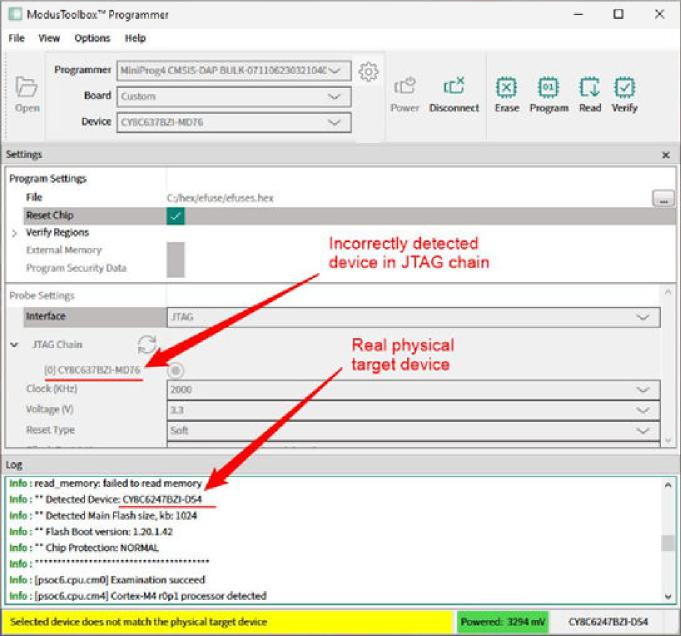
You can ignore this inconsistency in device names if you see the warning "Selected device does not match the physical target device" after clicking Connect button.