Follow instructions in

Create/export application for Keil µVision

. Then, use these instructions to configure, build, and debug your application.

  1. Create a

    postbuild.bat

    file in the root directory of the project.

  2. Add

    SET PATH=%PATH%;"/usr/bin"

    at the start of the file.

  3. Build the application using the ModusToolbox™

    make build

    command.

    You can do this by using a stand-alone terminal (modus-shell for Windows), or by exporting the application to Eclipse or VS Code and using the terminal in the IDE.

  4. Copy the post-build command output from the log. For example:

    [path-to-GCC]/bin/arm-none-eabi-objcopy -O ihex C:/20829_keil/Hello_World/build/APP_CYW920829M2EVK-02/Debug/mtb-example-hal-hello-world.elf C:/20829_keil/Hello_World/build/APP_CYW920829M2EVK-02/Debug/mtb-example-hal-hello-world.hex

    [path-to-GCC]/bin/arm-none-eabi-objcopy C:/20829_keil/Hello_World/build/APP_CYW920829M2EVK-02/Debug/mtb-example-hal-hello-world.elf -S -O binary C:/20829_keil/Hello_World/build/APP_CYW920829M2EVK-02/Debug/mtb-example-hal-hello-world.bin;

    "[path-to-modustoolbox-install/tools_[version]/modus-shell/bin/bash.exe" --norc --noprofile ../mtb_shared/recipe-make-cat1b/release-v2.2.1/make/scripts/20829/flash_postbuild.sh "GCC_ARM" "C:/20829_keil/Hello_World/build/APP_CYW920829M2EVK-02/Debug" "mtb-example-hal-hello-world" "[path-to-GCC]/bin" "[path-to-modustoolbox-install/tools_[version]/srecord/bin/srec_cat.exe" "0x00002400"

    "[path-to-modustoolbox-install/tools_[version]/modus-shell/bin/bash.exe" --norc --noprofile ../mtb_shared/recipe-make-cat1b/release-v2.2.1/make/scripts/20829/run_toc2_generator.sh "NORMAL_NO_SECURE" "C:/20829_keil/Hello_World/build/APP_CYW920829M2EVK-02/Debug" "mtb-example-hal-hello-world" "flash" "bsps/TARGET_APP_CYW920829M2EVK-02" "NONE" "[path-to-GCC]" "" 0x20000 0 "" "0x00002400" "256"

    [path-to-modustoolbox-install/tools_[version]/srecord/bin/srec_cat.exe C:/20829_keil/Hello_World/build/APP_CYW920829M2EVK-02/Debug/mtb-example-hal-hello-world.final.bin -Binary -offset 0x60000000 -o C:/20829_keil/Hello_World/build/APP_CYW920829M2EVK-02/Debug/mtb-example-hal-hello-world.final.hex -Intel -Output_Block_Size=16

    rm -rf C:/20829_keil/Hello_World/build/APP_CYW920829M2EVK-02/Debug/mtb-example-hal-hello-world.bin;

  5. Paste the command into the

    postbuild.bat

    file and make changes to the file to match the Keil µVision structure (changing paths to .elf and .hex files, etc.):

    Example of file after edit:

    SET PATH=%PATH%;"/usr/bin"

    "C:/Keil_v5/ARM/ARMCLANG/bin/fromelf" C:/20829_keil/Hello_World/mtb-example-hal-hello-world_Objects/mtb-example-hal-hello-world.elf --bin --output=C:/20829_keil/Hello_World/mtb-example-hal-hello-world_Objects/mtb-example-hal-hello-world.bin

    "[path-to-modustoolbox-install/tools_[version]/modus-shell/bin/bash.exe" --norc --noprofile ../mtb_shared/recipe-make-cat1b/release-v2.2.1/make/scripts/20829/flash_postbuild.sh "ARM" "C:/20829_keil/Hello_World/mtb-example-hal-hello-world_Objects" "mtb-example-hal-hello-world" "[path-to-GCC]/bin" "[path-to-modustoolbox-install/tools_[version]/srecord/bin/srec_cat.exe" "0x00002400"

    "[path-to-modustoolbox-install/tools_[version]/modus-shell/bin/bash.exe" --norc --noprofile ../mtb_shared/recipe-make-cat1b/release-v2.2.1/make/scripts/20829/run_toc2_generator.sh "NORMAL_NO_SECURE" "C:/20829_keil/Hello_World/mtb-example-hal-hello-world_Objects" "mtb-example-hal-hello-world" "flash" "bsps/TARGET_APP_CYW920829M2EVK-02" "NONE" "[path-to-GCC]" "" 0x20000 0 "" "0x00002400" "256"

    [path-to-modustoolbox-install/tools_[version]/srecord/bin/srec_cat.exe C:/20829_keil/Hello_World/mtb-example-hal-hello-world_Objects/mtb-example-hal-hello-world.final.bin -Binary -offset 0x60000000 -o C:/20829_keil/Hello_World/mtb-example-hal-hello-world_Objects/mtb-example-hal-hello-world.final.hex -Intel -Output_Block_Size=16

    del "C:\20829_keil\Hello_World\mtb-example-hal-hello-world_Objects\mtb-example-hal-hello-world.bin"

  6. Save the

    postbuild.bat

    file.

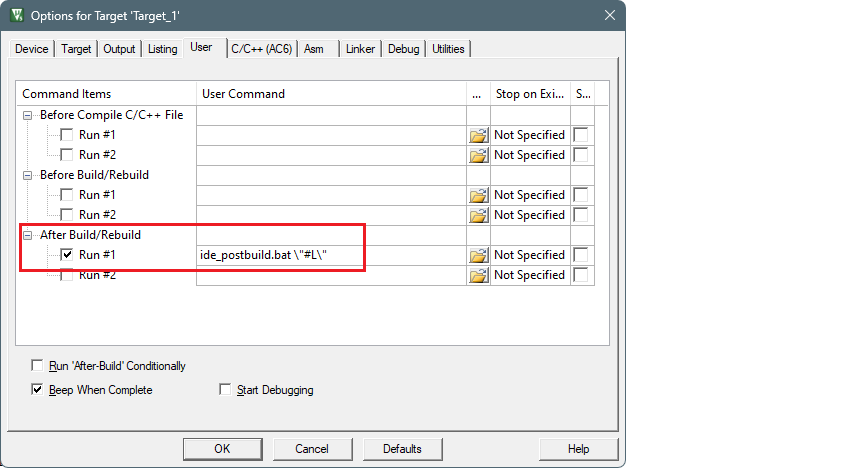
  7. Open the

    Project > Options for Target ‘Target 1’

    dialog, select the

    User

    tab, select the

    After build/Rebuild run #1

    check box, and select the

    postbuild.bat

    file:


    ../figures/image21.png

  8. Select the

    Output

    tab and add a ".elf" extension to the file in the

    Name of Executable

    field:


    ../figures/image22.png

  9. Create empty

    project.ini

    and

    project_2.ini

    files in the project root folder.

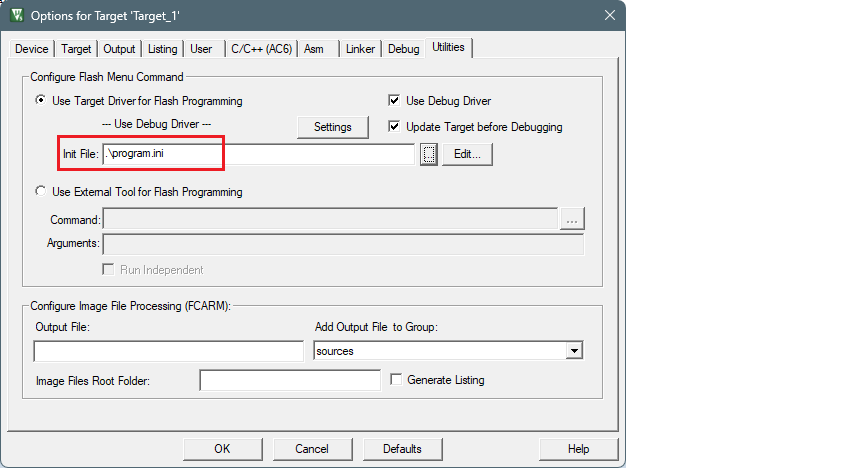
  10. Select the

    Utilities

    tab, select the

    project.ini

    file in the

    Init File

    field, click the

    Edit

    button, and click

    OK

    :


    ../figures/image23.png

  11. Add the following text to the

    project.ini file

    and click

    Save

    :

    LOAD $L@L.final.hex


    ../figures/image24.png

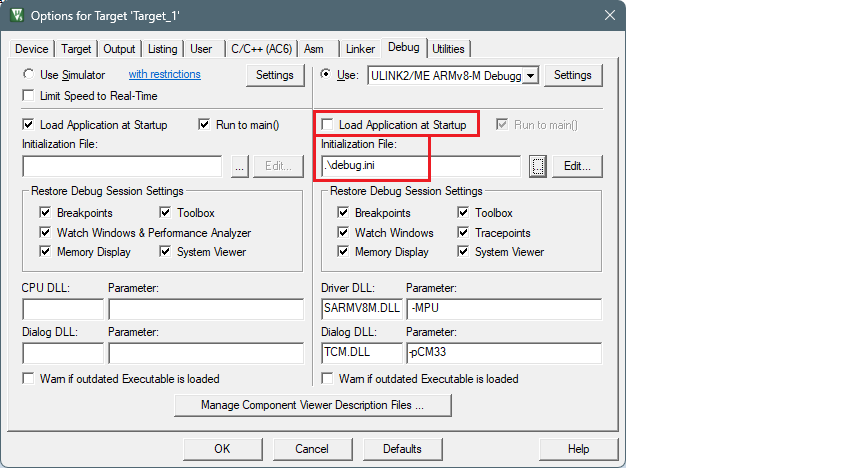
  12. Reopen the

    Project > Options for Target ‘Target 1’

    dialog and select the

    Debug

    tab. Make sure that the

    Load Application at Startup

    check box is not checked.

  13. Select the

    project_2.ini

    file in the

    Initialization File

    field, click the

    Edit

    button, and click

    OK

    :


    ../figures/image25.png

  14. Add the following text to the

    project_2.ini

    file and click

    Save

    .

    LOAD $L@L.elf NOCODE g, main


    ../figures/image26.png

  15. Select

    Project > Build Target

    to build the application and execute post-build commands.

After following these steps, you should be able to run Debug, Erase, and Program for the AIROC™ CYW20829 device.