In the

Controller

tab, the Power Conversion Configurator configures the controller and displays calculated controller coefficients values.
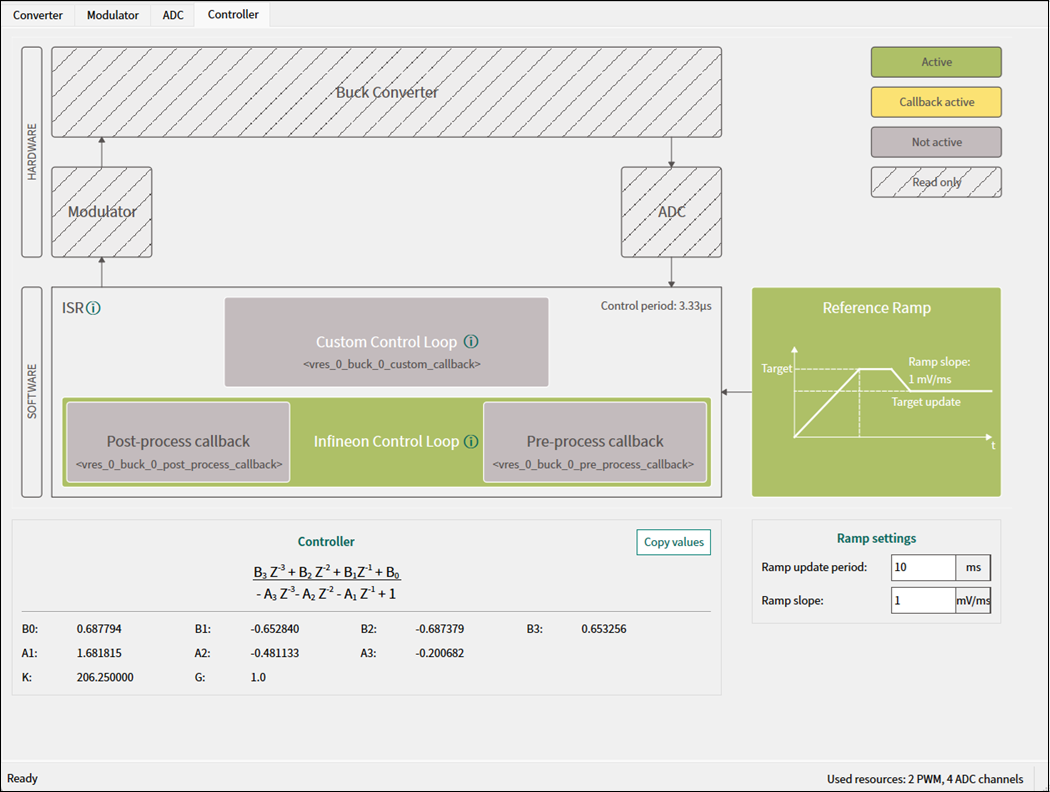


Block diagram

The block diagram illustrates the hardware and software components for the power converter operation. There are several categories of the blocks as shown in the diagram’s legend on the right side:

  • Active

    – clickable option, turned on

  • Callback active

    – clickable option, turned on

  • Not active

    – clickable option, turned off

  • Read only

    – not clickable, illustrative only.

HARDWARE

Includes:

Buck Converter

,

Modulator

,

ADC

SOFTWARE

Includes:

ISR

,

Custom Control Loop

,

Infineon Control Loop

. Click the info icon next to each component to go to

ModusToolbox™ Power Conversion Middleware

.

Parameter

Description

Default

Control period

The time required for 1 switching cycle.

5.00µs

Custom Control Loop

Disables default Infineon control loop and enables custom implementation. Click the info icon to go to the Power Conversion Middleware.

Disabled

Infineon control loop

Enables default control loop implementation

Enabled

Pre-process callback

Executes a user-defined pre-processing callback function before execution of control loop ISR. The callback name is displayed below. Click it to enter a custom name.

Disabled

Post-process callback

Executes a user-defined post-processing callback function after execution of control loop ISR. The callback name is displayed below. Click it to enter a custom name.

Disabled

Controller

The

Controller

section displays the formula used in the controller and correspondent coefficient values. The compensator type can be either Type III (

VCM

) or Type II (PCCM).

Parameter

Description

B0

Coefficient for Type II and Type III compensator

B1

Coefficient for Type II and Type III compensator

B2

Coefficient for Type II and Type III compensator

B3 (for VCM only)

Coefficient for Type III compensator

A1

Coefficient for Type II and Type III compensator

A2

Coefficient for Type II and Type III compensator

A3 (for VCM only)

Coefficient for Type III compensator

K

Digital controller gain

Scales the controller output to consider PWM, ADC and pre-ADC scaling gain

G

Value fixed to default

Note:

Default values for these coefficients are calculated depending on the control mode: Voltage or Peak Current (see the examples below).

  • Copy coefficients

    – Click this button to copy the controller coefficients.

You can use them in your custom code example for

VCM

:

#define B0 0.680625
#define B1 -0.614837
#define B2 -0.679306
#define B3 0.616156
#define A1 1.637124
#define A2 -0.446365
#define A3 -0.190759
#define K 258.891213
#define G 1.0

or

PCCM

:

#define B0 1.915586
#define B1 0.052375
#define B2 -1.863211
#define A1 1.859155
#define A2 -0.859155
#define K 1.046025
#define G 1.0

Reference Ramp

The

Reference Ramp

diagram next to the

ISR

component illustrates the

Target

update depending on the

Ramp update period

and

Ramp slope

.

Ramp settings

Parameter

Description

Range

Default

Ramp update period

Period required for ramp generator function execution

1-50 ms

1 ms

Ramp slope

Maximal speed of reference value change over time

1-1000 mV/ms (or cnts/ms)

1 mV/ms (or cnts/ms)