Skip to main content
ModusToolbox™ ecosystem documentation
Home
Community
Introduction
Getting started
General use case
ModusToolbox™ software installation guide
About this document
General information
Installation instructions
Advanced installation instructions
Updating versions instructions
Setup program GUI description
Troubleshooting
Revision history
ModusToolbox™ tools package quick start guide
ModusToolbox tools package quick start guide
ModusToolbox™ 3.x tools package user guide
About this document
Introduction
Getting started
Updating the example application
Version Control and sharing applications
ModusToolbox™ build system
Board support packages
Manifest files
Using applications with third-party tools
Training
PSOC™ Control quick start guide
PSOC™ Edge quick start guide
IDEs
Eclipse for ModusToolbox™ user guide
About this document
Getting started
GUI description
Configure applications
Build applications
Program and debug
Visual Studio Code for ModusToolbox™ user guide
About this document
Download/install software
Using the extension
Getting Started
Not using the extension
Program/debug
Keil µVision for ModusToolbox™ user guide
About this document
Download/install software
Create/export application for Keil µVision
Miscellaneous notes
PSOC™ Control application
PSOC™ Edge E84 multi-core application
PSOC™ 4 and PSOC™ 6 single-core application
PSOC™ 6 and XMC7xxx multi-core application
PSOC™ 64 secure single-core application
AIROC™ CYW20829 single-core application
Make application changes and re-export
IAR Embedded Workbench for ModusToolbox user guide
About this document
Download/install software
Create/export application for IAR Embedded Workbench
Miscellaneous notes
PSOC™ Control application
PSOC™ Edge E84 multi-core application
Build configuration
Debug configuration
PSOC™ 4 and PSOC™ 6 single-core application
PSOC™ 6 and XMC7000/TRAVEO™ II multi-core applications
PSOC™ 64 secure single-core application
AIROC™ CYW20829 application
Make application changes and re-export
Revision history
Base tools
ModusToolbox Dashboard user guide
About this document
Launch the Dashboard
GUI description
Version changes
Revision history
ModusToolbox™ Settings tool user guide
About this document
Overview
Launching the Settings tool
Configuring settings
Version changes
Revision history
ModusToolbox™ Project Creator user guide
About this document
Overview
GitHub Manifest files
Created application(s)
Launch the Project Creator
GUI description
CLI description
ModusToolbox™ Library Manager user guide
About this document
Overview
ModusToolbox™ 3.x vs. 2.x BSPs
Specifying dependencies
.mtb file
Direct dependency
Indirect dependency
Shared
Local
Including libraries and dependencies
Including libraries that are specified in a manifest
Direct dependencies
Indirect dependencies
Including libraries are not specified in a manifest
Manually adding a library
Manually adding dependencies
Specifying dependencies for custom BSPs
Launch the Library Manager
Working with BSPs
Select Active BSP
Add BSPs
Add BSP from template
Create BSP from MPN
Browse for existing BSP
Finalize Add BSP process
Rename BSP
Existing BSP
Added BSP
Remove BSP
Working with libraries
Add library (single-core application)
Add library (multi-core application)
Update indirect dependency libraries
Change library version
Share/unshare libraries
GUI description
Menus
Application directory
BSP/library controls
BSP context menus
Tabs
Properties tab
Name
Version
Type
Location
Source
MTB file location
Description
README.md tab
RELEASE.md tab
Buttons
Message console
ModusToolbox™ BSP Assistant user guide
About this document
Overview
Launch the BSP Assistant
Quick start
Editing the BSP
GUI Description
CLI Description
ModusToolbox™ Local Content Storage CLI user guide
About this document
Introduction
Getting started
Other LCS options
Revision history
ModusToolbox™ DFU Host tool user guide
About this document
Overview
Supported devices and file formats
Example code
Quick start
Launch the DFU Host tool
GUI description
CLI description
Input files
Customizing the DFU Host Tool
Troubleshooting
Version changes
Revision history
ModusToolbox™ signer/combiner user guide
About this document
Run config
Variable interpolation
JSON description
Commands description
JSON comments
Use cases
Programming tools
ModusToolbox™ Programmer GUI user guide
About this document
Overview
Installing ModusToolbox™ Programmer
Getting started
GUI description
Programming operations
Troubleshooting
Upgrading firmware
Revision history
Firmware Loader user guide
About this document
Introduction
Command-line options
Troubleshooting
Revision history
KitProg3 user guide
About this document
Introduction
Installing and Using KitProg3
KitProg3 Design
DAPLink Mode
KitProg3 vs. KitProg2
Updating KitProg3
Troubleshooting
Revision history
ModusToolbox™ software OpenOCD CLI user guide
About this document
Introduction
Getting started
Supported target configurations
Command-line options
OpenOCD commands overview
OpenOCD commands description
Global variables
Usage examples
Revision history
Configurators
Infineon Device Configurator user guide
About this document
Overview
Stand-alone operation
Using with ModusToolbox™ application
Quick start
Code generation
GUI description
Resources tabs
Panes
Version changes
Revision history
ModusToolbox™ CAPSENSE™ Configurator user guide
About this document
Overview
Launch the CAPSENSE™ Configurator
Quick start
Code generation
GUI description
Basic tab [all gen]
Advanced tab [all gen]
Pins tab [4th gen]
Scan Configuration tab [5th gen LP] , [5th gen ]
Known Issues
Version changes
Revision history
ModusToolbox™ CAPSENSE™ Tuner user guide
About this document
Overview
Launch the CAPSENSE™ Tuner
Quick start
GUI description
Tuner communication setup
Custom Data Settings
Status bar
Widget View tab
Graph View tab
SNR Measurement tab
Liquid Level Measurement tab
Touchpad View tab
Gesture View tab
Tuner Configuration options
Troubleshooting
Version changes
Revision history
ModusToolbox™ QSPI Configurator user guide
About this document
Overview
Launch the QSPI Configurator
Quick start
Code generation
GUI description
Create new memory file
XML schemas
Version changes
Revision history
ModusToolbox™ Segment LCD Configurator user guide
About this document
Overview
Launch the Segment LCD Configurator
Quick start
Code generation
GUI description
Display Editor
Display view
Mapping table
Known issues, limitations, and workarounds
Version changes
Revision history
ModusToolbox™ Smart I/O Configurator user guide
About this document
Overview
Launch the Smart I/O Configurator
Quick start
GUI Description
Functional Description
Version changes
Revision history
ModusToolbox™ Bluetooth® Configurator user guide
About this document
Overview
Launch the Bluetooth® Configurator
Quick start
Code generation
GUI description
Parameters configuration
Version changes
Revision history
ModusToolbox™ EZ-PD™ Configurator user guide
About this document
Overview
Launch the EZ-PD™ Configurator
Quick start
GUI description
Version changes
Revision history
ModusToolbox™ LIN Configurator user guide
About this document
Overview
Launch the LIN Configurator
Quick start
Code generation
GUI description
Parameters description
Version changes
Revision history
ModusToolbox™ USB Configurator user guide
About this document
Overview
Launch the USB Configurator
Quick start
Code generation
GUI description
Supported descriptors
Known issues, limitations, and workarounds
Version changes
Revision history
ModusToolbox™ Power Conversion Configurator user guide
About this document
Overview
Launch the Power Conversion Configurator
Quick start
Code generation
GUI description
Tabs/Parameter configuration
Converter tab
Control mode
Schematic diagram parameters
Input voltage (Vin)
Output voltage (Vout)
Output current (Iout)
Inductance (L)
Capacitance (C)
Sensor
Control parameters
Compensation settings (poles and zeros)
Modulator tab
PWM instance table
PWM
Comparator (CMP)
DAC settings
DMA
PWM diagram
ADC tab
Toolbar
ADC channels table
Controller tab
Block diagram
Controller
Reference Ramp
Bode plot
Toolbar
Legend
Version changes
Revision history
ModusToolbox™ Sensor Designer tool user guide
About this document
Overview
Launch the Sensor Designer tool
Quick start
GUI description
Liquid Level tab
Sensor verification
Button tab
Radial Slider tab
Version changes
Revision history
Additional packages information
Device support libraries
PSOC™ Edge
PSOC™ Control
PSOC™ 6, AIROC™ CYW20829, TRAVEO™ II, XMC7000
PSOC™ 4, PMG
AIROC™ CYW43907, CYW54907
AIROC™ CYW5551x
XMC1000, XMC4000
Middleware
Drivers and core middleware
ModusToolbox™ for connectivity
ModusToolbox™ for Wi-Fi and ethernet
ModusToolbox™ for Bluetooth®
ModusToolbox™ for motor control
ModusToolbox™ for power conversion
ModusToolbox™ for Graphics
ModusToolbox™ for Security
ModusToolbox™ for Machine Learning
ModusToolbox™ for Voice
ModusToolbox™ for sensing
ModusToolbox™ for Audio
Device-family-specific documentation
Disclaimer
Configurators
ModusToolbox™ Power Conversion Configurator user guide
Tabs/Parameter configuration
Converter tab
Converter tab
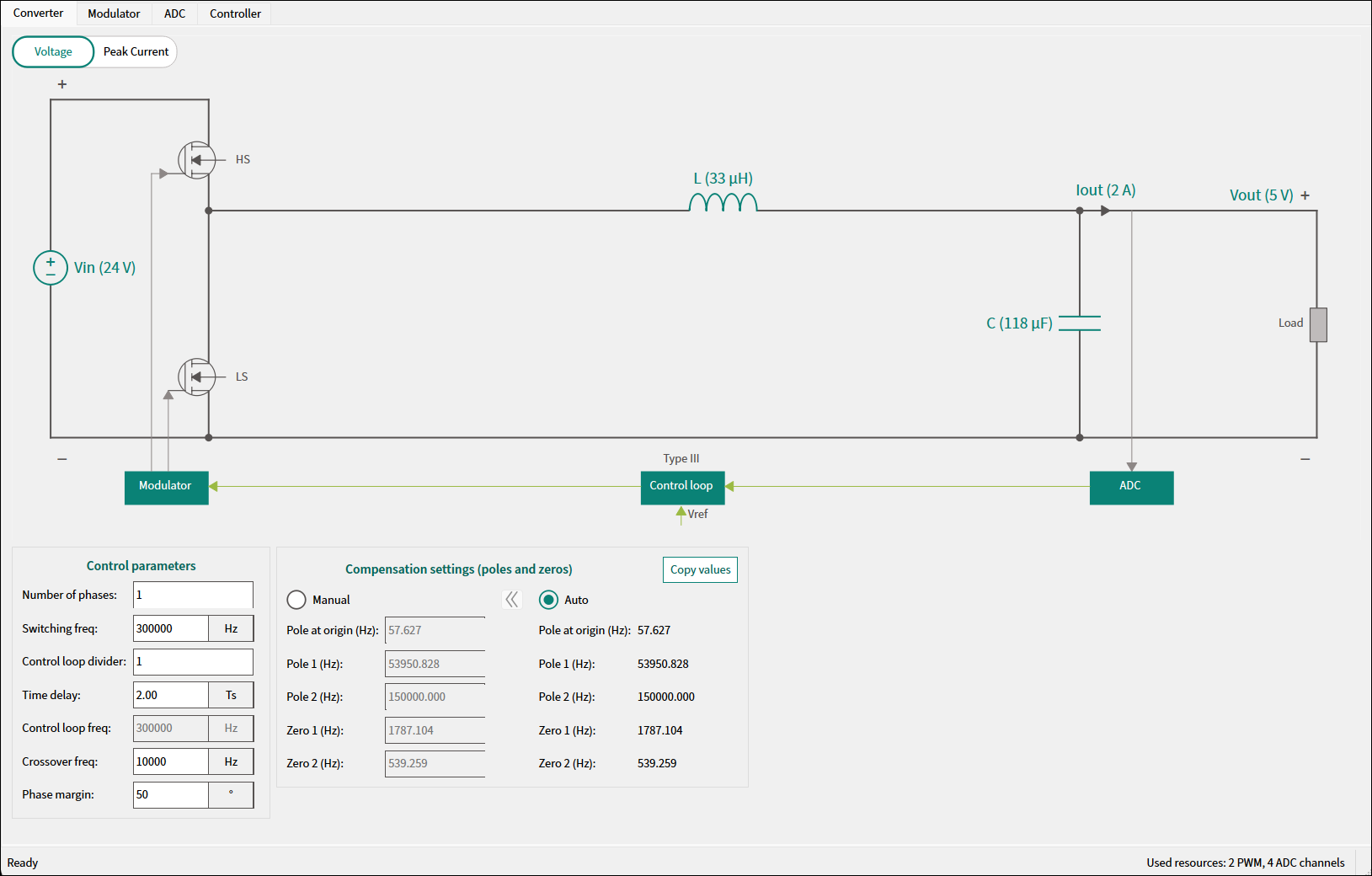
The
Converter
tab performs configuration of the general converter parameters.
Last updated on
Oct 13, 2026
Previous
Tabs/Parameter configuration
Next
Control mode