KitProg3 uses the industry-standard Serial Wire Debug (SWD) and JTAG protocols. It uses CMSIS-DAP V2.0.0 and V1.2.0 as the Bulk and HID endpoints transport mechanisms. CMSIS-DAP is also an industry standard. KitProg3 implements USB Bulk endpoints for faster communication. It also supports HID endpoints for use cases that require them, but communication is slower. Out of the box, KitProg3 uses Bulk endpoints.
KitProg3 also supports bridging: USB-UART, USB-I2C, USB-SPI, and GPIO Bridging Feature.
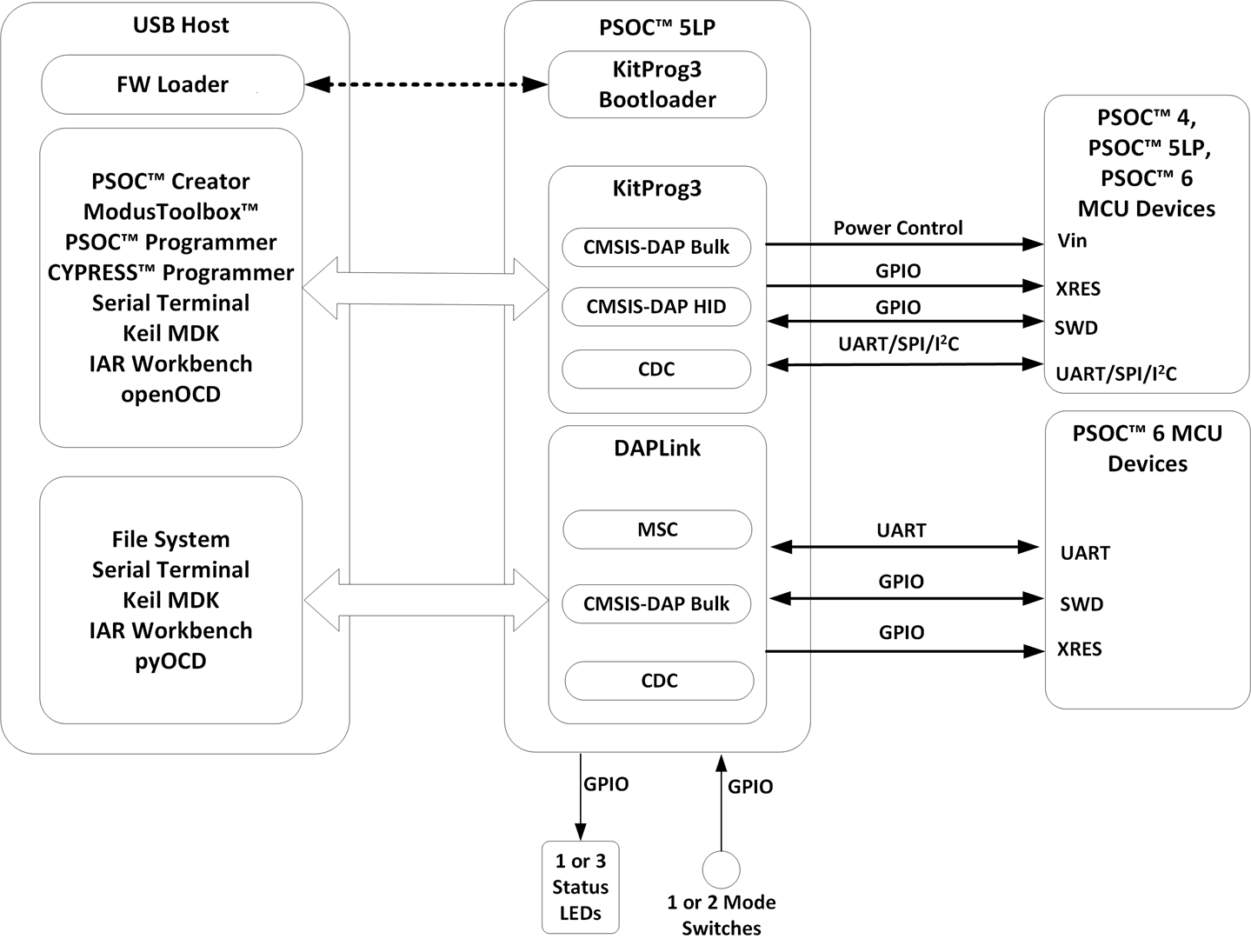
The KitProg3 package also includes the Arm® Mbed™ DAPLink that enables programming and debugging applications (IoT) for Arm Cortex® CPUs (PSOC™ 6 MCUs only). DAPLink is platform-independent and provides drag-and-drop programming via a Mass Storage Controller (MSC), CMSIS-DAP debugging (Bulk endpoints), and a virtual serial port via USB Communications Device Class (CDC). You can switch between KitProg3 and DAPLink with a simple push of a Mode button.
What's in this Guide
This user guide provides comprehensive information about KitProg3 in PSOC™ development kits:
- Installing and Using KitProg3 – provides all the information you need to get up and running for the common use cases, also, includes full details about KitProg3 User interface, mode switching and status LEDs behavior.
- KitProg3 Design – includes the list of supported devices, supported operating speeds for each supported interface/bridge.
- DAPLink Mode – includes details on how to upgrade kit firmware to KitProg3 with DAPLink, how to switch to DAPLink mode, and useful references to Arm resources.
- KitProg3 vs. KitProg2 – includes details about how to tell what's installed, the differences, and how to upgrade a kit to KitProg3.
- Updating KitProg3 – includes details on how to update KitProg3 firmware, how to use Firmware Loader to update, downgrade firmware and switch modes.
In case of any issues, see the Troubleshooting section.
KitProg3 Tools Support and Compatibility
KitProg3 is supported by the following tool combinations:
- KitProg3 CMSIS-DAP Bulk and HID modes
- ModusToolbox™ and ModusToolbox™ Programmer
- PSOC ™ Creator and PSOC ™ Programmer (v 3.28 or later)
- openOCD CLI
- µVision
- IAR Embedded Workbench
- Visual Studio Code
- DAPLink mode
| KitProg | IDE | Programmer | Bridging Tools |
|---|---|---|---|
|
KitProg3 |
ModusToolbox™ & PSOC™ Creator |
ModusToolbox™ Programmer & PSOC™ Programmer |
Bridge Control Panel (PSOC™ Programmer) 1 CAPSENSE™ Tuner (PSOC™ Creator and ModusToolbox™) |
|
KitProg2 |
PSOC™ Creator |
PSOC™ Programmer |
| Mode | USB devices | Features |
|---|---|---|
|
KitProg3 mode |
CMSIS-DAP Bulk CDC UART CMSIS-DAP HID Bridge Bulk |
CMSIS-DAP Programming/Debugging I2C/SPI/UART/GPIO Bridging Voltage control |
|
DAPLink mode |
Mass Storage Device CDC UART CMSIS-DAP Bulk |
CMSIS-DAP Programming/Debugging UART Bridging Drag-And-Drop Programming |