To set up a DC analysis, specify the sweep value and the sweep range.

Before you begin

Set up the simulation as described in

Setting up a simulation

.

About this task

Set up a DC analysis when you want to analyze the behavior of a device when a particular property is varied.

Procedure

  1. In the

    Analyses

    tab of the

    Simulation Environment

    view, check

    DC

    if it is not already checked.


    You can check additional analyses (such as OP or AC). If you do so, an additional Waveform Viewer window will open for each analysis when the simulation is run.
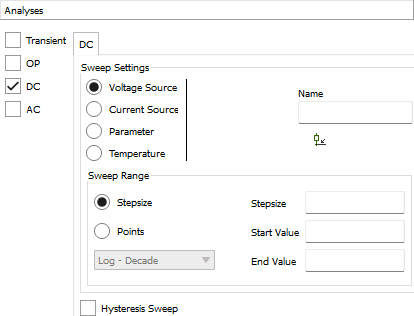
  2. Choose the desired sweep setting.

    • Voltage Source

      : Enter the name of the voltage source in the Name field, or click the Select Output tool

      below it and click the voltage source in the schematic.

    • Current Source

      : Enter the name of the current source in the Name field, or click the Select Output tool

      below it and click the current source in the schematic.

    • Parameter

      : Enter the name of the parameter in the Name field. If the parameter has been defined in the schematic itself, leave the Subcircuit field empty. If the parameter has been defined in a subcircuit, enter its name into the field.

    • Temperature

      : No additional options are available for this sweep setting.

  3. Specify the type of sweep range.

    • To specify range by the step intervals, choose

      Stepsize

      and enter the desired interval between two steps in the

      Stepsize

      field.

      For information on the number format, see

      Values and expressions

      .

      For example, when a voltage source is swept, entering

      250m

      sweeps the range in steps of 0.25 V.

    • To specify range by the number of steps, choose

      Points

      and enter the desired number of simulated points in time in the # Points field and choose linear or logarithmic spacing.

      Note that the number of steps includes both the beginning and end of the range, so that entering, for example,

      6

      results in a sweep with five steps. If you choose

      Linear

      , the steps are all equally-sized. If you choose

      Log - Decade

      or

      Log - Octave

      , each step is logarithmically larger than the one before.

  4. Enter the beginning and end of the range in the

    Start Value

    and

    End Value

    fields.

    For information on the number format, see

    Values and expressions

    .

  5. Optionally, check the

    Hysteresis Sweep

    checkbox to add a second sweep after the first one. This second sweep has the same parameters as the first one but begins with the specified end value and ends with the start value.

Results

The DC analysis is now set up, and you can run the simulation as described in

Running a simulation

. Evaluating the simulation results is described in

Evaluating simulations

.