This dialog lets you specify the page size and frame location for schematics.
The dialog contains two tabs, Format for the page format and Frame for the frame position. The buttons at the bottom of the dialog apply to both frames.
The dialog is opened by choosing in a schematic-editing view.
Format tab
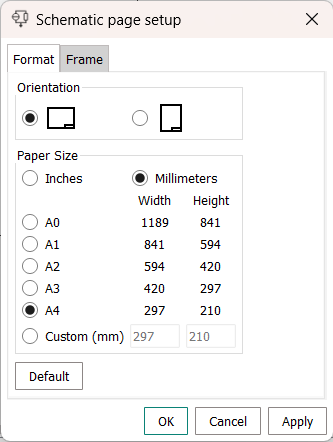
- Orientation
-
Choose between landscape (wide) and portrait (tall) orientation of the page. The choice is reflected in the page width and height displayed in the Paper Size section.
- Paper Size
-
- Inches
-
Clicking Inches displays US paper sizes and converts the displayed paper dimensions to inches.
- Millimeters
-
Clicking Millimeters displays ISO standard paper sizes and converts the displayed paper dimensions to millimeters.
- E, D, C, B, A
-
Choosing one of these options set the paper size to the chosen format. The page dimensions are displayed in the Width and Height columns.
These options are displayed when Inches is chosen.
- AO, A1, A2, A3, A4
-
Choosing one of these options set the paper size to the chosen format. The page dimensions are displayed in the Width and Height columns.
These options are displayed when Millimeters is chosen.
- Custom
-
Choosing Custom lets you freely specify the page size by entering the desired dimensions into the two text fields in the Width and Height columns.
- Default
-
Resets the page size settings to the standard values.
Frame tab
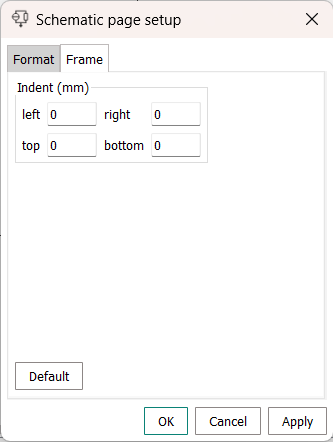
In this tab, you can specify the distance in millimeters between the page border and the frame around the schematic.
- Left, Right, Top, Bottom
-
Specifies the distance between the respective side of the frame and the page border.
For example, entering 12 into the Left field causes the left side of the frame to be drawn 12 mm away from the page border.
- Default
-
Resets the frame settings to the standard values.
Common buttons
- OK
-
Closes the dialog and applies the specified page size and frame settings to the current schematic.
- Cancel
-
Closes the dialog without changing the page size and frame settings of the schematic.
- Apply
-
Applies the specified page size and frame settings to the current schematic and leaves the dialog open.