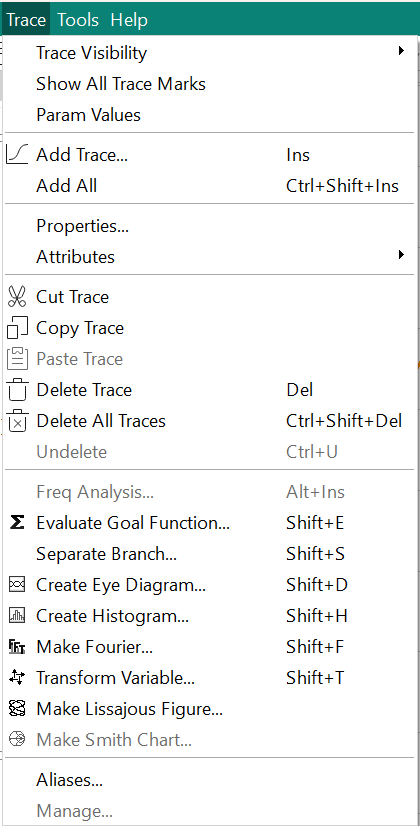
The icons found in the menu next to the command can also be found in the tool bar. Click directly on the icon in the toolbar to select the command.
- Trace Visibility
- Trace Visibility menu contains a dropdown list where you can hide the lines that connect the simulation values, so you only have the trace plot marks. Alternatively, you can also choose to hide lines. Only one of the choices is possible or else the plotting of all simulation values would be invisible.
- Show All Trace Marks
- All simulation values are depicted on the plot. Click Show All Trace Marks to select and click again to deselect the command
- Param Values
- All parameter values are depicted on the plots. Click Param Values to select and click again to deselect the command
- Add All
- Add All triggers traces of all available output variables in the plot regardless of whether they are visible in the list or not. Note that once you have triggered Add All, you have to select each plot individually and then select Delete Plot.
- Properties
- Select a plot and click Properties. A window opens and the Trace properties are shown. These include parameter in the plot as well as the value.
- Attributes
-
Any changes to color and mark can be reset to default in this menu.
- Cut Trace
-
Select a trace amongst the choice of traces and click Cut Trace to delete the trace from the plot.
- Copy Trace
-
Select the trace to copy. Click Copy Trace. The trace is on the clipboard. To paste the trace, select the location where you want the trace then,
- Delete Trace
-
Select the trace you want to delete and click Delete Trace.
- Delete All Traces
-
Place your cursor in the at once by clicking Delete All Traces.. A window pops up that asks you if you want to Delete all traces in the selected plot?YesNo
- Undelete
- You can retrieve a plot or plots by clicking Undelete and all traces appear as before delete.
- Aliases
- You can create an alternative name or an alias for a parameter. Click Aliases. A window opens with the name of the parameter. Click in the column next to the parameter and you can enter the alias.