Right-click on a library icon  , which is in the
vertical list, and you will get a menu with the following commands from which you
can choose:
, which is in the
vertical list, and you will get a menu with the following commands from which you
can choose:
, which is in the
vertical list, and you will get a menu with the following commands from which you
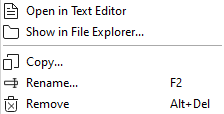
can choose: - Open in Text Editor
- A text editor opens where you can edit your library.
- Show in File Explorer
- By right-clicking on the library, you can locate in which directory this library is saved.
- Copy
- You can copy the schematic and choose the location to which it should be copied. If you do not give it a new name, it will rename itself by adding a digit to the original name.
- Rename
- You can rename a file.
- Remove
- Delete the file from view.