Right-click on a schematic icon  , which is in the
vertical list, and you will get a menu with the following commands from which you
can choose:
, which is in the
vertical list, and you will get a menu with the following commands from which you
can choose:
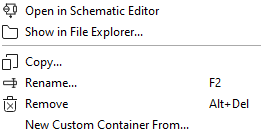
- Open in Schematic Editor
-
Display a schematic in the work area by right clicking on the schematic and select Open in Schematic Editor
Alternatively, you can also double click on a schematic from the Workspace to display in the work area.
- Show in File Explorer
- By right-clicking on the schematic, you can locate in which directory this schematic is saved.
- Copy
- You can copy the schematic and choose the location to which it should be copied. If you do not give it a new name, it will rename itself by adding a digit to the original name.
- Rename
- You can rename a file.
- Remove
- Delete the file from view.
- New Custom Container From
- You can place all of your schematics in a container of your choice. When you do this, you have to name of the container. You will be asked if the dependencies should also be copied, if there are any to other existing containers. Find your new containers in the