The Net Colors dialog shows the colors of all selected wires and lets you modify them.
The dialog is opened by selecting wires from multiple nets and choosing . (If you select only one wire or wires from just one net, the net color dialog opens instead.)
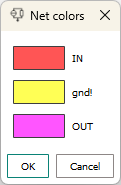
The dialog displays all selected nets and the colors that have been assigned to them.
Clicking any of the swatches opens the net color dialog in which you can modify the color.
Clicking OK assigns the colors that are shown in the dialog to the respective nets.
Clicking Cancel closes the dialog without recoloring the nets.