Program QSPI memory with patched flashloader
This feature is supported by AIROC™ CYW20829 devices, as well as PSOC™ Edge E84, XMC7100/7200 and CYT4Bx MCUs. It allows you to specify the patched flashloader file in FLM format along with the appropriate QSPI configuration. Patched flashloaders contain data about how your external memory is configured.
Connect the device to the host computer and select it in the
Programmer
,
Board
, and
Device
drop-downs.
Select the programming file as described in the
Load programming file
section.
Select the
External Memory
option under
Program Settings
(if supported).
Click on the
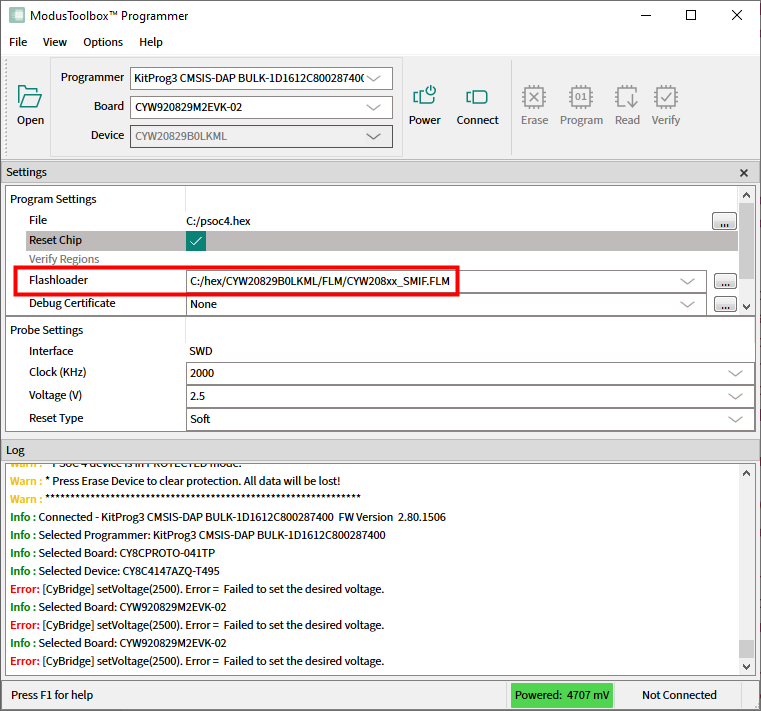
Flashloader
option under
Program Settings
and select the patched flashloader (FLM) file in the dialog.
The path will display under
Settings
.
Connect to the device (see
Connect device
).
Click the
Program
button.
Note:
To be able to program custom QSPI memory, you should also provide the appropriate QSPI
configuration file (qspi_config.cfg) generated by the ModusToolbox™ QSPI Configurator tool.
This file should be placed in the same directory as the patched flashloader file; it is
located and read by ModusToolbox™ Programmer automatically.
Refer to the QSPI Configurator User Guide for more information about patching flashloaders.