AN241827 PMSM FOC using TRAVEO™ T2G CYT4BF MCU

About this document
Scope and purpose
This document describes the implementation of permanent magnet synchronous motor (PMSM) sensorless field-oriented control (FOC) using the Infineon's TRAVEO™ T2G CYT4BF MCU.
Intended audience
This document is intended for customers who would like a configurable system for FOC control with sensorless feedback using the TRAVEO™ T2G CYT4BF MCU.
Introduction
Sensorless FOC for brushless permanent magnet synchronous motors has been widely used as a control method in variable frequency drive applications. The system cost and energy efficiency are the two main factors driving the adoption of FOC-driven three-phase motors. For most applications, three shunt resistors located at the low side of inverter switches are used to measure three-phase motor currents for FOC. However, a single shunt is also widely used for cost-sensitive applications.
The TRAVEO™ T2G CYT4BF MCU is designed for real-time control applications such as motor control. The uses of various peripherals intended for motor control applications are described in this document.
Key features
TRAVEO™ T2G CYT4BF key features
Two 350 MHz 32-bit Arm® Cortex®-M7 CPUs, each with
Single-cycle multiply
Single/double-precision floating point unit (FPU)
16 KB data cache, 16 KB instruction cache
Memory protection unit (MPU)
16 KB instruction and 16 KB data tightly coupled memory (TCM)
100 MHz 32-bit Arm® Cortex® M0+ CPU with single-cycle multiply and MPU
Up to 8384 KB of code flash with an additional up to 256 KB of work flash and an internal SRAM of up to 1024 KB
Flash programming on JTAG/SWD interface
Read-while-write (RWW) allows updating the code flash and work flash while executing from it
Single and dual bank modes, specifically for firmware over-the-air (FOTA) update
Hardware error correction (ECC) on all safety-critical memories (SRAM and flash)
Low-power 2.7 V to 5.5 V operation, with two robust brownout detect (BOD) and overvoltage detect (OVD) options
High-performance 12-bit, 3x SAR ADC, supports 12-bit resolution and sampling rates up to 1 Msps
Various TCPWM channels design for real-time control applications
High-speed CAN FD communication supporting up to 8 Mbps data rate
Serial interface to support various serial communications (UART/SPI/I2 C)
Support 10/100/1000 Mbps Ethernet MAC interfaces
Hardware watchdog function
Deep sleep and hibernate power modes for low-power solution
DMA controllers supports peripheral-to-memory and memory to memory data transfer
FOC motor control features
Multiple motor control capabilities
Speed control
Current control
Torque control
Voltage control
Adaptive sensorless observer that provides minimal phase distortion. It can observe rotor angle, speed, stator angle, stator flux magnitude, and load angle
Start up technique
Open-loop Volt/Hz
Rotor prealignment
Six-pulse injection
High-frequency injection
Maximum torque per amp (MTPA)
Maximum torque per volt (MTPV)
Field weakening
Active damping
Motor I2T protection
Various voltage modulation methods
DSP math library
Hardware and software fault detection for protection
Floating point implementation of all control features
Motor profiler to facilitate tuning when new motors are used
High-sampling-rate oscilloscope support for signal monitoring
Abbreviations and acronyms
API | Application programming interface |
DMA | Direct memory access |
DSP | Digital signal processor |
FOC | Field-oriented control |
FPU | Floating point unit |
I-PMSM | Interior permanent magnet synchronous motor |
ISR | Interrupt service routine |
MCU | Microcontroller unit |
MPU | Memory protection unit |
PMSM | Permanent magnet synchronous motor |
PWM | Pulse width modulation |
RFO | Rotor frame orientation |
SFO | Stator frame orientation |
SMPMSM | Surface-mounted permanent magnet synchronous motor |
SVM | Space vector modulation |
TBC | Trapezoidal block commutation |
TCPWM | Timer, counter, and pulse-width modulator |
TRAVEO™ T2G CYT4BF resource allocation
TRAVEO™ T2G CYT4BF MCU peripherals allocated for the FOC sensorless solution are captured in Table 2 .
TRAVEO™ T2G CYT4BF peripherals | Usage | Default resource allocation |
|---|---|---|
TCPWM | PWM_U: PWM generation for phase U, 16-bit resolution | TCPWM[1] Group [1] Counter 0 |
PWM_V: PWM generation for phase V, 16-bit resolution | TCPWM[1] Group [1] Counter 1 | |
PWM_W: PWM generation for phase W, 16-bit resolution | TCPWM[1] Group [1] Counter 2 | |
SYNC_ISR1:
| TCPWM[1] Group [2] Counter 0 | |
ADC0_ISR0: Start in sync with PWM timers and trigger SAR ADC 1 | TCPWM[1] Group [1] Counter 4 | |
ADC0_ISR1: Start in sync with PWM timers and trigger SAR ADC 0 and SAR ADC 2 | TCPWM[1] Group [1] Counter 5 | |
PWM_SYNC: Start in sync with PWM timers and trigger the PWM compare value swap | TCPWM[1] Group [1] Counter 3 | |
ADC0 | Channel 0: Phase U current sensing (IUP) | 12-bit SAR ADC 0 |
Channel 1: Phase U back emf sensing (VEMF_U) | ||
Channel 2: Dc bus voltage sensing (VBUS) | ||
Channel 3:
| ||
ADC1 | Channel 0: Phase V current sensing (IVP) | 12-bit SAR ADC 1 |
Channel 1: Phase V back emf sensing (VEMF_V) | ||
Channel 2:
| ||
ADC2 | Channel 0: Phase W current sensing (IWP) | 12-bit SAR ADC 2 |
Channel 1:
| ||
Interrupt controller (NVIC) | ISR1(Slow control loop): Timer interrupt | tcpwm_1_interrupts_512_IRQn |
ISR0 (Fast control loop):
| cpuss_interrupts_dw0_50_IRQn cpuss_interrupts_dw0_81_IRQn cpuss_interrupts_dw0_112_IRQn | |
MATH | FPU |
TRAVEO™ T2G CYT4BF peripheral interconnectivity
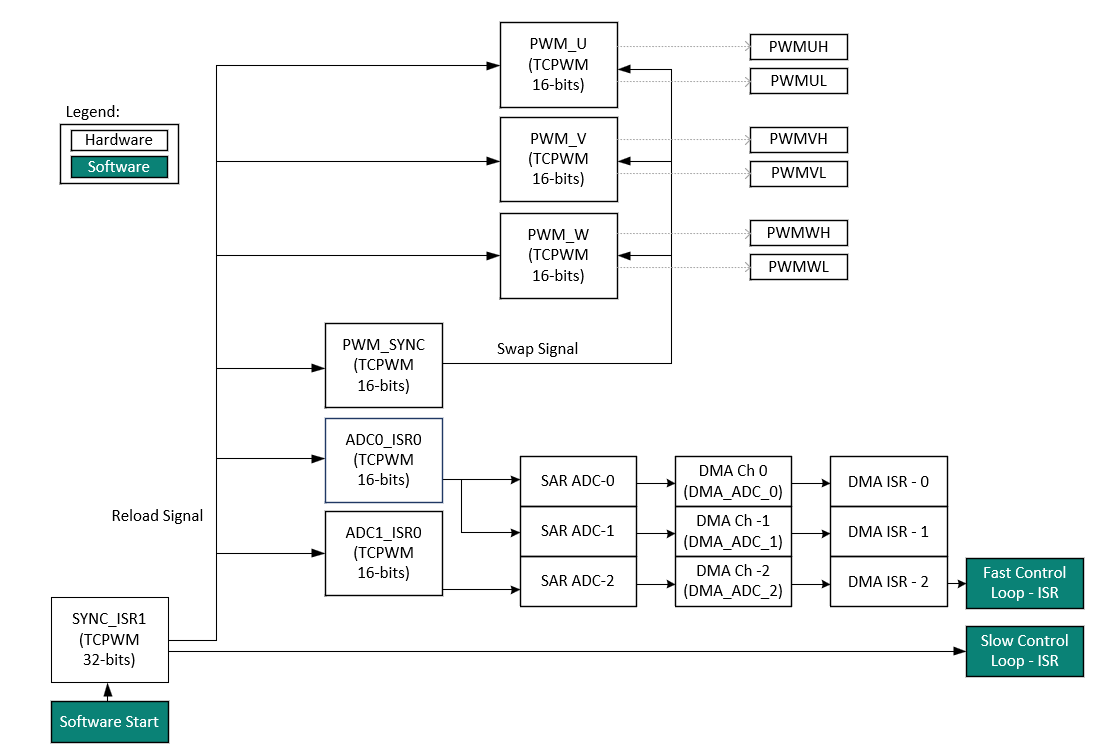
Figure 1 shows the interconnection between TRAVEO™ T2G CYT4BF peripherals used for three-shunt sensorless FOC.
Figure 1.
Peripheral interconnectivity
Motor control library
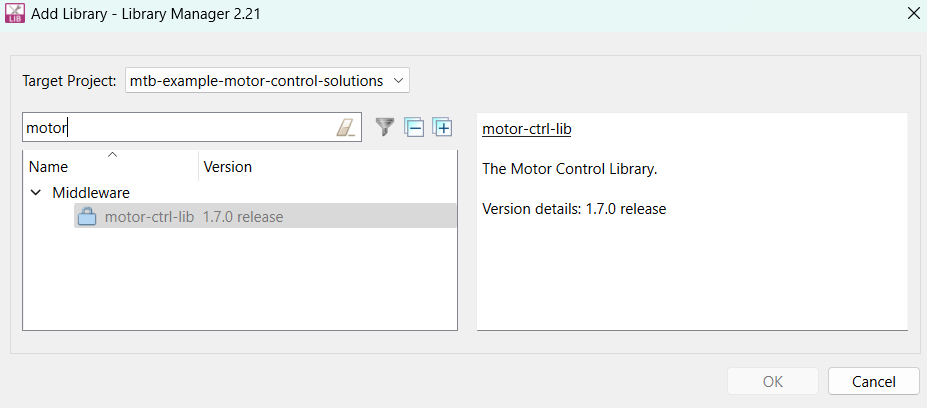
The motor control library is a ModusToolbox™ middleware asset. It can be integrated with a new application using Library Manager as shown in Figure 2 .
Figure 2.
Middleware asset - Motor control library
It has a well-defined layered architecture including the hardware interface layer as shown in Figure 3 .
Figure 3.
Library layered architecture
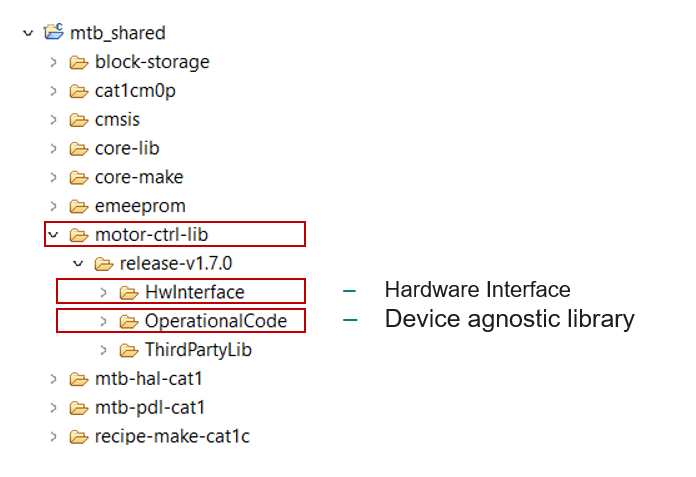
Hardware interface layer provide the interface functions to integrate the device agnostic library to the hardware modules.
PMSM sensorless FOC basics
This section introduces the different types of PMSM motors and the structure of a typical sensorless FOC system.
Types of synchronous motors
There are two types of PMSMs, the salient and the non-salient type of motor. They differ in how magnets are placed in the rotor. Figure 4 shows the non-salient surface mounted permanent magnet synchronous motor (PMSM/SMPMSM) [left] and a salient interior permanent magnet synchronous motor (IPMSM) [right].
Figure 4.
Structure for SMPMSM and IPMSM
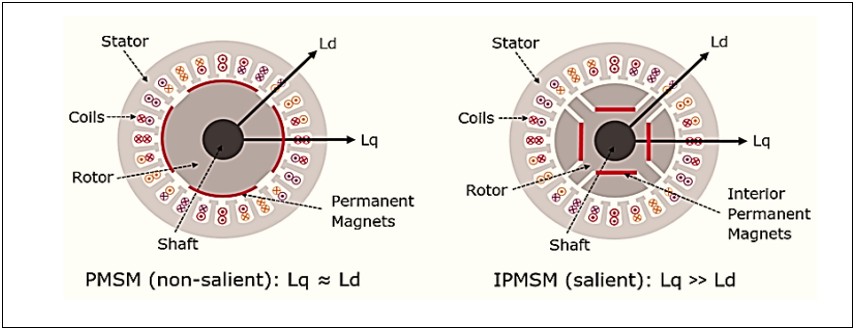
IPMSM has distributed windings with interior permanent magnets inside the rotor causing a saliency and therefore, also reluctance torque. In SMPMSM, magnets are placed on the surface of the rotor, it has no saliency. In the non-salient type of synchronous motor, the stator inductance is not dependent on the rotor position whereas in the salient type of motor the stator inductance is dependent on the rotor position.
Synchronous motors can provide torque when a rotating electromagnetic field and a constant field are standing still relative to each other. To develop a constant torque, the stator field must rotate synchronously with the rotor (permanent magnets) which is excited by a DC power supply.
The d-axis refers to the direct axis (main flux path axis that is normally in the orientation of the permanent magnets) of a synchronous machine, while the q-axis refers to the quadrature axis.
Sensorless FOC system overview
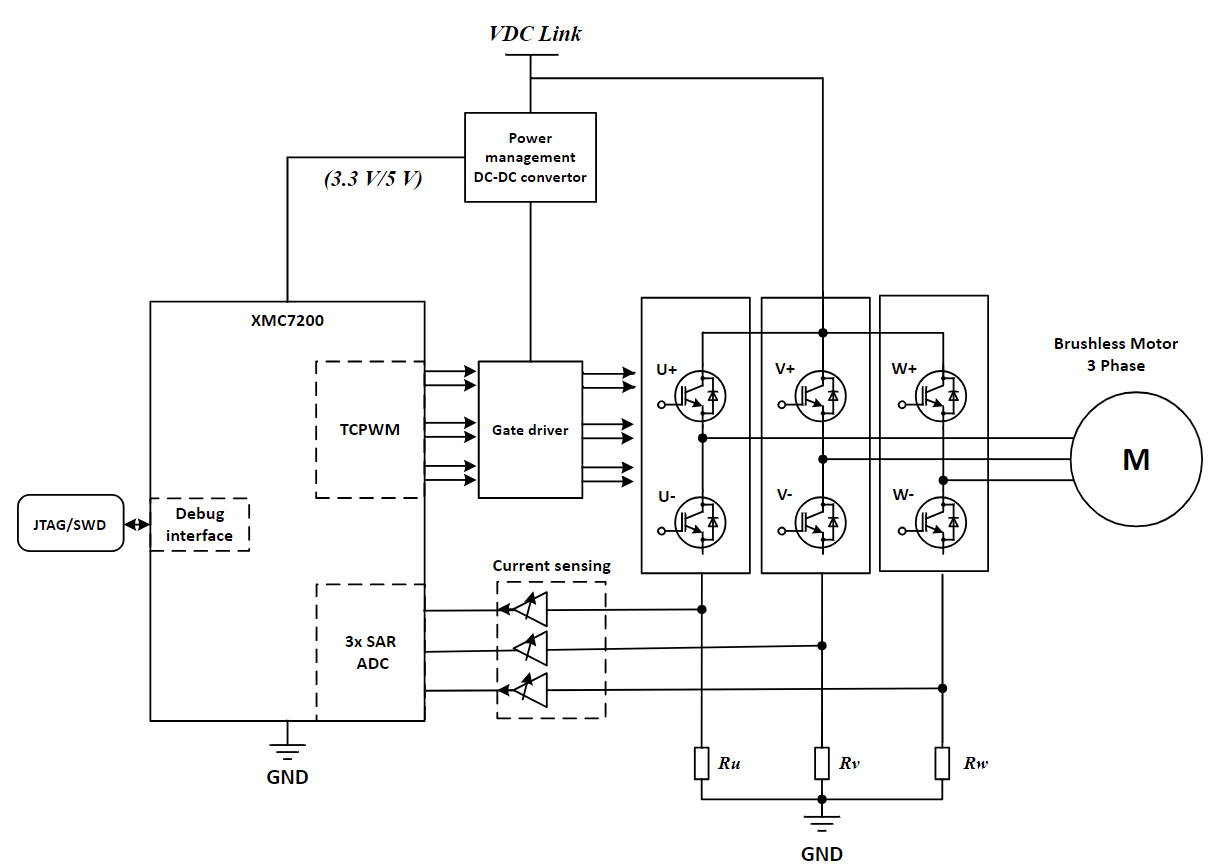
FOC is also known as vector control, it provides better efficiency at higher speeds than sinusoidal control. Vector control guarantees optimized efficiency even during transient operation by perfectly maintaining the stator and rotor fluxes. It gives better performance on dynamic load changes when compared to all other control techniques. Figure 5 shows the hardware block diagram of a typical sensor less FOC system. It consists of MCU, inverter, motor, current sensing circuit, and communication interfaces. These components can be on the same controller board or separated in the system such as on an MCU board and an inverter board.
Figure 5.
Overview of a typical FOC system
Inverter
The objective of any motor control method is to generate a reference voltage to be applied to the motor windings using an inverter. Since the inverter is made of discrete switching devices, it cannot produce a continuous voltage on its output. Therefore, a modulation scheme is needed to create a voltage that has an average equal to the reference voltage. Figure 6 shows the basics of modulation.
Figure 6.
Voltage modulation
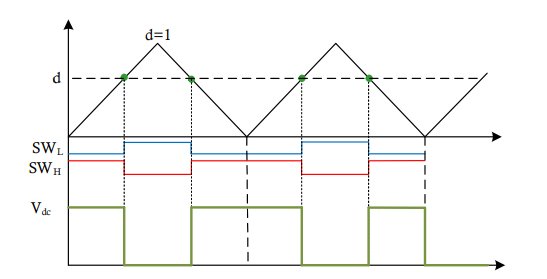
As shown in Figure 6 , the reference voltage "d" generated by the controller is compared with a triangular waveform, which creates the switching signals for low-side SWL and high-side SW H switches in the associated leg of an inverter. The result would be the voltage waveform with an average of d x V dc in the leg of the inverter (with respect to the negative DC bus).
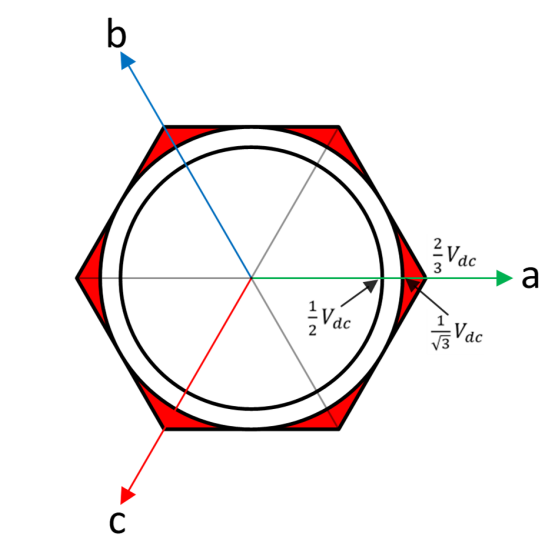
In a three-phase inverter, the maximum voltage vector that can be generated depends on the modulation scheme. As shown in Figure 7 , the maximum voltage that can be generated by the inverter is 2/3 × V dc (with respect to the neutral point of the motor). Space Vector Modulation (SVM) and Neutral Point Modulation can both produce 1/√3 × V dc . These modulation schemes will be discussed in the following sections.
Figure 7.
Inverter voltage generation
Space vector modulation
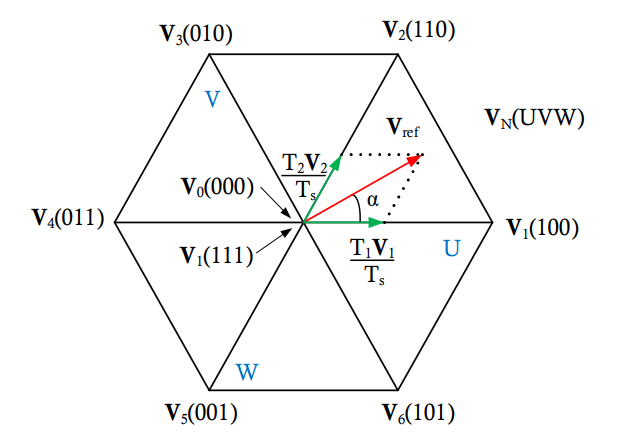
In the SVM method, the voltage reference is created using the two adjacent voltage vectors as shown in Figure 8 .
Figure 8.
SVM voltage creation
for the rest of the period. Therefore,
and the duration of each voltage vector can be calculated as:
where 𝑚 is the modulation index and defined as:
Figure 8 shows the two different switching schemes for each leg of the inverter based on the timings acquired for each voltage vector. There are a few different switching schemes that can be used to create the vectors determined by the SVM method. However, 7 segment and 5 segment switching methods as shown in Figure 9 are the most popular (
).Figure 9.
SVM switching methods
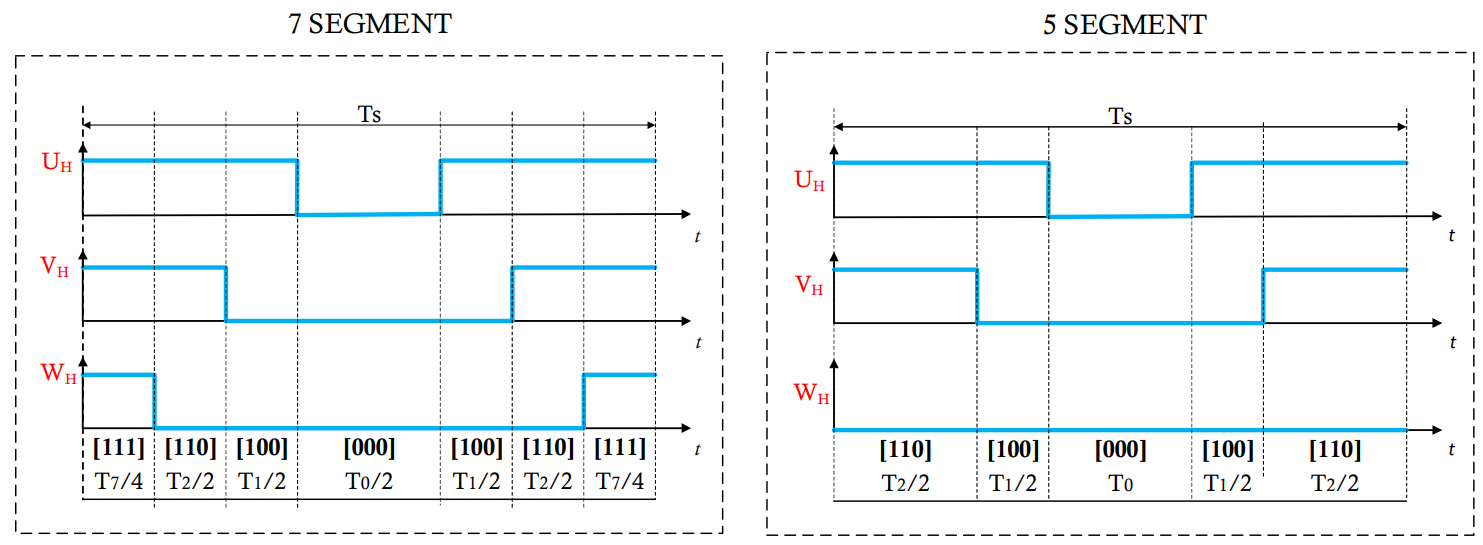
The difference between the two switching methods is that in 7 segment, both V0 and V7 times are used to create zero voltage while in 5 segment only V0 is used to create zero voltage.
Note that the 5 segment switching method creates less switching compared to the 7 segment which reduces the switching losses. However, the current ripple in this switching method is higher compared to 7 segment.
Neutral point modulation
Neutral point modulation is another method to increase the modulation index beyond 1.0, similar to the SVM method. This modulation method can be used to increase the modulation index to 1.15. Figure 10 shows the type of modulation work.
Figure 10.
Neutral point modulation scheme
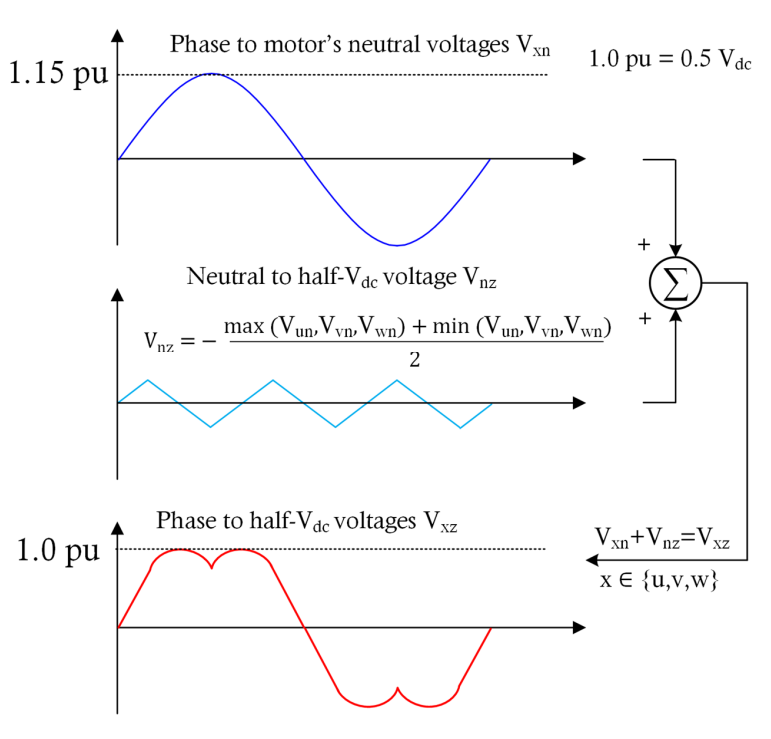
In Figure 10 , the 𝑉𝑥𝑛 is the phase reference voltage created by the controller. Note that this voltage is phase-to-neutral not phase-to-phase. 𝑉𝑛𝑧 is a common mode voltage that must be added to all the three-phase voltage references. This voltage is calculated as:
The voltages with respect to the half 𝑉𝑑𝑐 point of the inverter are denoted as 𝑉𝑥𝑧 as shown in Figure 10 .
As mentioned, this is a simple modulation strategy to increase the effective modulation index which creates results that are identical to those of SVM while being less computationally demanding. The switching can also be scheduled like the SVM method according to the SVM switching methods image.
Current sensing in sensorless FOC
FOC needs phase currents as input to control the motor. In sensorless FOC, phase currents are needed to estimate the rotor position in addition to field-oriented control. Therefore, fast and accurate current sensing is the core of PMSM sensorless FOC. It enhances the system performance by reducing the torque ripple or noise. The delay in current sensing path or inaccurate current sensing leads to a distorted current waveform and it produces torque ripple, which results in inefficient performance.
The three-phase or two-phase current sampling must be done when the low-side switches are ON, and the current sampling point must be synchronized with the pulse-width modulation (PWM). Different current sampling techniques and associated challenges are described in the following sections.
Three-shunt current sensing
This technique uses low-side current sensing in which shunt resistors located at the base of the inverter bridge to measure the currents that are flowing through the phases as shown in Figure 11 .
Figure 11.
Three-shunt current measurement
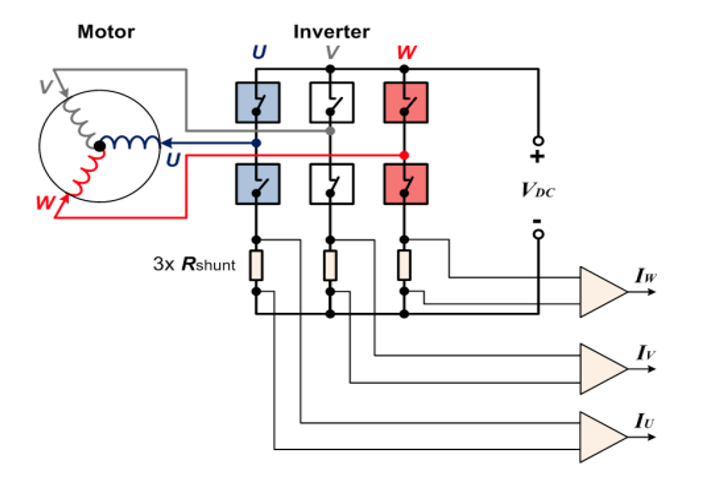
In three-shunt current sensing, the ADC conversion trigger is set at half of the PWM cycle where all the low side switches are on, and the high side switch is off. In each SVM sector, the all three-phase currents are assigned to be measured at the same time as shown in Figure 12 .
Figure 12.
Three-shunt current sampling with respect to SVM sectors
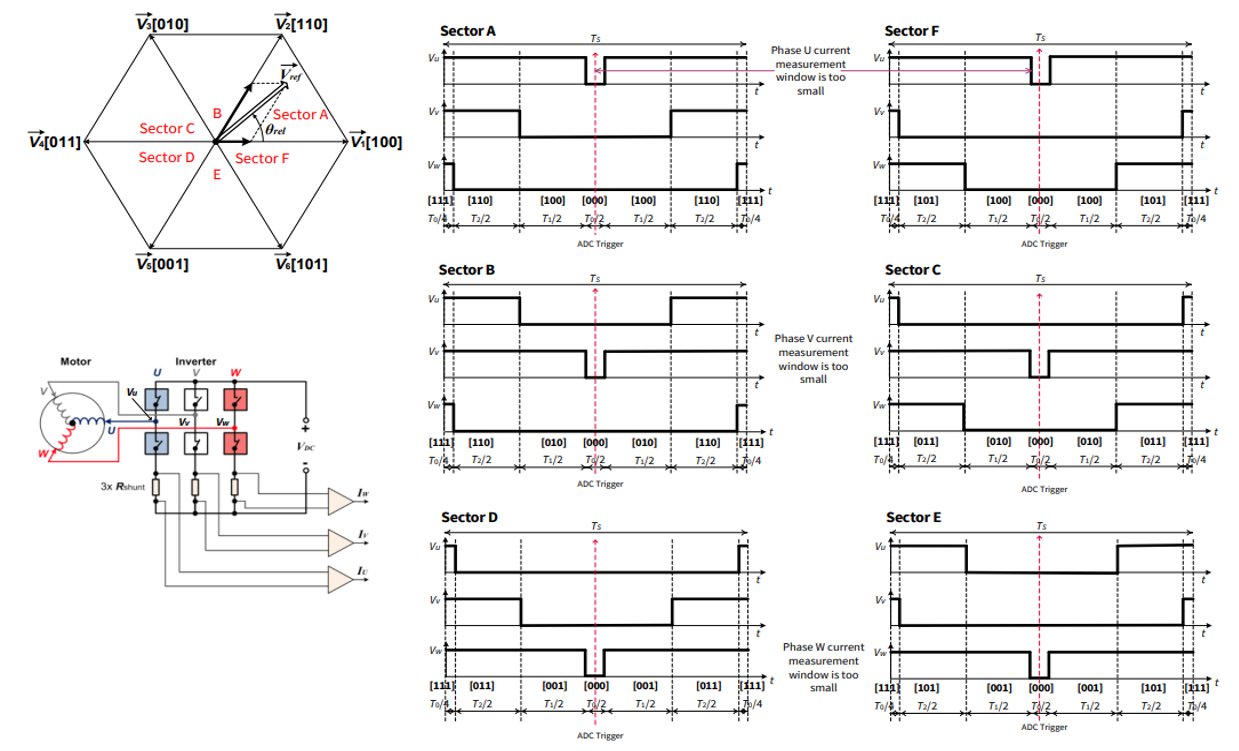
In the case of over modulation, phase current is immeasurable in certain regions due to insufficient current measurement time that results in inaccurate sampling of current. The immeasurable area is shown in Figure 13 .
Figure 13.
Immeasurable areas
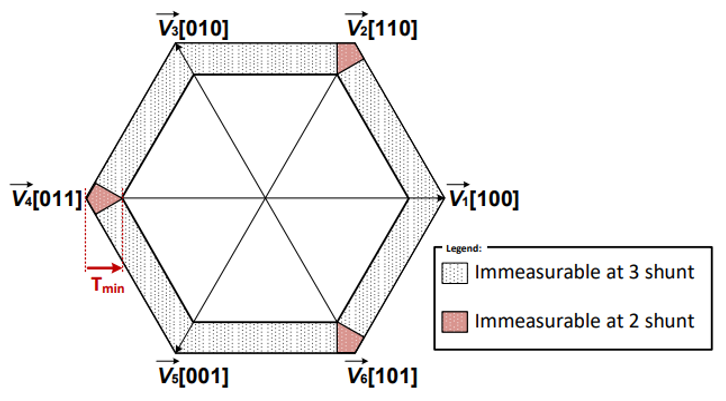
For example, in SVM sector A and F shown in Figure 13 , the two most critical phase currents are IV and IW as the phase U current can be inaccurate. This is because with a high modulation index, the window to measure phase U current can be short and the reading of the phase U current could be inaccurate.
Sensorless FOC implementation with TRAVEO™ T2G CYT4BF MCU
This section describes the implementation of a sensorless FOC using the Infineon's TRAVEO™ T2G CYT4BF MCU.
Sensorless FOC block diagram
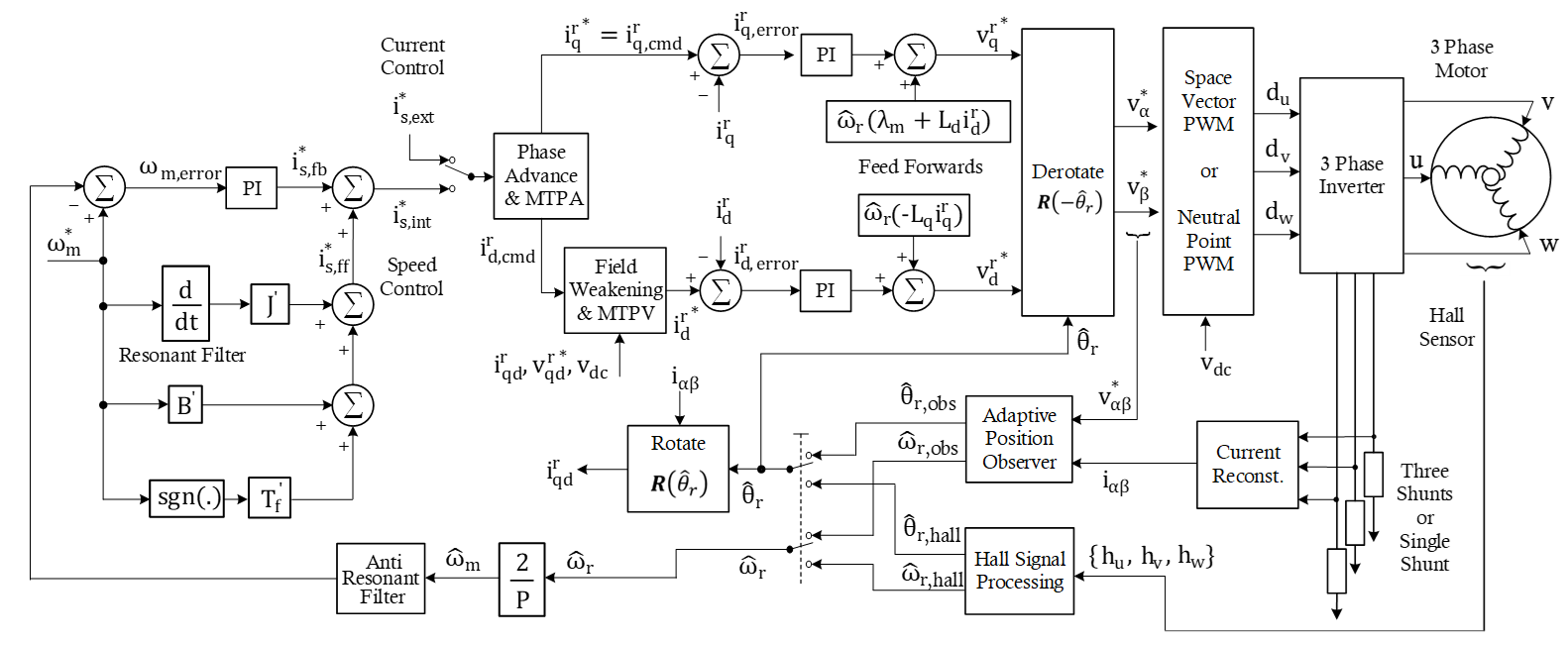
Figure 14 shows a block diagram of the sensorless FOC algorithm implemented using the TRAVEO™ T2G CYT4BF MCU. It shows the major software components and their connections.
Figure 14.
FOC block diagram
TRAVEO™ T2G CYT4BF features for FOC
Multiple TCPWM units, three SAR ADC for parallel sampling and conversion, flexible signal connectivity across different peripherals, and the CPU performance makes the TRAVEO™ T2G CYT4BF MCU an ideal device for PMSM FOC applications.
The following sections explain the usage of the key hardware modules of the TRAVEO™ T2G CYT4BF for sensorless FOC applications.
PWMs
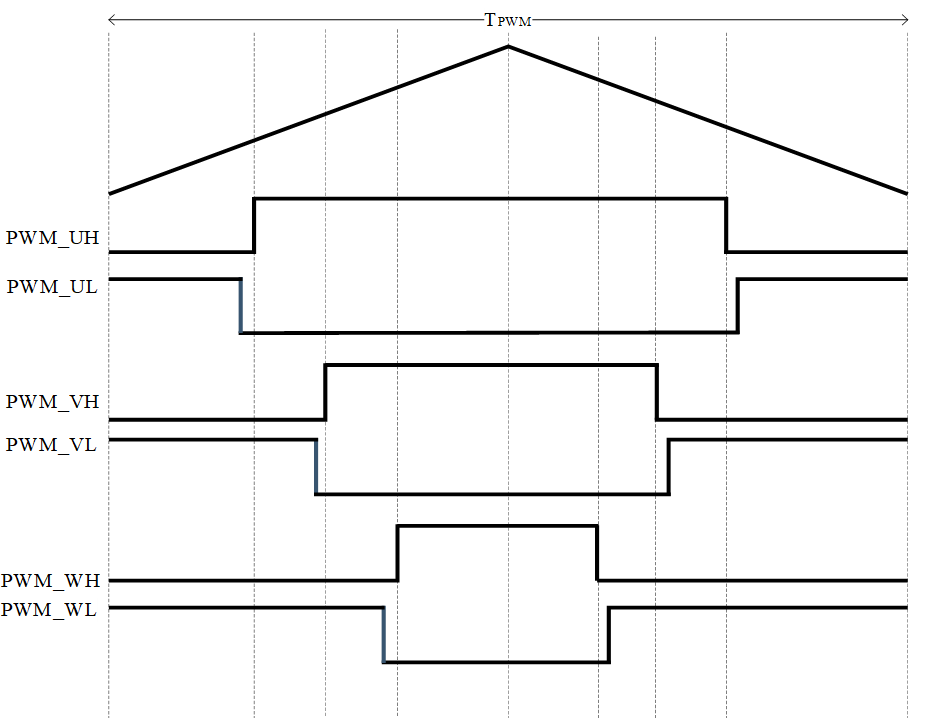
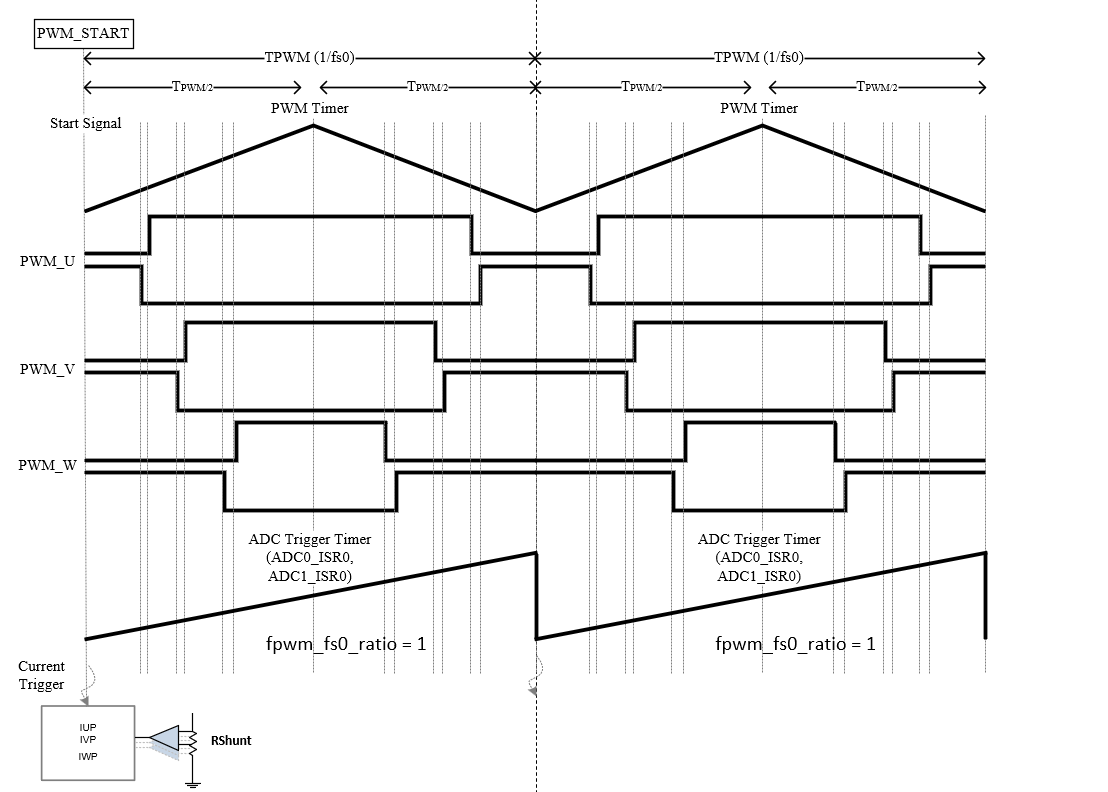
The space vector modulation (SVM) transforms the stator voltage vectors into PWM signals (compare match values). The TCPWM timer unit of the TRAVEO™ T2G CYT4BF MCU has been designed to generate the PWM signals. Three channels of TCPWM are used to generate six PWM signals for the SVM as shown in Figure 15 . The PWM period (TPWM) is setup according to the PWM frequency, whereas the three compare values define the ON-time for the three phases. Additional TCPWM channel (ADC trigger timer) is used in sync with the PWM timer to generate the trigger events for the ADC conversion. A compare event is used for triggering the current sampling. Sampling starts automatically on the defined compare match event.
Figure 15.
PWM signals with dead-times (center-aligned mode)
Dead-time configuration
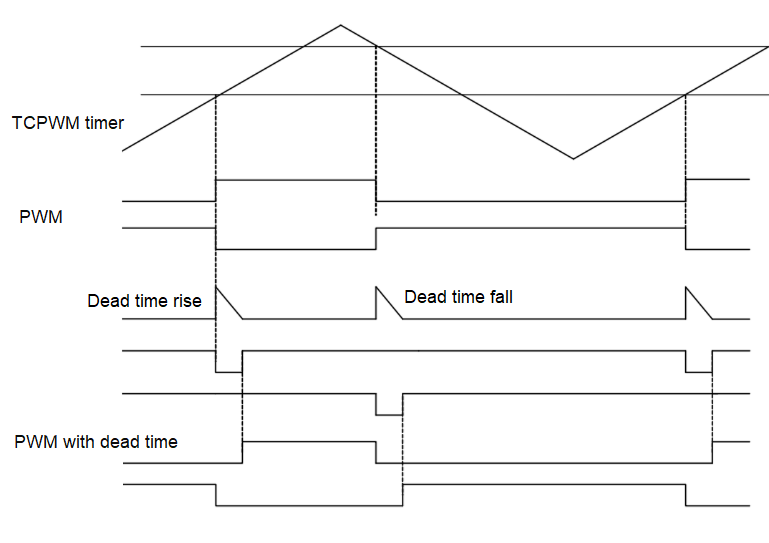
To guarantee the safety of the inverter bridge, the TCPWM unit contains a programmable dead-time generation block. Dead-time insertion prevents the short circuits of switches. It adds a delay between the switch-off time of MOSFET and the switch-on time of its complementary MOSFET to avoid the short circuit shown in Figure 16 .
Figure 16.
PWM with dead-time
Synchronization of timer counters
All PWM and ADC trigger timers need to start simultaneously in the FOC algorithm. In TRAVEO™ T2G CYT4BF MCU, it can be achieved using a hardware trigger or synchronized software-based event generation.
Current sensing
The PMSM FOC sensorless solution configures the ADC channels for current measurement, DC bus voltage measurement, analog speed measurement, power board temperature measurement, and back emf voltage measurement. The SAR ADC convert the current measurement from the shunt resistance to a digital value that can be used in the software. A simplified block of three shunt current measurement with respect to the PWM trigger instance is shown in Figure 17 .
Three-shunt current measurement
In TRAVEO™ T2G CYT4BF , the capture compare 0 event of the ADC trigger timers (ADC0_ISR0 and ADC1_ISR0) are used for current triggering. The ADC trigger timer is running in sync with the PWM timer. The measurement of ADC is set at half of the PWM cycle where all the low-side switches are ON as shown in Figure 17 .
Figure 17.
Three shunt current measurement
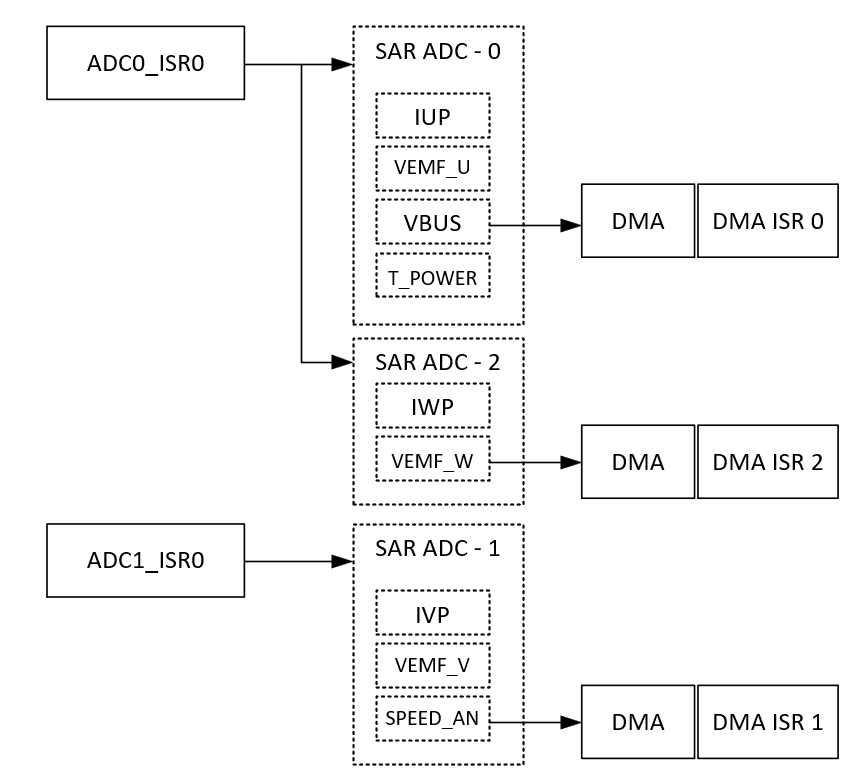
This solution uses nine ADC channels. These channels are distributed among the three SAR ADC as shown in Figure 18 . All three SAR ADC getting trigger simultaneously to get the parallel current sampling IUP, IVP, and IWP channels.
SAR ADC 0: Contains four channels. End of fourth channel (T_POWER) conversion triggers the DMA transfer
SAR ADC 1: Contains three channels. End of third channel (SPEED_AN) conversion triggers the DMA transfer
SAR ADC 2: Contains two channels. End of second channel (VEMF_W) conversion triggers the DMA transfer
Two timers, ADC0_ISR0 and ADC1_ISR0 trigger the ADC. Trigger timers start in sync with PWM timers. Conversion complete of each SAR ADC group trigger the DMA transfer of ADC results.
Figure 18.
ADC configuration for three shunt FOC
Protection
The TCPWM of TRAVEO™ T2G CYT4BF has a PWM kill feature that provides hardware protection. The PWM kill is connected to the fault input pin. If a fault is detected, the kill signal latches the PWM outputs without any software intervention. An example of PWM kill is shown in Figure 19 .
Figure 19.
PWM sync kill
Fast control loop
In the PMSM FOC solution, the fast control loop ISR is set up to execute the FOC current-control loop. If there is no fault in the system, this ISR reads the current, executes the FOC loop, and updates the PWM duty cycle.
Slow control loop
In the PMSM FOC solution, the TCPWM timer is set up to provide a slow control loop ISR. The slow control loop ISR is used by the state machine handling and other miscellaneous activities in the FOC algorithm.
Motor state machine
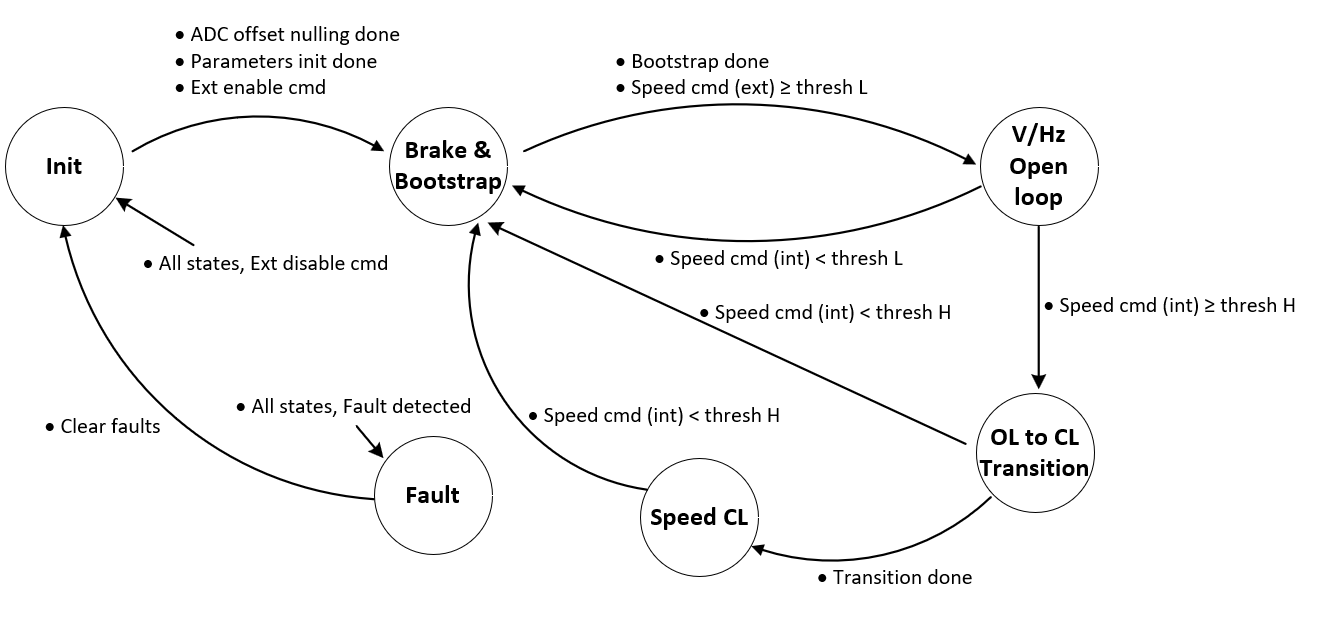
The state entry function is called to enter in any state and similarly the corresponding state exit function is called to exit from a particular state. In each state, there are functions to call from fast control and slow control ISRs respectively. The structure of a state machine is as follows:
typedef struct
(
STATE_t states[State_ID_Max];	        //State call back functions
STATE_ID_t current;	                // Current state ID
STATE_ID_t next;	                // Next state ID
STATE_VARS_t vars;	                // State variables
STATE_ADD_CALLBACK add_callback;	// Additional call back functions
) STATE_MACHINE_t;
The following state machine explain the different states of V/Hz start-up based
FOC. Initialization function
STATE_MACHINE_Init ()
, enter the control
into the “Init” state.
Figure 20.
State machine
Example software
This section describes the practical aspects of using the Infineon FOC solution on TRAVEO™ T2G CYT4BF MCU using the ModusToolbox™. ModusToolbox™ supports the " KIT_TRAVEO_T2G_B_H_MC1 " and the associated code examples. See the ModusToolbox™ software webpage for more information and support.
Test setup
Figure 21 shows the TRAVEO™ T2G CYT4BF Motor Control Drive Card details.
Figure 21. KIT_TRAVEO_T2G_B_H_MC1 Motor Drive Card
Test setup " KIT_TRAVEO_T2G_B_H_MC1 " consists of an TRAVEO™ T2G CYT4BF Motor Control Drive Card connected to an adapter board, a standard motor drive power board, USB-A to USB-C cable, power supply, and motor. The power board is rated at 250 W output power and 24 V input DC voltage. See the kit webpage for more information.
Figure 22.
Test setup -
KIT_TRAVEO_T2G_B_H_MC1
Example code
Follow these steps to create the example project using the ModusToolbox™.
Open Eclipse IDE for ModusToolbox™, create the workspace and select the launch
Select New Application in the Quick Panel
Select KIT_TRAVEO_T2G_B_H_MC1 from TRAVEO™ T2G BSPs and click Next >
Figure 23.
BSP selection
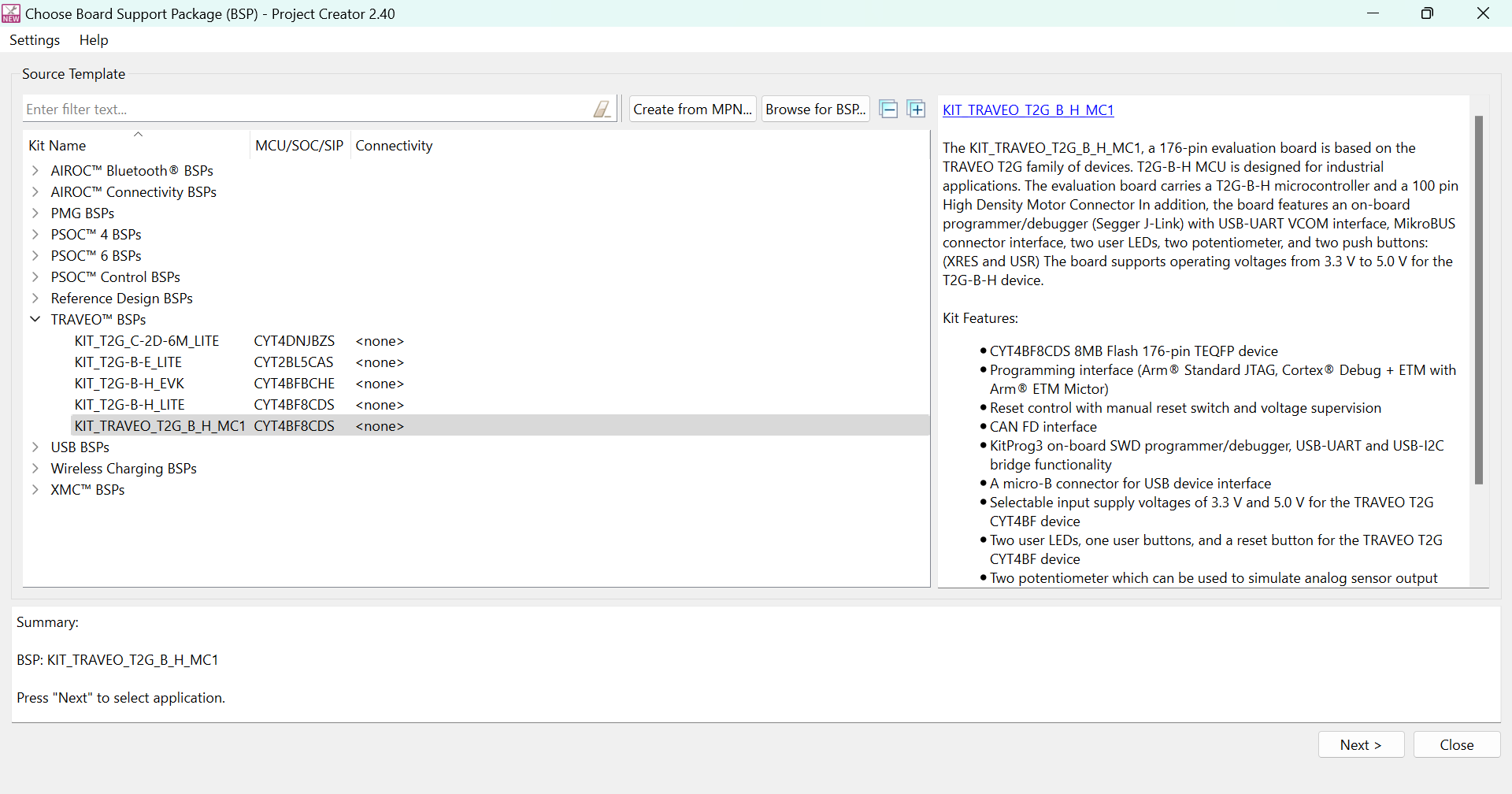
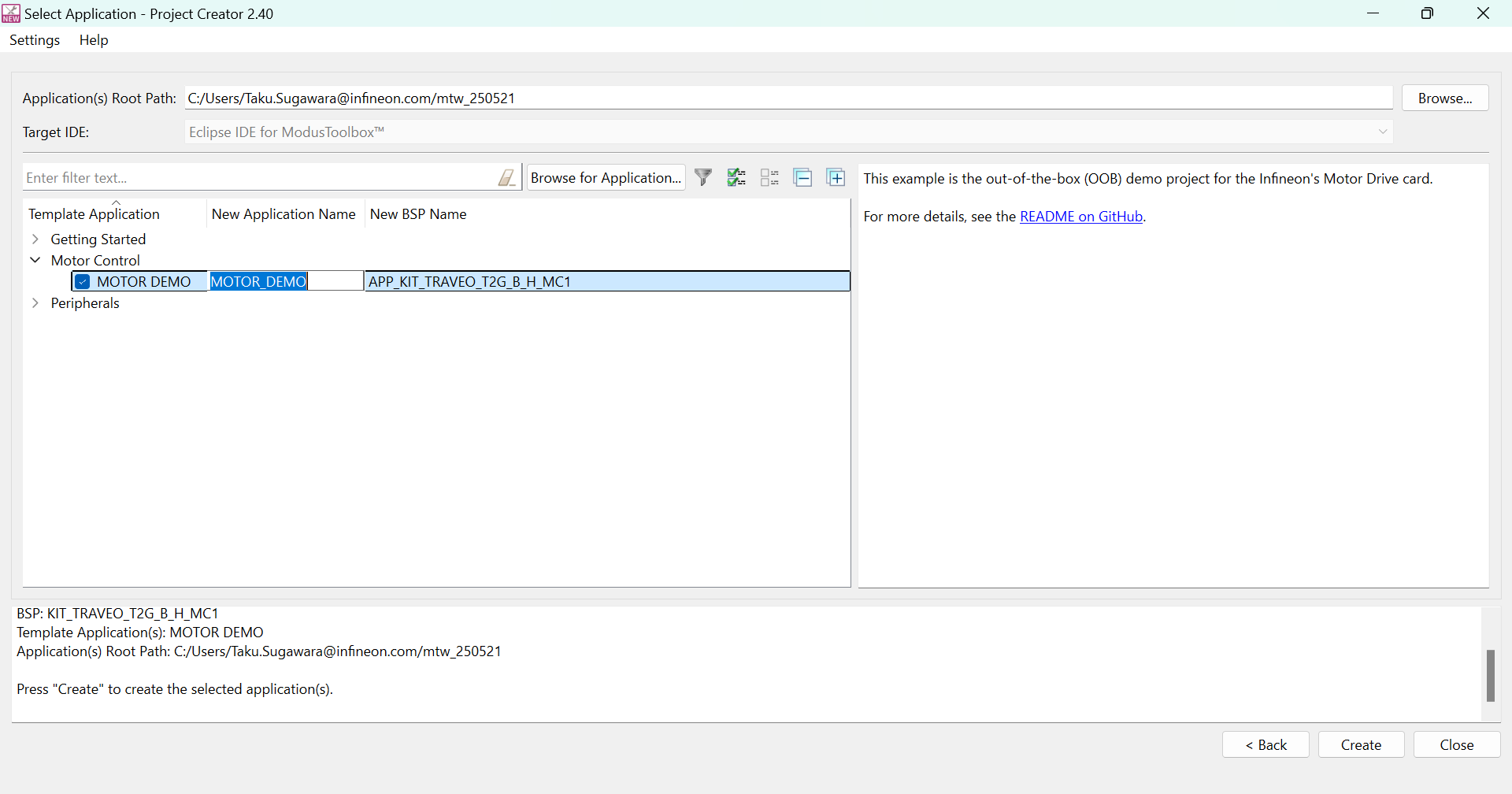
Select MOTOR DEMO within the Motor Control to create a project for KIT_TRAVEO_T2G_B_H_MC1 as shown in Figure 24
Figure 24.
Code example selection
Peripheral configuration
ModusToolbox™ Device Configurator has been used for TRAVEO™ T2G CYT4BF PMSM FOC peripheral configurations as shown in Figure 25 .
Figure 25.
Peripheral configuration
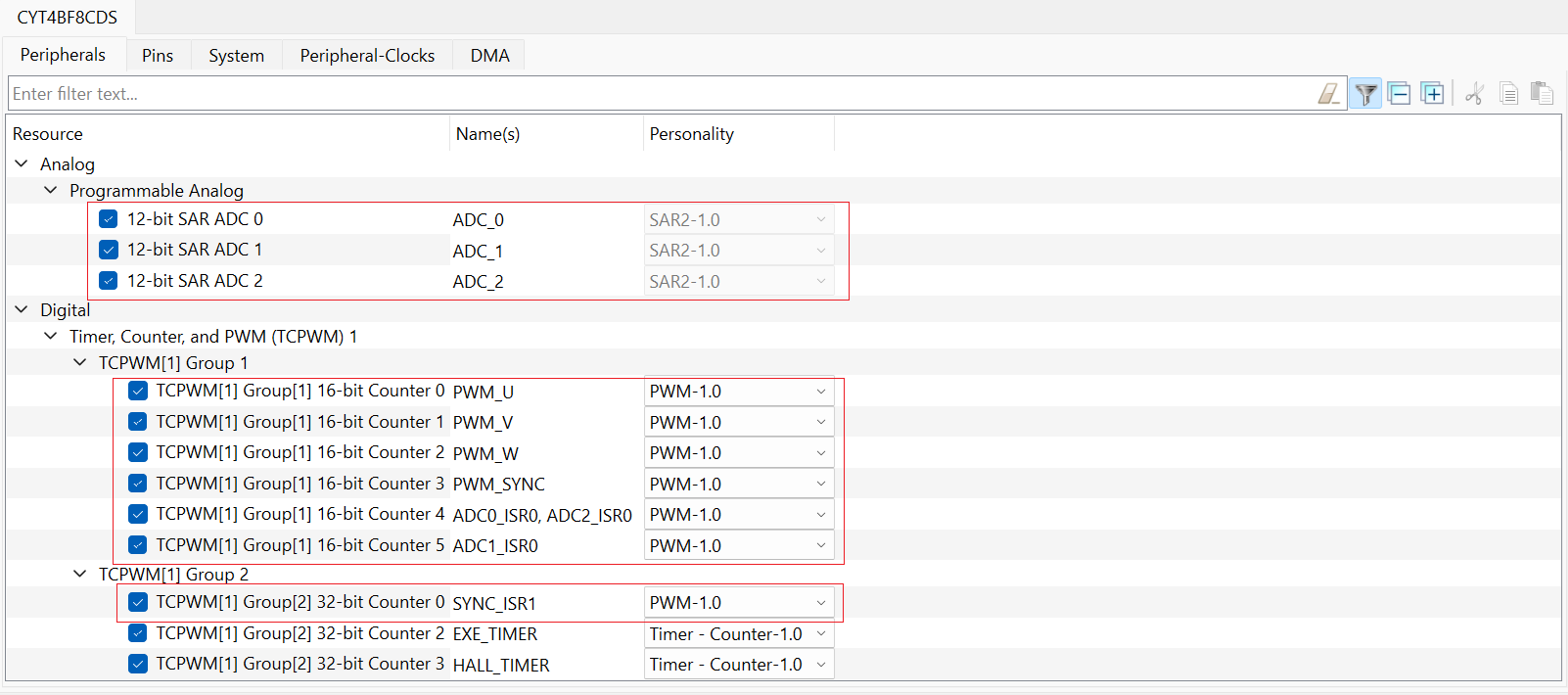
TCPWM configuration
Algorithm is required to configure seven TCPWM counters of the TRAVEO™ T2G CYT4BF MCU. Configuration details of each TCPWM has been provided in the following sections.
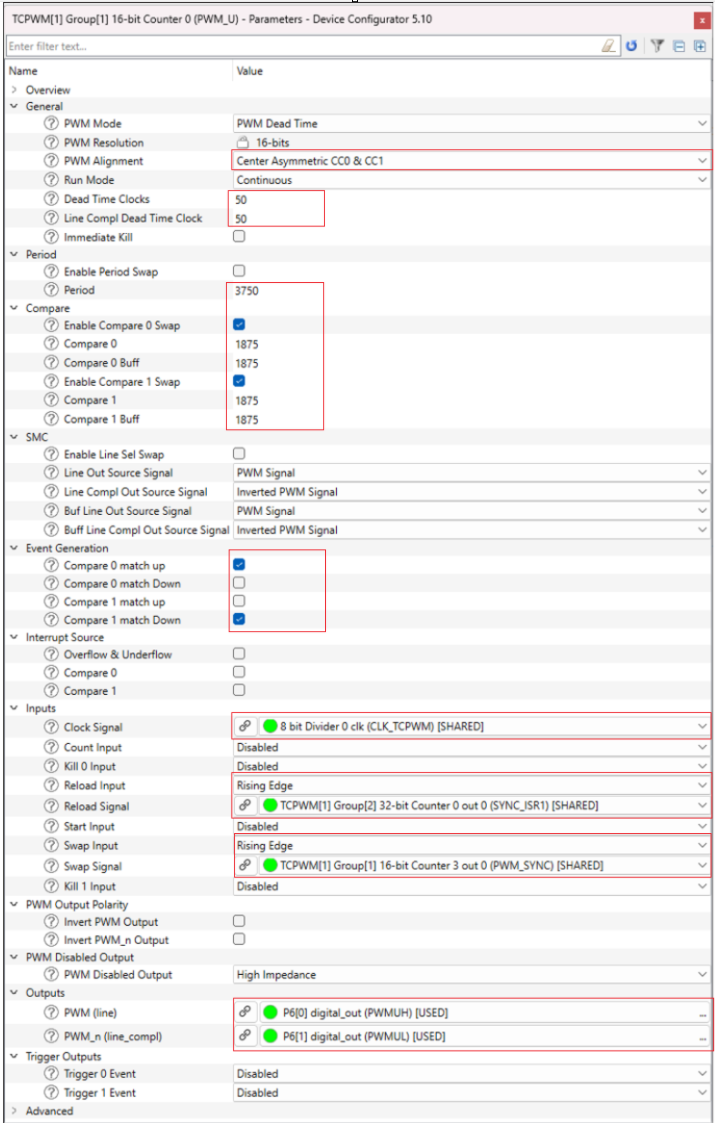
Start in sync and generate PWM signals to drive the motor
PWM pins are configurable
Figure 26.
PWM timers (PWM_U, PWM_V, and PWM_W)
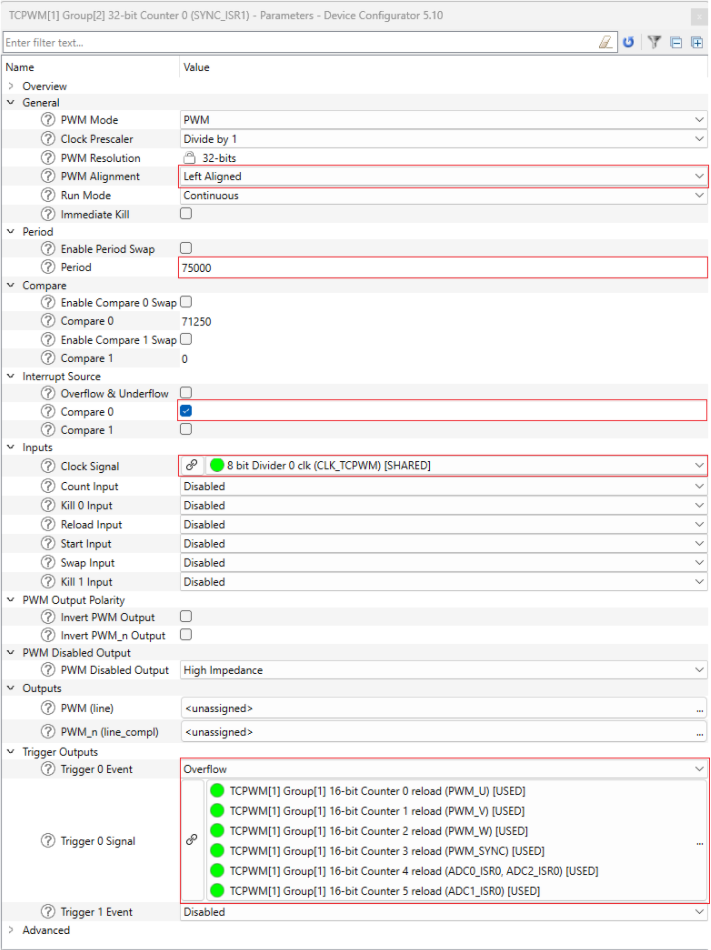
SYNC_ISR1 timer
Reload signal connected to all other timers, provide start signals
Compare-0 match event connected to slow loop ISR
Figure 27.
SYNC_ISR1 timer configuration
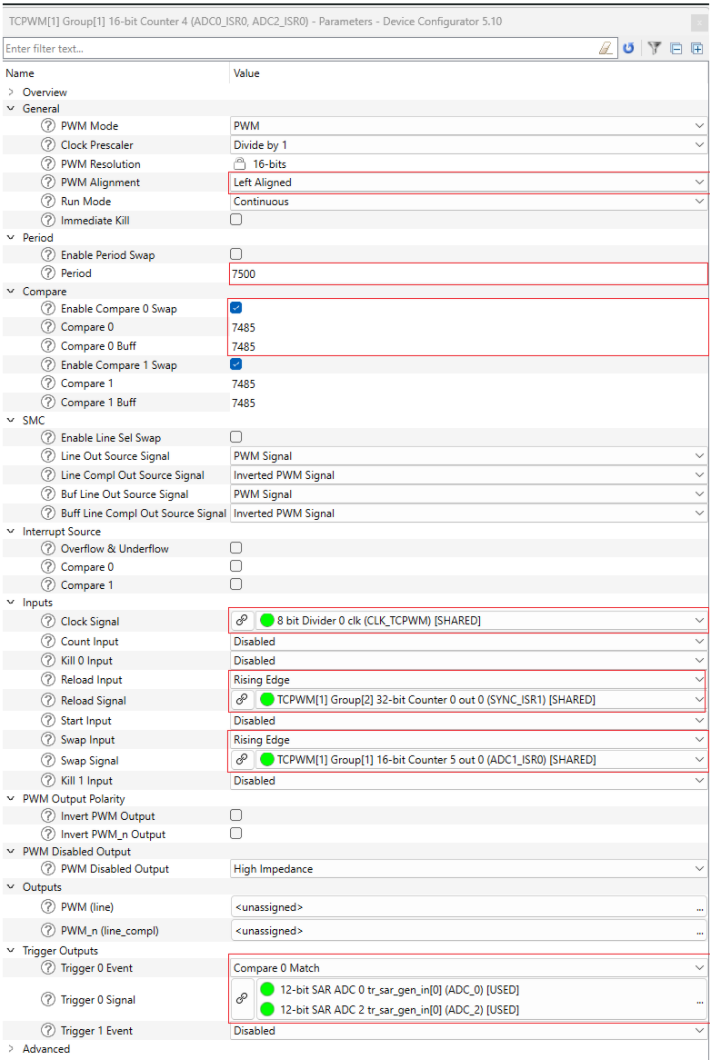
ADC0_ISR0 timer
Start in sync with PWM_U, PWM_V, and PWM_W timers
Compare-0 match triggers the SAR ADC 0 and SAR ADC 2
Figure 28.
ADC0_ISR0 configuration
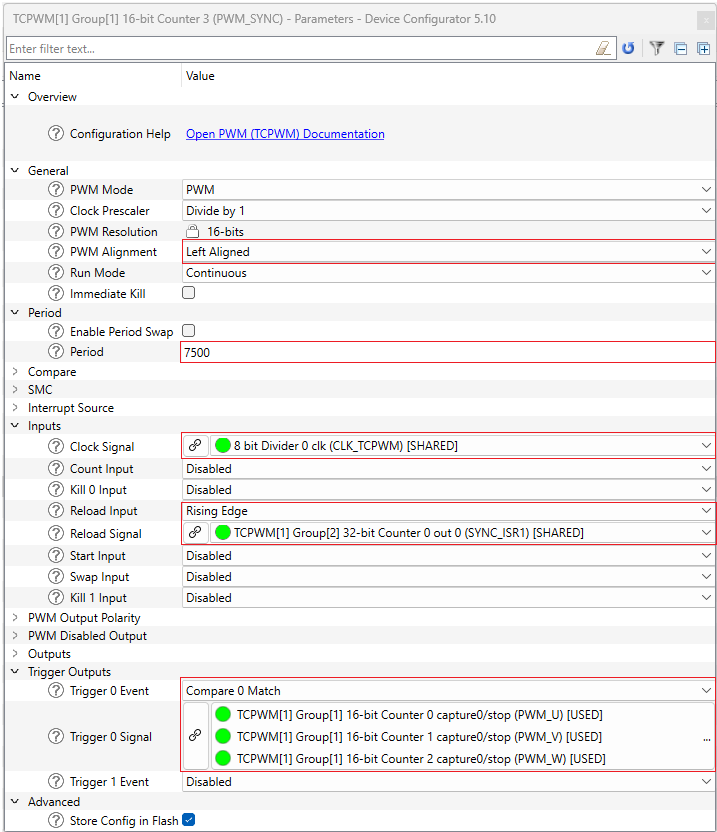
PWM_SYNC timer
Start in sync with PWM_U, PWM_V, and PWM_W timers
Provide buffer swap signal to PWM timers
Figure 29.
PWM_SYNC timer configuration
ADC configuration
There are nine ADC channels distributed in three SAR ADC groups. Each SAR ADC converting one current channel to get the parallel sampling. Configuration details of SAR ADC 2 are captured in Figure 30 .
Figure 30.
SAR ADC 2 configuration
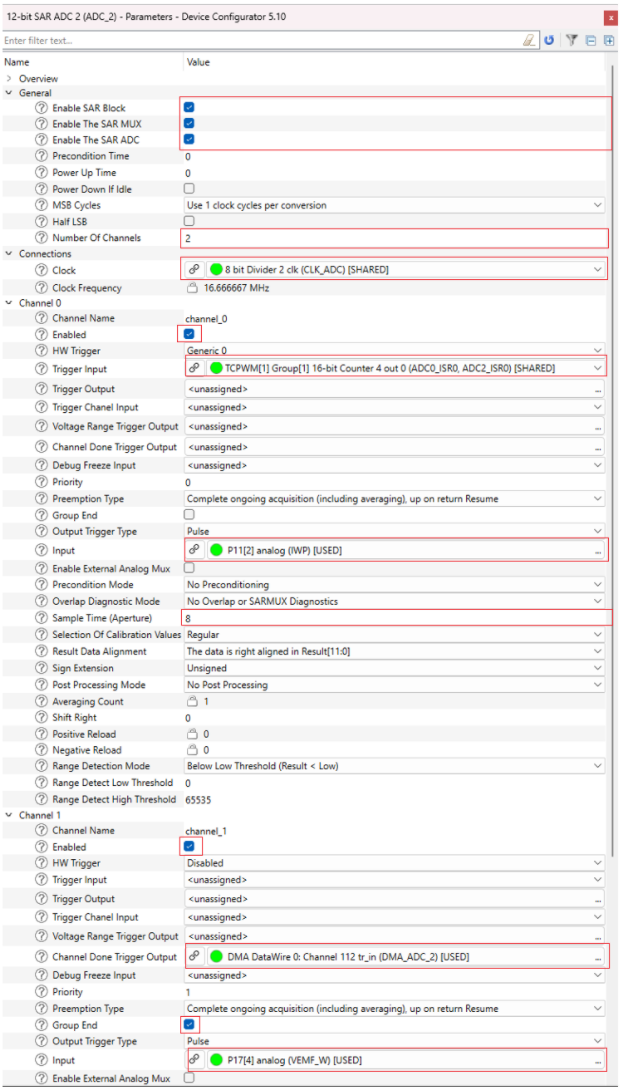
Trigger input received from timer ADC0_ISR0
End of conversion triggers the DMA
Analog pins are configurable
DMA configuration
Figure 31.
DMA DataWire 0 configuration for ADC 2 channels
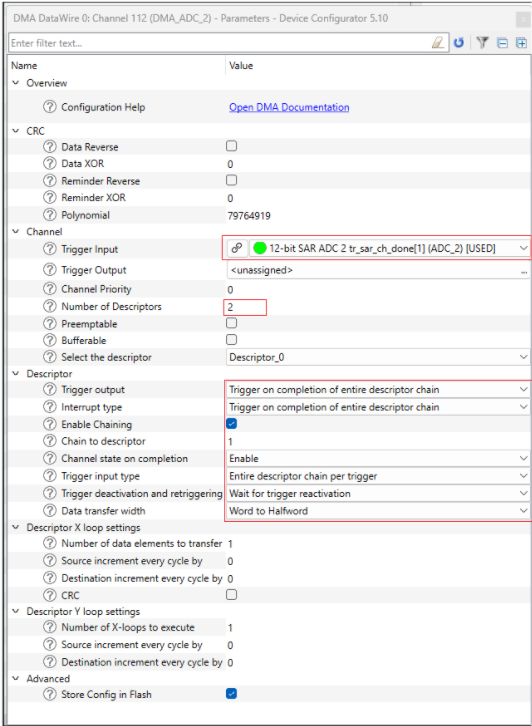
Parameter configuration
This section describe the important parameters to spin the motor.
There are two ways to update the parameters either using the Motor Suite
GUI or ModusToolbox™. If you are not using GUI, then ensure
PARAMS_ALWAYS_OVERWRITE
macro in
param.h
file is changed from false to
true. Otherwise, any change in the
param.c
file will not be effective.
#define PARAMS_ALWAYS_OVERWRITE (true) // This will ensure parameters are always overwritten.
Basic and advanced parameters
There are a few basic parameters. If these basic parameters are set properly, then you can spin and control any PMSM or BLDC motors. Additionally, a set of parameters called advanced parameters that are a function of basic parameters. Advance parameters are auto calculated (derived from basic parameters).
Following code shows the parameter structure of the motor control library. These parameters will be used for motor tuning and control.
Parameter structure
/* Motor parameters */
typedef struct
(
    float                  P;          // [#], Number of poles
    float                  lq;         // [H], q-axis inductance
    float                  ld;         // [H], d-axis inductance
    float                  lam;        // [Wb], permanent magnet's flux linkage
    float                  r;          // [ohm], stator resistance
    float                  T_max;      // [Nm], maximum torque
    float                  i_cont;     // [A], continuous current rating
    float                  i_peak;     // [A], peak current rating
    float                  id_max;     // [A], maximum demagnetization current
    float                  v_nom;      // [Vpk-ln], nominal voltage peak, line to neutral
    ELEC_t                 w_nom;      // [Ra/sec-elec], nominal speed
    ELEC_t                 w_max;      // [Ra/sec-elec], maximum speed
    float                  zeta;       // [#], saliency ratio = lq/ld
    I2T_PARAMS_t           i2t;
) MOTOR_PARAMS_t;
/* System parameters */
typedef struct
(
    SAMPLE_PARAMS_t       samp;       // [], sampling parameters
    LUT_PARAMS_t          lut;        // [#], luts
    ANALOG_SENS_PARAMS_t  analog;     // [], analog sensor parameters
    RATE_LIM_PARAMS_t     rate_lim;   // [], rate limiter parameters
    FAULT_PARAMS_t        faults;     // [], fault parameters
    CMD_PARAMS_t          cmd;        // [], command parameters
    FB_PARAMS_t           fb;         // [#], feedback parameters
    float                 boot_time;  // [sec], time for charging bootstrap capacitors
    float                 vdc_nom;    // [], dc bus voltage parameters
) SYS_PARAMS_t;
/* Parameter configuration structure*/
typedef struct
(
    PARAMS_ID_t           id;
    MOTOR_PARAMS_t        motor;
    SYS_PARAMS_t          sys;
    OBS_PARAMS_t          obs;
    MECH_PARAMS_t         mech;
    FILTER_PARAMS_t       filt;
    CTRL_PARAMS_t         ctrl;
) PARAMS_t;
/*Parameter Configuration Object*/
PARAMS_t params
The basic parameters are divided into multiple categories, such as:
Motor parameters: params.motor
System parameter: params.sys
Observer parameters: params.obs
Motor mechanical parameters: params.mech
Filter parameters: params.filtand
Control parameters: params.ctrl
Motor parameters
motor.Prepresents the number of polesThe current values are based on the peak values, not rms
motor.i_contis the continuous current rating of the motormotor.i_peakis the peak current rating of the motor. Set this value to 2.5 to 3x ofmotor.i_cont, if not specified in the motor datasheet
    params.motor.P          = 8.0f; // [#]
    params.motor.lq         = 670.0E-6f; // [H]
    params.motor.ld         = 670.0E-6f; // [H]
    params.motor.lam        = 6.0E-3f; // [Wb]
    params.motor.r          = 450.0E-3f; // [Ohm]
    params.motor.T_max      = 0.390f; // [Nm]
    params.motor.i_peak     = 10.80f; // [A]
    params.motor.i_cont     = 3.50f; // [A]
    params.motor.id_max     = 1.75f; // [A]
    params.motor.v_nom      = LINE_TO_PHASE(24.0f); // [Vpk-ln]
    params.motor.w_nom.elec = MECH_TO_ELEC(HZ_TO_RADSEC(RPM_TO_HZ(4000.0f)), params.motor.P);
    params.motor.w_max.elec = MECH_TO_ELEC(HZ_TO_RADSEC(RPM_TO_HZ(6000.0f)), params.motor.P);
System parameters
Set the shunt type to three shunts or single shunt based on your inverter setup
Set the current sensing opamp gain based on your inverter setup
hyb_mod.adc_t_minandhyb_mod.kibelong to single shunt-based controlshunt.resis a key parameter and represents the shunt value for both single shunt and three shunt control. The value is set in the MotorCtrlHWConfig.h fileparams.sys.analog.shunt.type =Three_Shunt;
params.sys.analog.shunt.opamp_gain = ADC_CS_OPAMP_GAIN;
params.sys.analog.shunt.hyb_mod.adc_t_min = 3.0E-6f; // [sec]
params.sys.analog.shunt.hyb_mod.ki = 0.5f; // [#]
params.sys.analog.shunt.res = ADC_CS_SHUNT_RES; // [Ohm]Sampling parameters
    params.sys.samp.fs0	           = 15.0E3;  // PWM frequency
    params.sys.samp.fpwm_fs0_ratio = 1U;     // ISR-0 to PWM frequency ratio (1x slower)
params.sys.samp.fs0_fs1_ratio = 15U; // ISR-1 to ISR-0 ratio (15x slower)cmd.w_max.mechis the maximum speed that you can command via a potentiometer. For example, setmotor.w_max.electo 6000 rpm but if you wish to setcmd.w_max.mechto 3000 rpm, then turn the potentiometer all the way up and the motor will spin at maximum speed of 3000 rpm rather than 6000 rpmparams.sys.cmd.w_max.mech = HZ_TO_RADSEC(RPM_TO_HZ(4000.0f));vdc_nomis the power supply voltage. Ideally, this number is the same as themotor.v_nom. However, as an example, if you want to apply 24 V to a 48 V motor, setvdc_nomas 24 V rather than 48 V in this caseparams.sys.vdc_nom = 24.0f;Command parameters: Default source of speed control is a potentiometer. It can be changed to external source
params.sys.cmd.source = Potentiometer;
Observer parameters
Setting the observer parameters are important for sensorless FOC operation.
w_thresh.elecis the speed at which the transition from open loop to close loop FOC happens. This is a key parameter to tune if the transition to closed loop does not happen smoothlylock_timeis the time expected for the observer to lock to the rotor angle, to be tuned as required
    params.obs.w_thresh.elec = params.motor.w_nom.elec * 0.20f;
    params.obs.lock_time     = 0.500f;
Mechanical parameters
The mechanical parameters cannot be found in the motor datasheet. They depend mostly on the mechanical load attached to the motor’s shaft. It is best to derive and set them properly.
    params.mech.inertia  = 1.1E-5f;
    params.mech.viscous  = 1.2E-5f;
    params.mech.friction = 6.0E-3f;
Control parameters
Control parameters are divided into subcategories as follows:
Control mode: Multiple control modes are available to select in the firmware. You can set the control mode in param.c file. Configuration options are available in the param.h file
params.ctrl.mode = Speed_Mode_FOC_Sensorless_Volt_Startup;- Speed controller
speed.bwis a key parameter where you need to provide for the speed loop controller. Kp and Ki for the controller are automatically calculated from the given bandwidth and motor mechanical parameters inPARAMS_InitAutoCalc()functionparams.ctrl.speed.bw = HZ_TO_RADSEC(15.0f); Current controller
ctrl.curr.bwis a key parameter to provide for the current loop controller. Kp and Ki for the controller are automatically calculated from motor electrical parameters including stator inductance and resistance inPARAMS_InitAutoCalc()function. Set the value ofctrl. curr.bwat least 3~5 times lower than the switching frequency. In addition, set it to be higher thanspeed.bwparams.ctrl.curr.bw = HZ_TO_RADSEC(750.0f); // [Ra/sec]Voltage controller
Following parameters are the key to start spinning the motor
w_thresh.elecis the minimum speed that will activate open loop voltage control. Any speed commanded under this threshold will not spin the motorv_minis the minimum voltage need to apply when speed is still zero and right before the motor starts spinning in an open loopv_to_f_ratiois the slope of the V/F curve that the motor is required to follow in an open loopparams.ctrl.volt.w_thresh.elec = params.motor.w_nom.elec * 0.05f;
params.ctrl.volt.w_hyst.elec = params.ctrl.volt.w_thresh.elec * 0.5f;
params.ctrl.volt.v_min = 0.15f;
params.ctrl.volt.v_to_f_ratio = 7.5E-3f;Modulation method configuration
params.ctrl.volt.mod_method=Space_Vector_Modulation;
ModusToolbox™ Motor Suite
Motor Suite is a GUI, installed with the ModusToolbox™ Automotive MCU Technology Pack. This GUI is used for configuration, control, and monitoring of the motor parameters.
GUI has two options to flash the firmware onto the target board.
Option-1 (default): Flash the default executable
Option-2: Compile the project and flash the custom executable
Launch Motor Suite from ModusToolbox™ Quick Panel (highlighted) in the bottom-left corner as shown in Figure 32 .
Figure 32.
ModusToolbox™ Motor Suite launch from Quick Panel
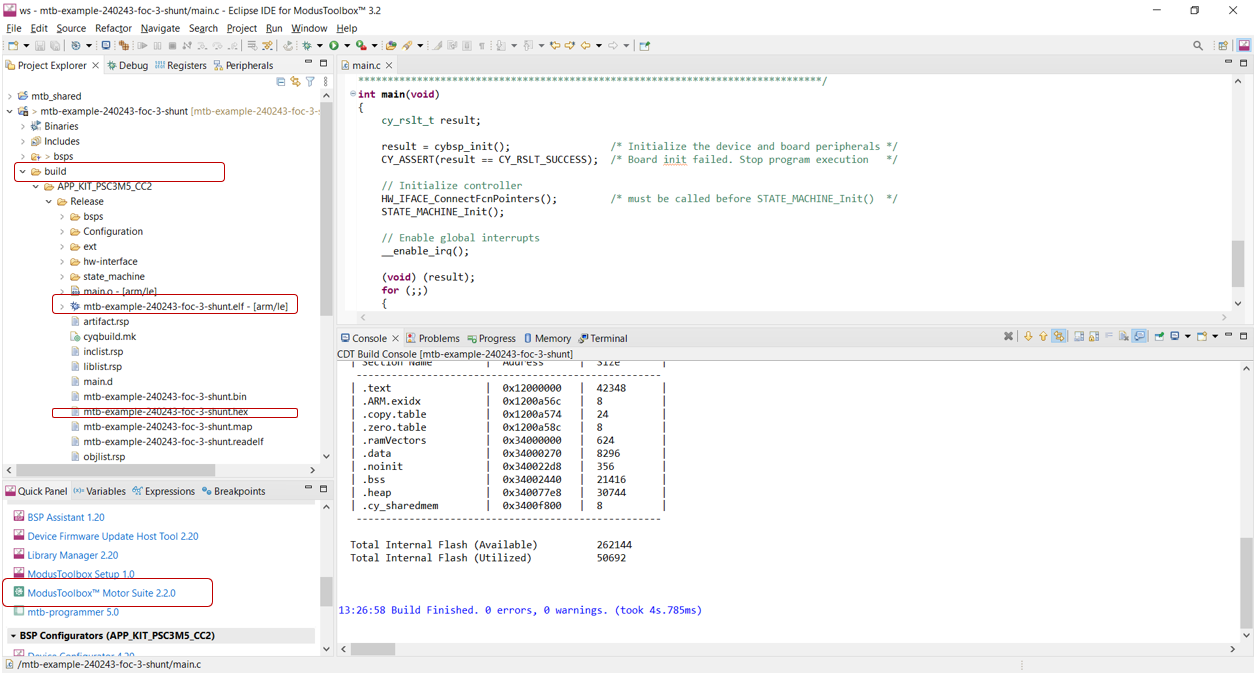
Double-click on ModusToolbox™ Motor Suite in the Quick Panel, a new window opens as shown in Figure 32 .
Figure 33.
ModusToolbox™ Motor Suite
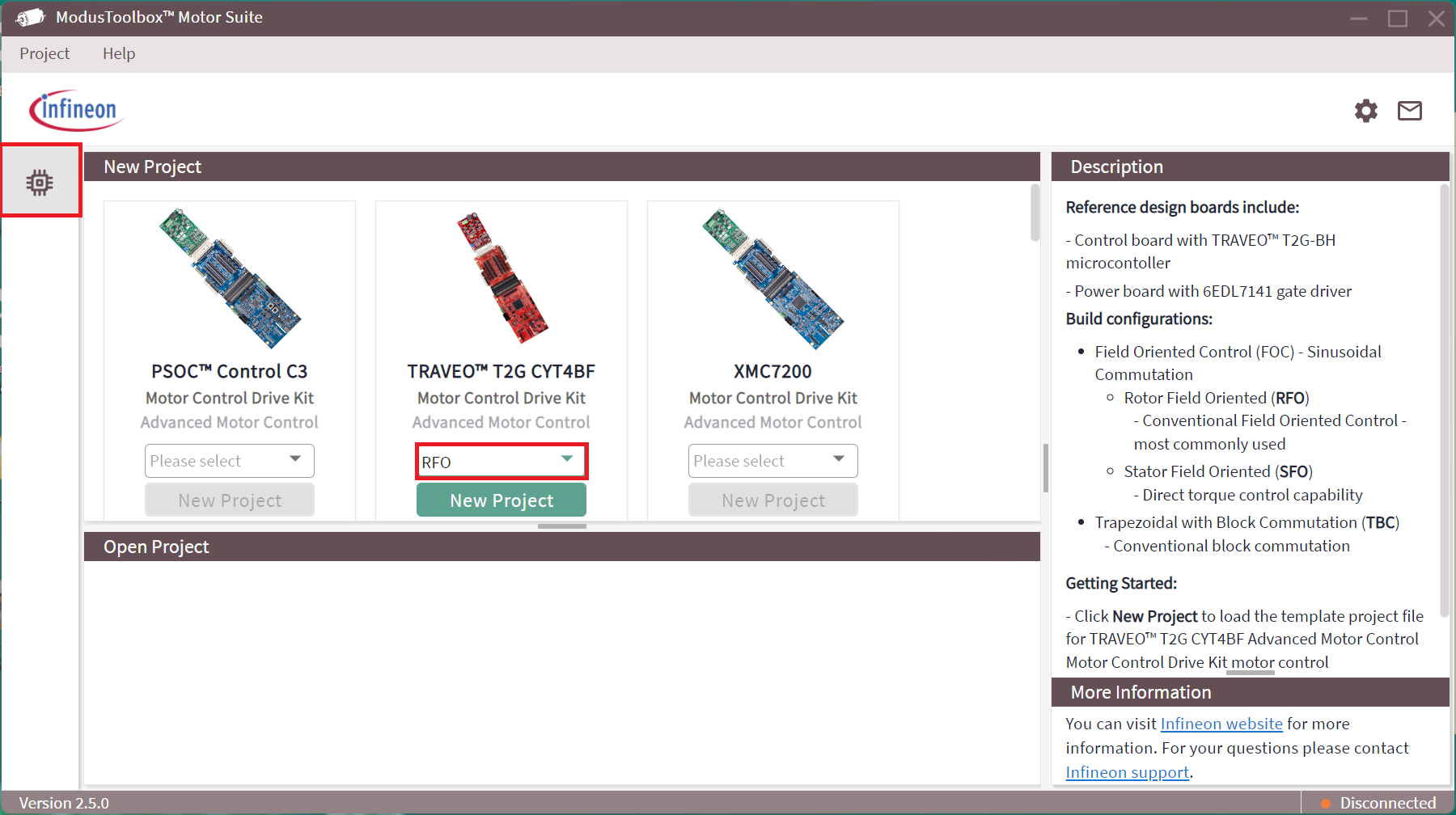
Select the TRAVEO™ T2G CYT4BF Motor Control Drive kit and create a new project. The configurator page will pop-up with an addition icon for the Test Bench.
Configurator
ModusToolbox™ Motor Suite Configurator provides the following:
Displays the J-Link connection establishment in the right bottom corner indicated by a green LED
Flash Firmware for default as well as custom executable
Static parameter configuration for motor control application
Launches the oscilloscope
Figure 34.
Parameter Configurator GUI view
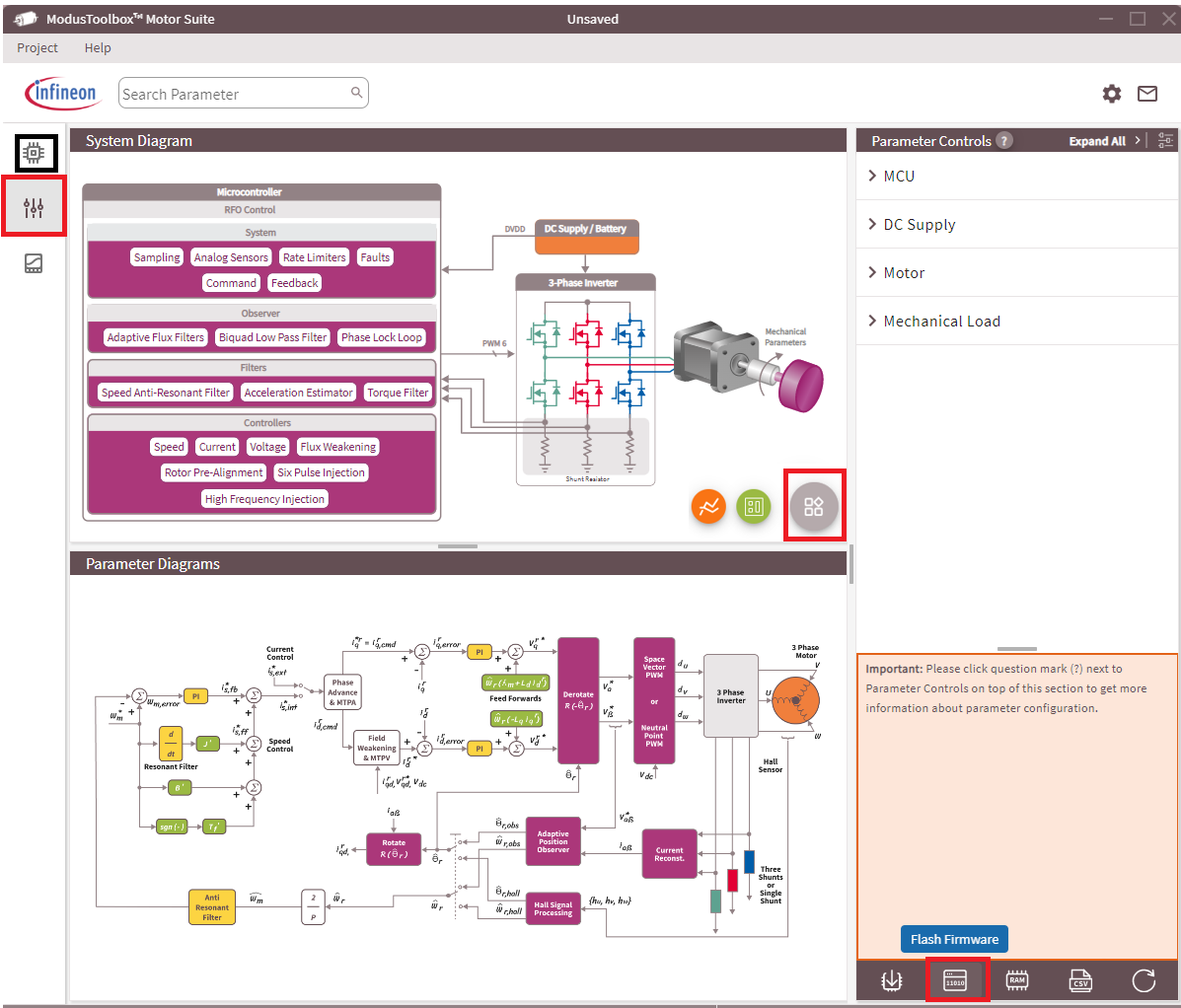
For more details, click Help in the left top corner of the window.
Test Bench
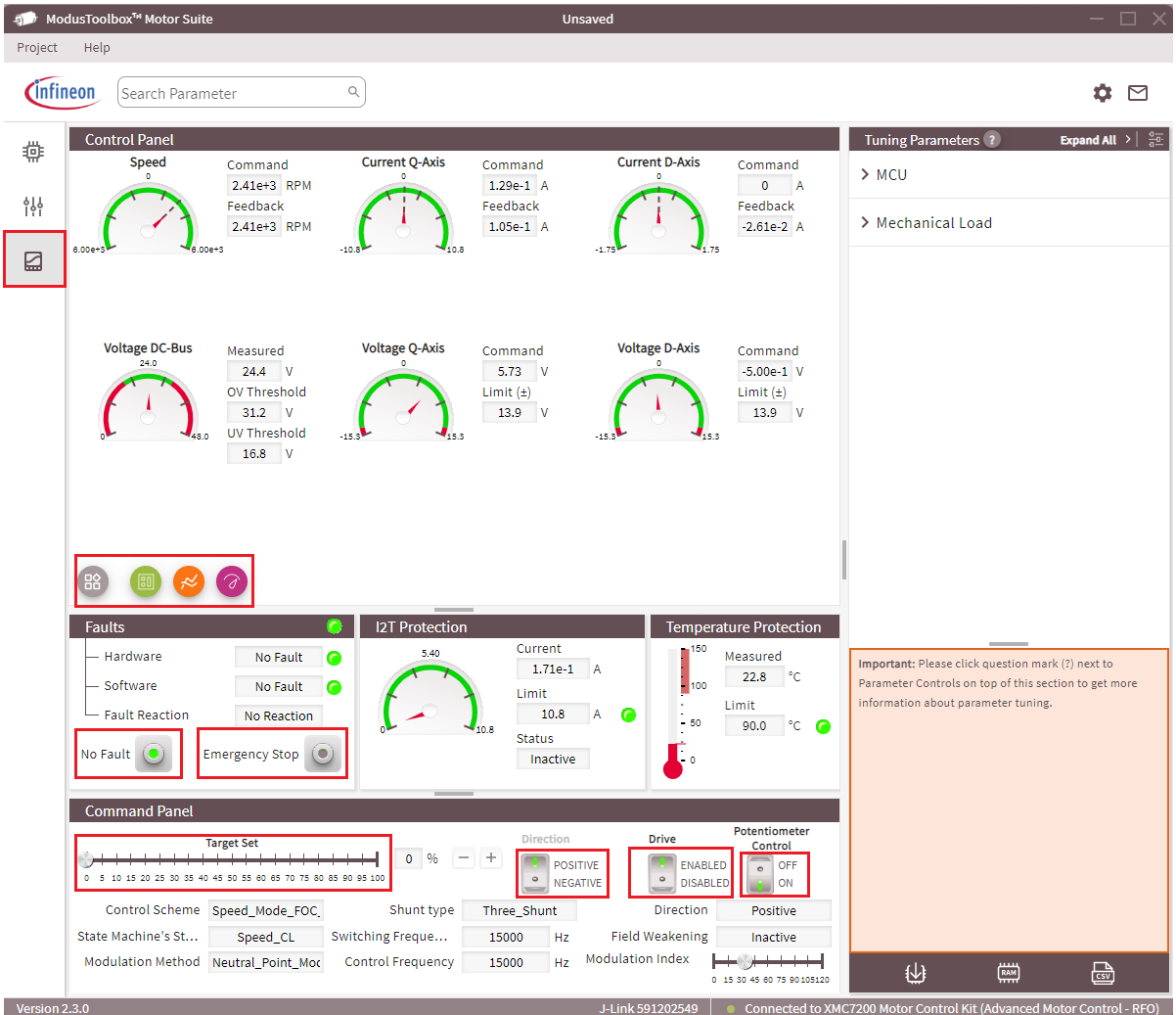
Test Bench provide the run time control and monitor of the motor parameters.
Control parameters
Drive: Enable/disable the drive
- Potentiometer:
Switch on to control motor speed using a potentiometer (hardware)
Switch off to control motor speed using the Target Set slider in the GUI
Direction: Change the motor direction
Emergency Stop: Stop and reset
Figure 35.
Motor Test Bench
Oscilloscope
ModusToolbox™ Motor Suite support a high-speed oscilloscope to monitor any firmware variable, at a time it monitors up to four variables. In the oscilloscope window, configure the Divider value and select Auto Scale to get the optimum resolution.
Figure 36.
Oscilloscope
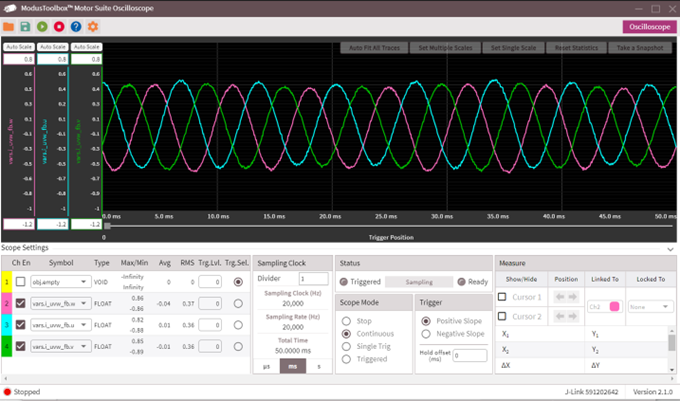
In
Figure 36
, three motor phase current has been monitored while Channel 1 is
unused. Channel 2, channel 3, and channel 4 are used for phase current
vars.i_uvw_fb.w
,
vars.i_uvw_fb.u
, and
vars.i_uvw_fb.v
respectively.
Motor Profiler
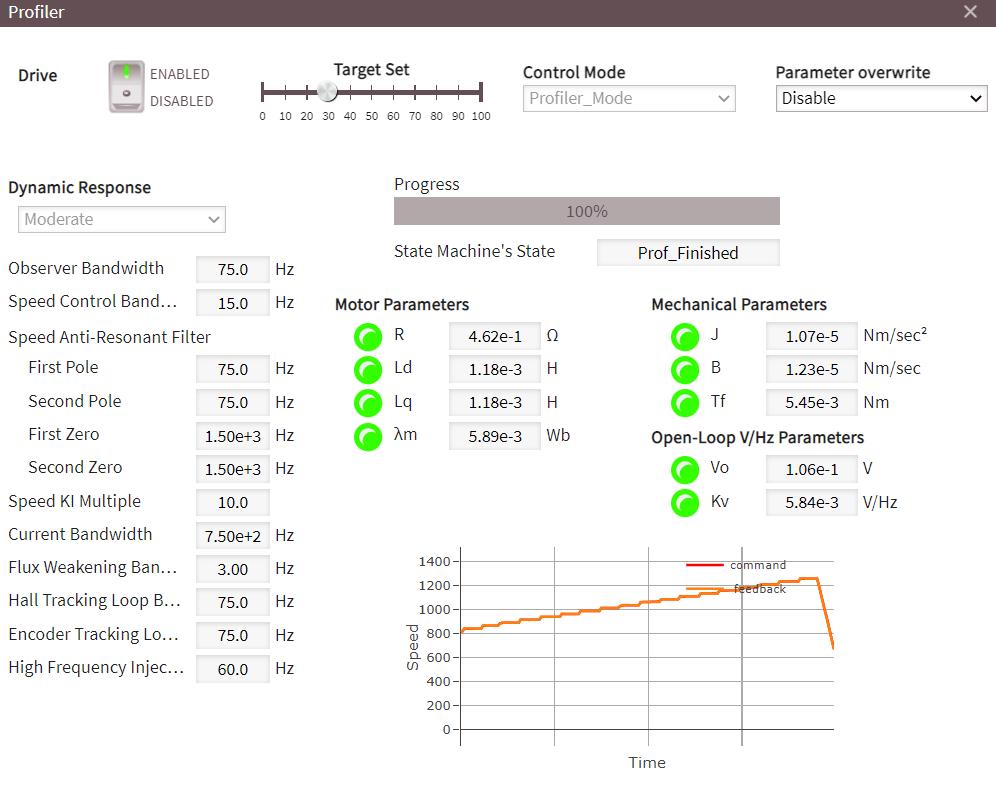
The motor profiler estimates the following electrical and mechanical parameters of the motor.
Electrical parameters
Stator inductance both d and q axis
Stator resistance, and
Rotor flux
Mechanical parameters
Inertia (J)
Viscous friction coefficient (B)
Coulomb friction (Tf)
Additionally, the motor profiler calculates the open-loop V/Hz constant as well.
Run the profile from the test bench view of Motor Suite. Profiler provides the option to select the dynamic response of the speed control loop. There are three options available: Slow, Moderate, and Fast as shown in Figure 37 .
Figure 37.
Motor profiler
Summary
This application note shows how to develop the sensorless FOC scheme in a straightforward hardware and software implementation with the TRAVEO™ T2G CYT4BF MCU. It is indeed possible to integrate ADC and TCPWM so that the timing and synchronization required by the complexity is accommodated.
The capabilities of the TRAVEO™ T2G CYT4BF MCU are demonstrated by the easy-to-use PMSM sensorless FOC code examples that can be downloaded through the ModusToolbox™. FOC code example is a useful starting point for developing typical applications, you can set up, personalize, and optimize the scheme to its own use cases.
References
Device datasheet
Infineon Technologies AG: TRAVEO™ T2G CYT4BF datasheet ; Available online
Devices technical reference manual
Infineon Technologies AG: TRAVEO™ T2G CYT4BF architecture technical reference manual; Available online
Infineon Technologies AG: TRAVEO™ T2G CYT4BF registers technical reference manual; Available online
Application notes
Infineon Technologies AG: AN235305 - Getting started with TRAVEO™ T2G family MCUs in ModusToolbox™ Available online
Infineon Technologies AG: AN219755 - Using a SAR ADC in TRAVEO™_TM T2G automotive microcontrollers ; Available online
Infineon Technologies AG: AN220224 - How to use Timer, Counter, and PWM TCPWM in TRAVEO™ T2G family ; Available online
Infineon Technologies AG: AN228104 - How to use trigger multiplexer in TRAVEO™ T2G Family ; Available online
User guide
Infineon Technologies AG: KIT_TRAVEO™_T2G_B_H_MC1 Motor Control Evaluation Kit guide ; Available online
Infineon Technologies AG: KIT_TRAVEO™_T2G_B_H_MC1 Quick Start Guide ; Available online
Revision history
Document revision | Date | Description of changes |
|---|---|---|
** | 2025-10-08 | Initial release |