System tab
The
System
tab provides access to system-level items, such as system clocks, power management, and debug interfaces. All available resources are shown in an expandable tree. The filter box and the hide disabled button above the list of resources allows you to limit the items shown in the tree. This tab allows you to enter one or more
Name(s)
for the resource. It also shows the selected
Personality
where applicable.
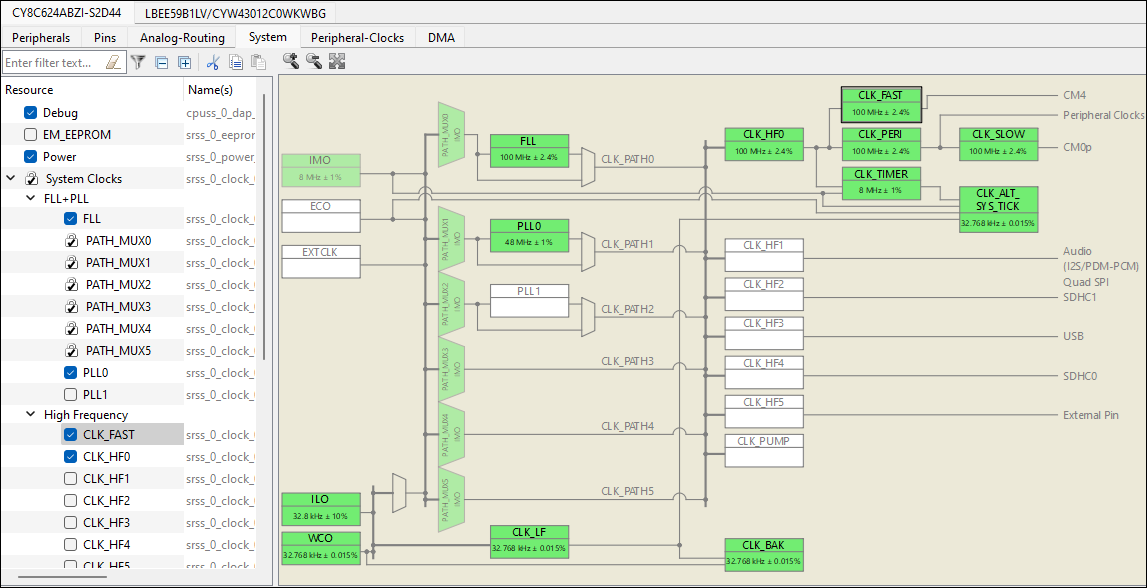
The interactive clock diagram shows all the system clocks and how they connect to each other. You can enable/disable a clock by double-clicking it in the diagram. Enabled clocks are green, disabled clocks are white, and clocks in error state are red.
Note:
The semi-transparent (faded) elements in the diagram indicate that their enabled state is locked.