CM55 project
The default CM55 project includes a
cy_syslib_ext.s
that is not compatible with µVision, and the file needs to replaced with a .c file
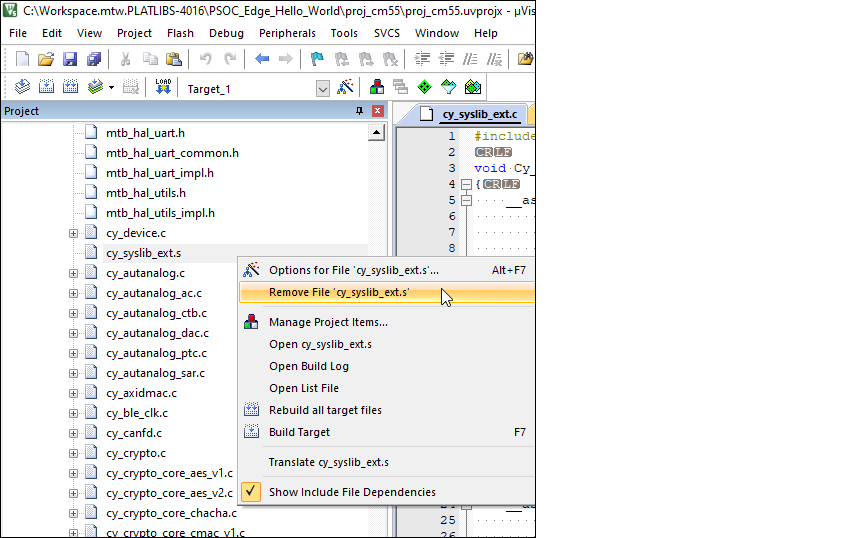
Select the project window and locate the file
cy_syslib_ext.s
under the
Target_1 > mtb-dsl-pse8xxgp
in the project tree. Right-click on it and select
Remove File 'cy_syslib_ext.s
'.
Note:
In some older versions of µVision, there is only one folder named '<unnamed>'.
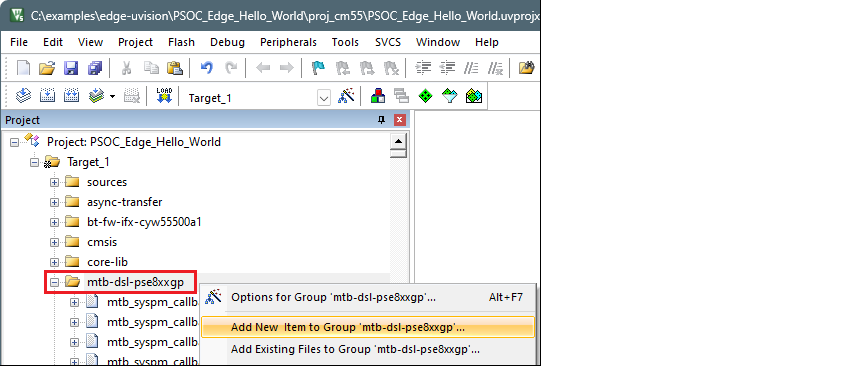
Right click on the
mtb-dsl-pse8xxgp
group and select
Add New Item to Group '[name]' …
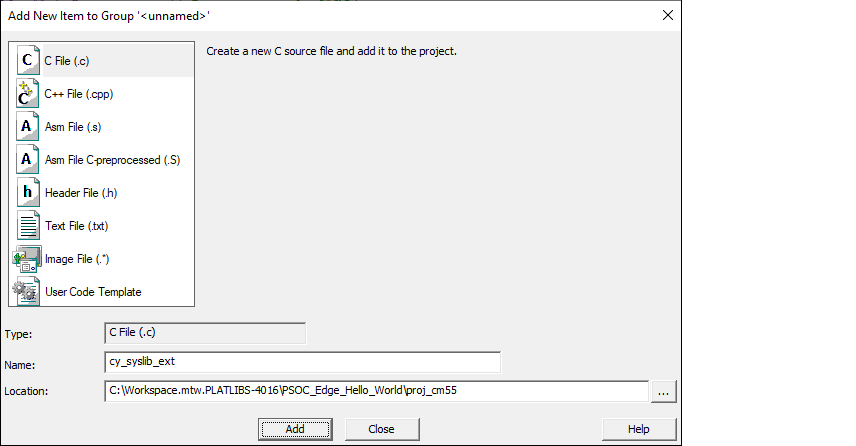
Then, choose a new C source file, specify the name "cy_syslib_ext", and click the
Add
button.
Copy the following code and paste it into the newly created file named "cy_syslib_ext.c".
#include <stdint.h>

void Cy_SysLib_DelayCycles(uint32_t cycles)
{
    __asm volatile (
        "adds %0, %0, #2 \n"           // Add 2 to cycles
        "lsrs %0, %0, #2 \n"           // Logical Shift Right by 2 (divide by 4)
        "beq Cy_DelayCycles_done \n"   // Branch to done if cycles is zero

        "Cy_DelayCycles_loop: \n"      // Label for loop start
        "adds %0, %0, #1 \n"           // Increment cycles
        "subs %0, %0, #2 \n"           // Subtract 2 from cycles
        "bne Cy_DelayCycles_loop \n"   // Branch to loop if cycles is not zero

        "Cy_DelayCycles_done: \n"      // Label for loop end
        : "+r" (cycles)                // Output operand
    );

}

uint32_t Cy_SysLib_EnterCriticalSection(void)
{
    uint32_t primask;
    __asm volatile(
        "mrs %0, primask\n"    // Save and return interrupt state
        "cpsid i"              // Disable interrupts
        : "=r" (primask)       // Output to 'primask'
        :
        : "memory"
    );
    return primask;
}

void Cy_SysLib_ExitCriticalSection(uint32_t savedIntrStatus)
{
    __asm volatile(
        "msr primask, %0"      // Restore interrupt state
        :
        : "r" (savedIntrStatus) // Input from 'savedIntrStatus'
        : "memory"
    );
}
Save the file.
Open the Options dialog. Under the
User
tab, enable the
Run #1
check box located under
After Build/Rebuild
. Then, paste the following command as single line.
ide_postbuild.bat \"#L\"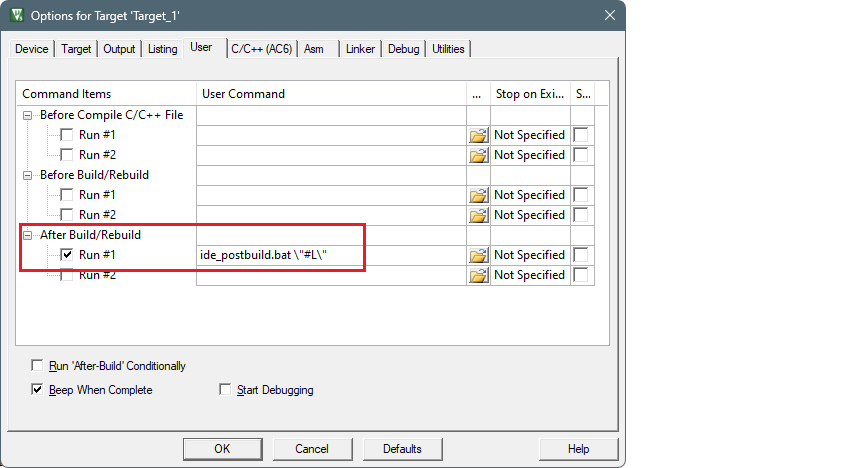
Click
OK
to close the Options dialog.
Select
Project > Build Target
to build the project and execute post-build commands.
This time, the postbuild will succeed, and you'll see messages similar to the following:
: E : INFO  : metadata_proj_cm33_s: command "sign" validation succeeded
: E : INFO  : Image saved to 'C:\examples\edge-uvision\PSOC_Edge_Hello_World\build\project_hex\proj_cm33_s_signed.hex'
: E : INFO  : metadata_proj_cm33_s: command "sign" succeeded
: E : INFO  : relocate_proj_cm33_ns: command "hex-relocate" validation succeeded
: E : INFO  : Relocating segment 0x08340400-0x08344100 to 0x60340400-0x60344100
: E : INFO  : Saved file to '../build/project_hex/proj_cm33_ns_shifted.hex'
: E : INFO  : relocate_proj_cm33_ns: command "hex-relocate" succeeded
: E : INFO  : merge: command "merge" validation succeeded
: E : INFO  : merge: command "merge" succeeded
Searching installed tools in progress...
Searching installed tools complete
C:\examples\edge-uvision\PSOC_Edge_Hello_World\proj_cm55>ENDLOCAL
".\PSOC_Edge_Hello_World_Objects\PSOC_Edge_Hello_World.axf" - 0 Error(s), 39 Warning(s).
Build Time Elapsed:  00:01:02