Non-secure CM33 project
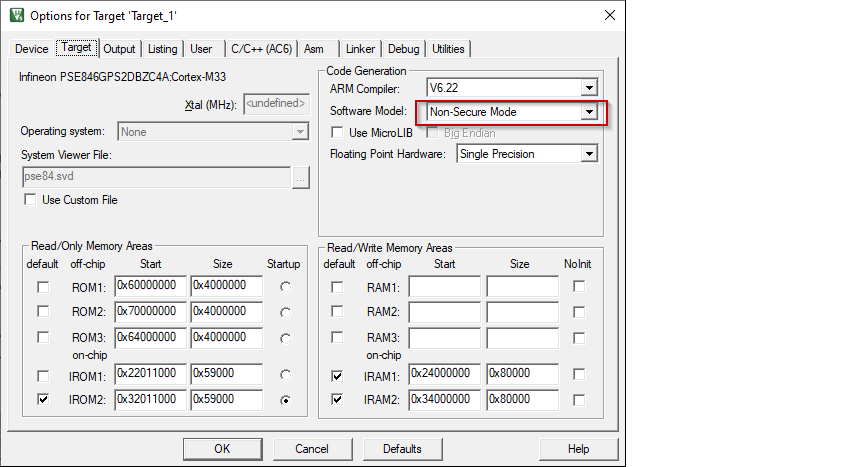
Open the Options dialog. Go to the
Target
tab and select "Non-Secure Mode" for
Software model
.
Switch to the
User
tab and enable the
Run #1
check box located under
After Build/Rebuild
. Then, paste the following command as single line (edit paths as needed).
ide_postbuild.bat \"#L\"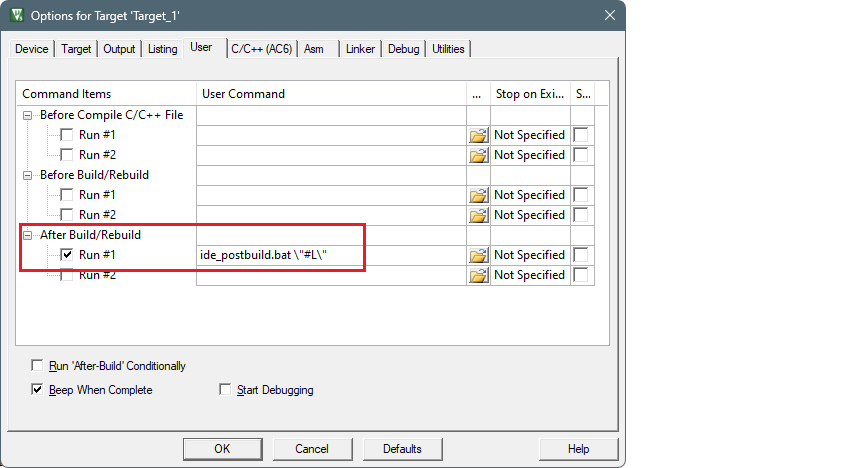
Switch to the
Linker
tab and enter the path to the object file generated by the secure project in the
Misc controls
section. For example:
../proj_cm33_s/PSOC_Edge_Hello_World_Objects/PSOC_Edge_Hello_World.axf_CMSE_Lib.o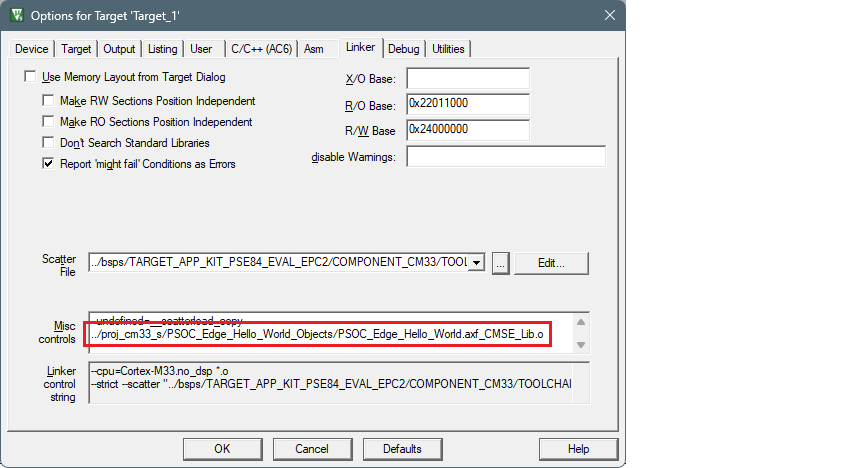
Click
OK
to close the Options dialog.
Select
Project > Build Target
to build the project.
The postbuild will fail with a message like:
: E : ERROR : File not found: "C:\examples\edge-uvision\PSOC_Edge_Hello_World\build\project_hex\proj_cm55.hex". Check the log for details
Proceed to the next step to configure the cm55 project.