Configure non-secure CM33 project
Select the non-secure CM33 project, open the Options dialog, and go to
General Options > 32-bit
.
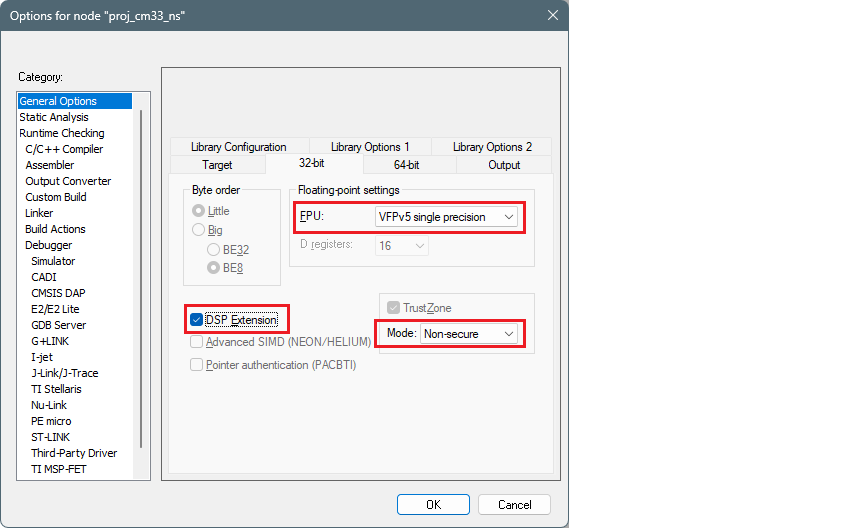
Select:
FPU
: VFPv5 single precision
DSP Extension
: selected
Mode
: Non-secure
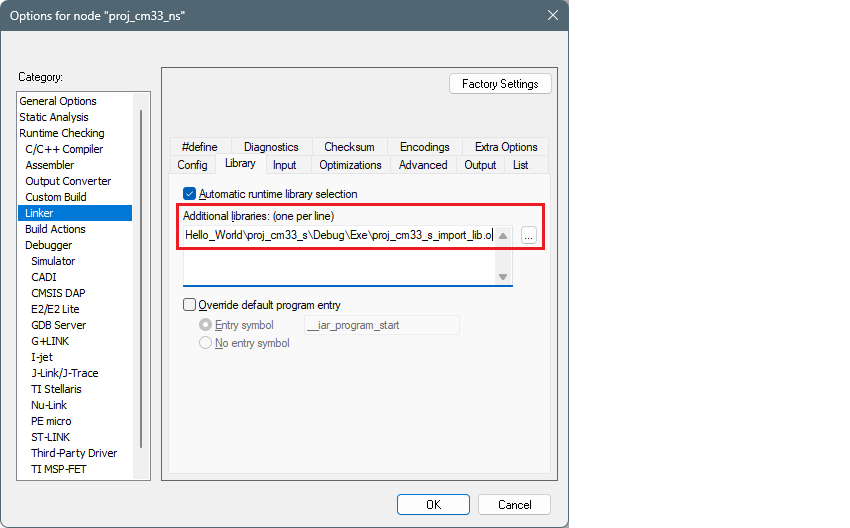
Switch to
Linker > Library
tab. Under
Additional libraries
, click the ellipsis button
[ . . . ]
and navigate to the
lib.o
file in the secure cm33 project. For example (update the path and file name as needed for your system):
C:\examples\edge-iar\PSOC_Edge_Hello_World\proj_cm33_s\Debug\Exe\proj_cm33_s_import_lib.o

Click
OK
to close the Options dialog.
Save the project and build it using
Project > Make
on the main menu to include the
lib.o
file.
Note:
You will likely see an error in the postbuild similar to "cm55.hex not found". This is expected because that project has not been built yet.