Configure CM4/CM7 project
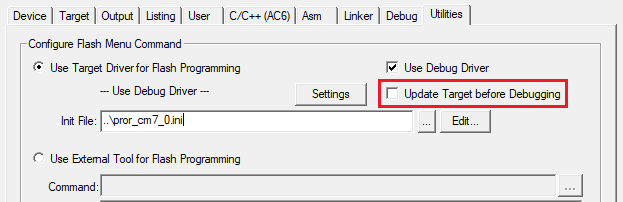
Open the Options dialog to the
Utilities
tab, and deselect the
Update Target before the Debugging
check box.
Switch to the
Debug
tab, select the applicable debug probe (CMSIS-DAP or J-Link).
If using ULINK2, select the
CMSIS-DAP Debugger
option as the debug probe, the ULINK2 driver does not support multi-core debugging.
Click the
Settings
button to configure the target driver.
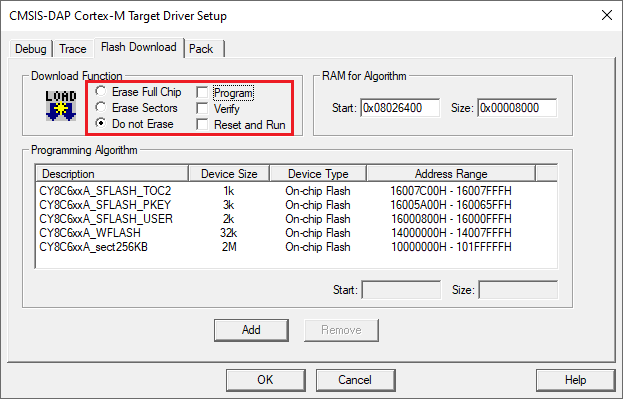
On the Target Driver Setup dialog, switch to the
Flash Download
tab, select the
Do not Erase
radio button, and deselect the
Program
,
Verify
, and
Reset and Run
check boxes.
Switch to the
Debug
tab.
The configuration settings are different for CMSIS-DAP/ULINK2 and J-Link. Refer to the following for the appropriate options:
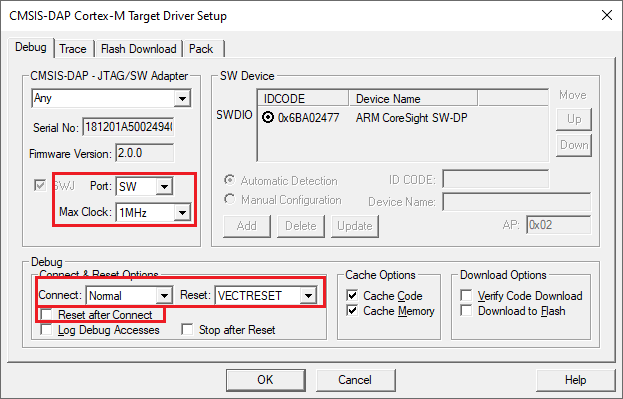
CMSIS-DAP/ULINK2 Target Driver Setup
– Use the following options:
Port
: SW
Max Clock
: 1 MHz
Connect
: Normal
Reset
: VECTRESET
Reset after Connect
check box: deselected
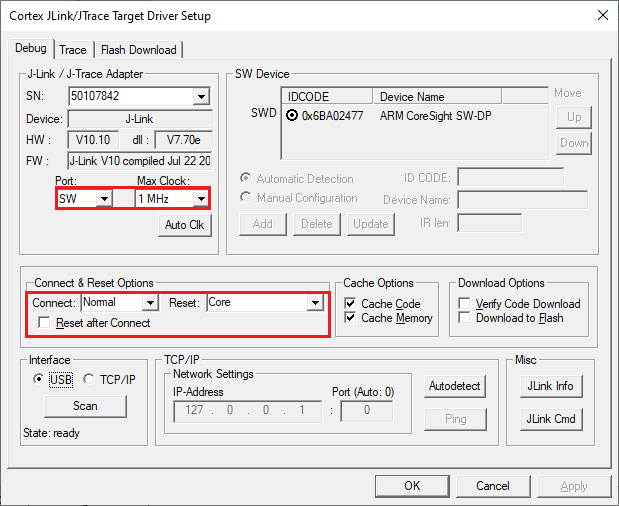
J-Link Target Driver Setup
– Use the following options:
Port
: SW
Max Clock
: 1 MHz
Connect
: Normal
Reset
: Core
Reset after Connect
check box: deselected
Click
OK
to close the Target Driver Setup dialog.
Save the project(s).