Build configuration
After all the core projects have been created, configure and build the secure CM33 project first and then the non-secure CM33 project. The CM33 project contains a non-secure-callable file, and it must be built before the non-secure CM33 project. There is nothing to configure for the CM55 core.
The project creation process creates and adds postbuild commands automatically. For the secure CM33 project, the postbuild command will sign and shift the hex file. For the non-secure CM33 project, the postbuild command will shift the hex file. For each project, the postbuild command will also generate a combined file if all projects have been built at least once.
Configure secure CM33 project
-
Select the non-secure CM33 project, open the Options dialog, and go to General Options > 32-bit .

Select:
-
FPU : VFPv5 single precision
-
DSP Extension : selected
-
Mode : Secure
-
-
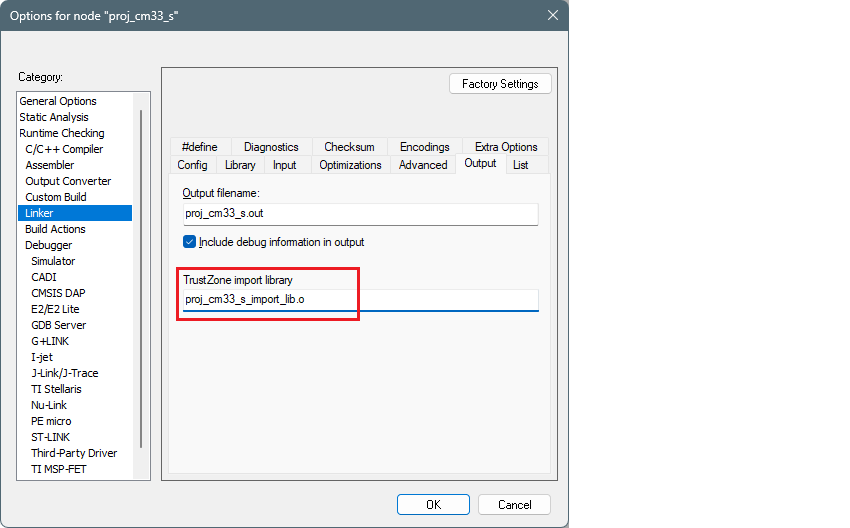
Switch to Linker > Output tab, and verify that the TrustZone import library is set.
-
Click OK to close the Options dialog.
-
Save the project and build it using Project > Make on the main menu, and this generates the library file.
Configure non-secure CM33 project
-
Select the non-secure CM33 project, open the Options dialog, and go to General Options > 32-bit .
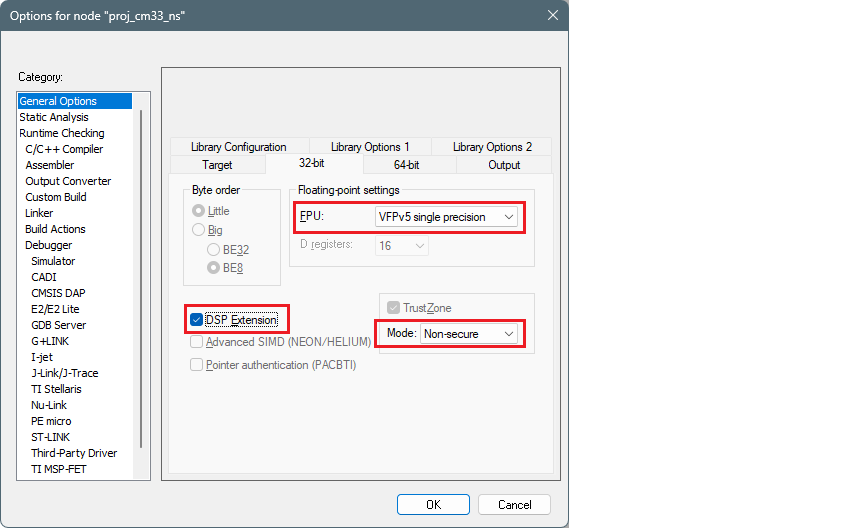
Select:
-
FPU : VFPv5 single precision
-
DSP Extension : selected
-
Mode : Non-secure
-
-
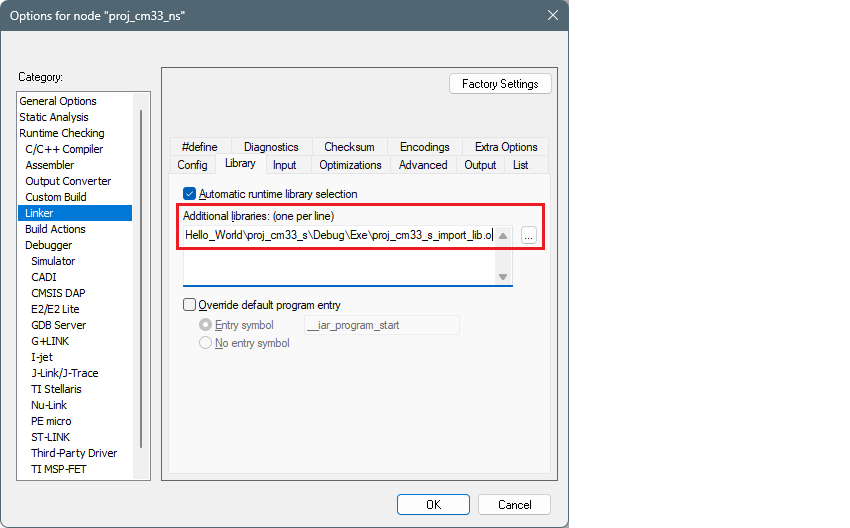
Switch to Linker > Library tab. Under Additional libraries , click the ellipsis button [ . . . ] and navigate to the lib.o file in the secure cm33 project. For example (update the path and file name as needed for your system):
C:\examples\edge-iar\PSOC_Edge_Hello_World\proj_cm33_s\Debug\Exe\proj_cm33_s_import_lib.o

-
Click OK to close the Options dialog.
-
Save the project and build it using Project > Make on the main menu to include the * lib.o* file.
You will likely see an error in the postbuild similar to "cm55.hex not found". This is expected because that project has not been built yet.
Build CM55 project
There is nothing to configure for the CM55 project. Just build it using Project > Make on the main menu after you have already build the secure CM33 and non-secure CM33 projects, and this will generate a single combined image at ..\build\app_combined.hex.
After all three projects have been built at least once, any time you build any of the projects, the combined hex file will be regenerated.
Refer to Debug configuration multi-core programming and debugging instructions.