Configuring IAR Embedded Workbench
One option to open ModusToolbox™ tools is to configure the IAR Embedded Workbench
Tools
menu using the
Configure Tools
dialog to add shortcuts to the various tools. This is a one-time configuration for each tool you wish to add. Then, the tools will be available for all your ModusToolbox™ applications running in IAR Embedded Workbench.
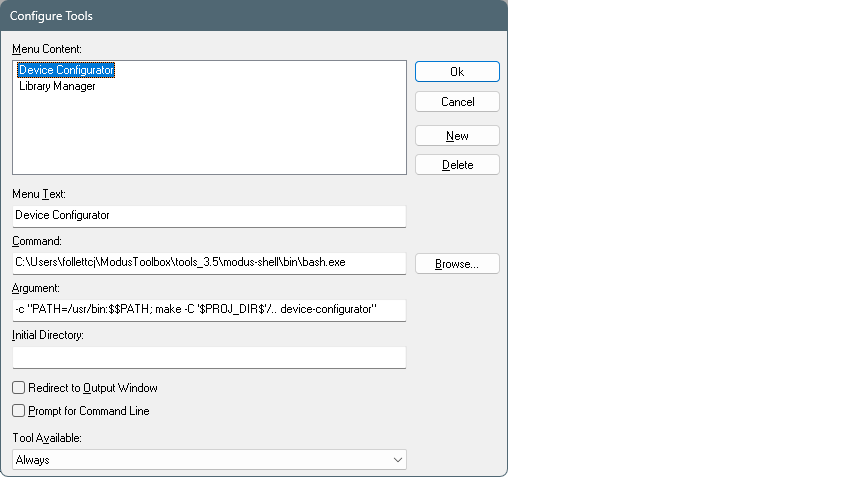
On this dialog, enter the following:
Menu Text
: Name of the tool.
Command
:
[
path-to-modustoolbox-tools
]\modus-shell\bin\bash.exe
This opens the bash shell from the tools package installation location. You can navigate to the executable using the [
Browse…
] button.
Argument
:
-c "PATH=/usr/bin:$$PATH; make -C '$PROJ_DIR$' [
tool-name
]"
This passes a command to the bash shell to open the specified
[tool-name]
(for example, device-configurator, bsp-assistant, library-manager, etc.).
The variable
'$PROJ_DIR$'
is the IAR Embedded Workbench project directory, and it is quoted because it returns a Windows-style path, which does not work without the quotes in bash. If the application is multi-core, add
/..
to navigate to one directory higher where the
Makefile
is located.
Redirect to Output Window
: This check box is optional. If selected, the bash shell commands run in the output window instead of a separate terminal.
For more details about this dialog, refer to the IAR Embedded Workbench user guide/help.