Build options, and prebuild/postbuild settings
To set various build options, use the sections on the IAR Embedded Workbench Project Options dialog where you can enter command-line options:
C / C++ Compiler > Extra Options
Assembler > Extra Options
Linker > Extra Options
Prebuild and postbuild steps from a ModusToolbox application are not included in the export process by default for most devices at this time. If your original application has these steps, you must include them in the IAR Embedded Workbench manually as follows:
In IAR Embedded Workbench, open the Options dialog, go to the
Build Actions
category.
Click the
New
button to open the New Build Action dialog.
On the New Build Action dialog, enter a command-line argument, output and/or input files, the working directory, and the build order.
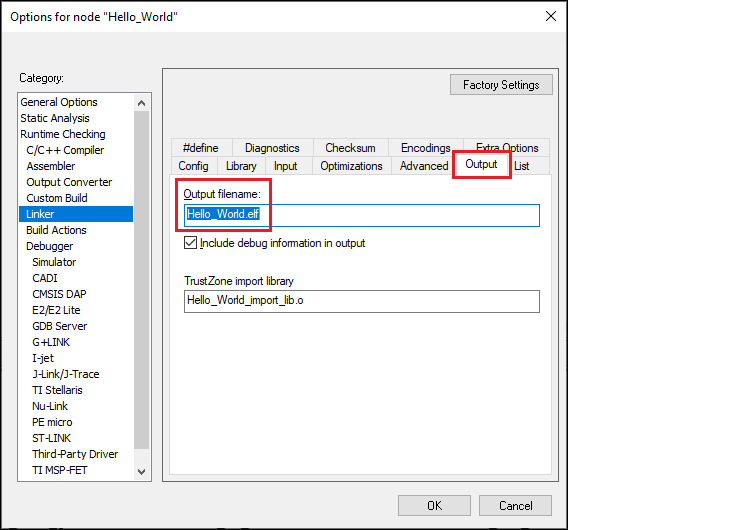
If using a postbuild script that works with .elf files, switch to the
Linker > Output
tab and change the file extension from ".out" to ".elf" in the
Output filename
field:
Click
OK
to close the Options dialog.
Refer to the IAR Embedded Workbench Help for more details.
On the IAR main menu, select
Project > Make
to build the application. You should see the following:
Hello_World.elf

Total number of errors: 0
Total number of warnings: 0
Resolving dependencies...
Build succeeded