GATT Settings tab (Option1..4)
The
GATT Settings (Option1..4)
tab is used to configure profile-specific parameters. The tab has three areas:
toolbars
profies tree
parameters configuration pane
Depending on the selected device, some parameters may be unavailable. The tab displays for the different options as follows:
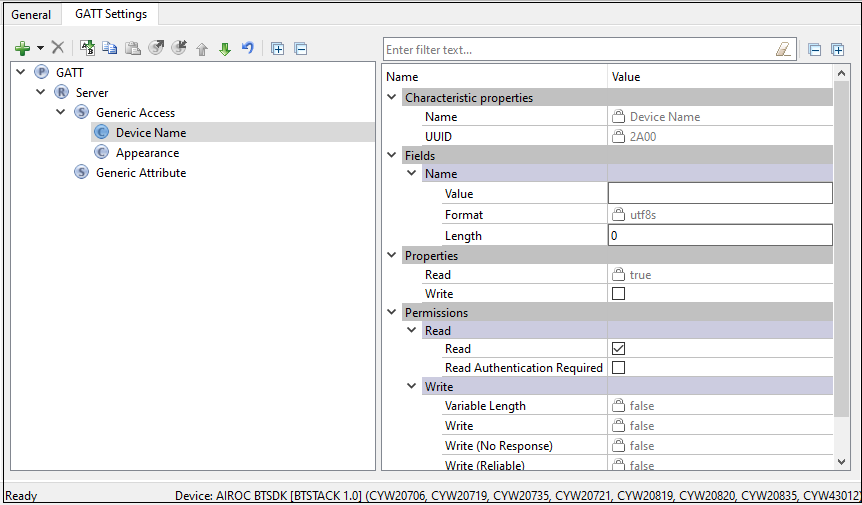
for Option2, Option3
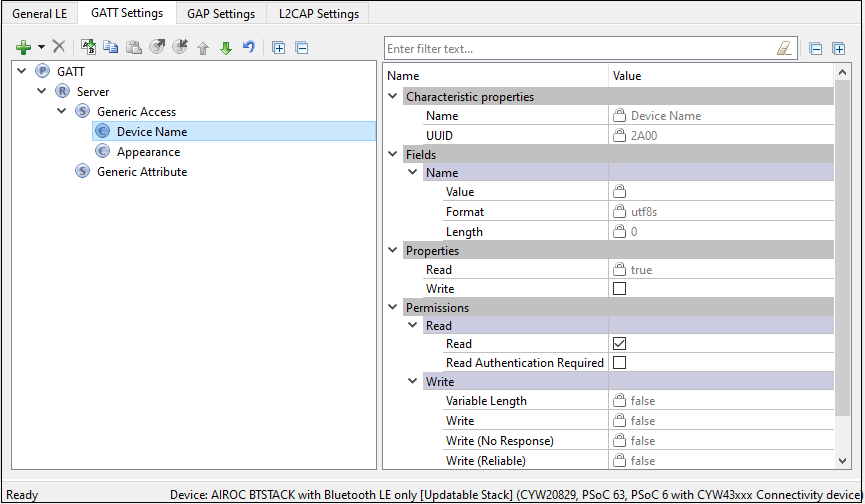
for Option4
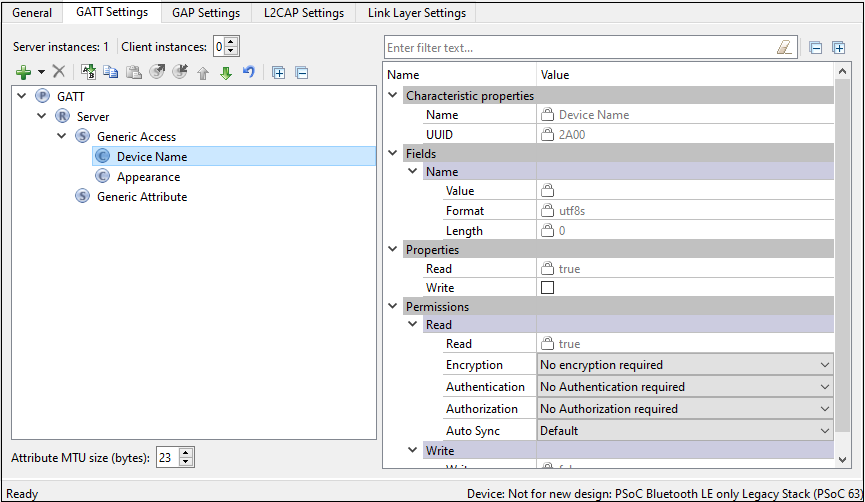
Toolbars (GATT Settings)
The toolbars contain navigation options and various commands to add or delete Services, Characteristics, and Descriptors.
Server instances ( Option4 ) – The number of GATT Server instances. The Bluetooth® resource supports a single instance of a GATT Server (single GATT database). You can add additional Services or complete Profiles to the existing Server Profiles tree to build the GATT database. This single GATT database will be re-used across all Bluetooth® Low Energy connections.
Note:
The CCCD values for each of active connections will be unique.
Client instances ( Option4 ) – The number of GATT Client instances. One GATT Client instance exists per connection. You can configure up to four GATT Client instances. All GATT Client instances have one common Client Profiles tree configuration.
Add Profile – Available when the GATT node is highlighted in the Profile tree. It allows adding a whole Profile to the Profiles tree. This option does not remove existing Services from the tree. Several Profiles can exist in the tree simultaneously.
Add Service – Available when the Profile Role is highlighted in the Profile tree. Allows loading of Services in the selected Profile Role. In the GATT server configuration, adds the selected service data to the server GATT database and enables service-specific APIs.
For
Option4
, in the GATT client configuration, the data structures for auto discovery of this service are created. If services not populated in the GUI are discovered during auto discovery, this option ignores those services and the application is responsible for discovering the details of such services. Refer to the Profiles section for the available Services.
Add Characteristic – Available when a service is highlighted in the Profile tree. The Characteristic options are unique to each Service and are loaded automatically when a service is added to the design. The Add Characteristic button can be used to manually add a new characteristic to the service. All characteristics for the above-mentioned services plus Custom Characteristic are available for selection.
Add Descriptor – Available when a characteristic is highlighted in the Profile tree. Similar to the Characteristic options, the Descriptor options are unique to a characteristic and are all automatically loaded when a characteristic is added to the design.
Delete – Deletes the selected Service, Characteristic, or Descriptor.
Rename – Renames the selected item in the Profiles tree.
Copy/Paste – Copies/pastes items in the Profiles tree.
Export to file – Exports the settings of the selected GATT Service and saves to an XML file .
Import from file – Imports the saved file back to the GATT tree.
Move Up/Down – Moves the selected item up or down in the Profiles tree.
Reset branch to default – Resets the selected item with child items in the Profiles tree to the default.
Expand Al l – Expands all items in the Profiles tree.
Collapse all Services – Collapses all Services in the Profiles tree.
Profiles tree
The
Profiles
tree is used to view GATT Services, Characteristics, and Descriptors of the GATT Server and Client roles (GATT Client role is supported for
Option4
. By navigating through the tree, you can quickly add, delete, or modify Services, Characteristics, and Descriptors using the toolbar buttons or the context menu. You can configure the parameters by clicking an item on the tree. These parameters will show in the
Parameters configuration
section.
For GATT Services defined by Bluetooth® SIG (except for Generic Attribute and Generic Access), the version number displays on the tree next to the Service name. This corresponds to the Service specification version currently implemented in the Bluetooth® Configurator.
The tree may contain the following nodes:

Profile

Profile Role

Service

Characteristic

Descriptor
In addition, nodes may include colors and icons as follows:
Shaded icon – The node is mandatory

White icon – The node is optional

A '+' sign – The Service includes other Services

Error icon – The node parameters have errors
Parameters configuration
The Parameters configuration pane allows you to configure a Profile, Service, or Characteristic by selecting the type of a Service or Characteristic in the tree. The filter box above the list of parameters allows limiting the items shown in the pane.
Attribute MTU size
Applicable for
Option4
. The Maximum Transmission Unit size (bytes) of an attribute to be used in the design. The valid range is 23 – 512 bytes. This value is used to respond to an Exchange MTU request from the GATT Client.
Profiles
You can add a whole profile to the Profiles tree from a list of supported profiles.
Note:
All Profiles must have a Generic Access Service and a Generic Attribute Service.
Note:
For
Option1
,
Option2
, and
Option3
devices, only the GATT Server role is configurable.
Note:
The Service Characteristics are configurable only if they belong to a GATT Server node.
Note:
The security settings located in the
GAP Settings
tab are applied globally. Also, you may manually configure the security of each Characteristic/Descriptor.
The following profiles are available for selection:
Alert Notification
This profile enables a GATT Client device to receive different types of alerts and event information, as well as information on the count of new alerts and unread items, which exist in the GATT Server device.
Alert Notification Server Profile role – Specified as a GATT Server. Requires the following Service: Alert Notification Service.
Alert Notification Client Profile role – Specified as a GATT Client.
Refer to the
Alert Notification Profile Specification
for detailed information about the Alert Notification Profile.
Automation IO
This profile enables a device to connect and interact with an Automation IO Module (IOM) in order to access digital and analog signals.
Automation IO Server Profile role – Specified as a GATT Server. Requires the following Service: Automation IO Service.
Automation IO Client Profile role – Specified as a GATT Client.
Refer to the
Automation IO Profile Specification
for detailed information about the Automation IO Profile.
Blood Pressure
This profile enables a device to connect and interact with a Blood Pressure Sensor device for use in consumer and professional health care applications.
Blood Pressure Sensor Profile role – Specified as a GATT Server. Requires the following Services: Blood Pressure Service, Device Information Service.
Blood Pressure Collector Profile role – Specified as a GATT Client. Requires support of the following Services: Blood Pressure Service. Support of Device Information Service is optional.
Refer to
Blood Pressure Profile Specification
for detailed information about the Blood Pressure Profile.
Continuous Glucose Monitoring
This profile enables a device to connect and interact with a Continuous Glucose Monitoring Sensor device for use in consumer healthcare applications.
Continuous Glucose Monitoring Sensor Profile role – Specified as a GATT Server. Requires the following Services: Continuous Glucose Monitoring Service, Device Information Service. Optionally may include Bond Management Service.
Collector Profile role – Specified as a GATT Client. Requires support of the following Services: Continuous Glucose Monitoring Service. Support of Bond Management Service and Device Information Service is optional.
Refer to
Continuous Glucose Monitoring Profile Specification
for detailed information about the Continuous Glucose Monitoring Profile.
Cycling Power
This profile enables a Collector device to connect and interact with a Cycling Power Sensor for use in sports and fitness applications.
Cycling Power Sensor Profile role – Specified as a GATT Server. Requires the following Service: Cycling Power Service. Optionally may include Device Information Service and Battery Service.
Cycling Power Sensor and Broadcaster Profile role. Requires the following Service: Cycling Power Service.
Collector Profile role – Specified as a GATT Client. Requires support of the following Service: Cycling Power Service. Support of Device Information Service and Battery Service is optional.
Refer to
Cycling Power Profile Specification
for detailed information about the Cycling Power Profile.
Cycling Speed and Cadence
This profile enables a Collector device to connect and interact with a Cycling Speed and Cadence Sensor for use in sports and fitness applications.
Cycling Speed and Cadence Sensor Profile role – Specified as a GATT Server. Requires the following Service: Cycling Speed and Cadence Service. Optionally may include Device Information Service.
Collector Profile role – Specified as a GATT Client. Requires support of the following Service: Cycling Speed and Cadence Service. Support of Device Information Service is optional.
Refer to
Cycling Speed and Cadence Profile Specification
for detailed information about the Cycling Speed and Cadence Profile.
Environmental Sensing Profile
This profile enables a Collector device to connect and interact with an Environmental Sensor for use in outdoor activity applications.
Environmental Sensor Profile role – Specified as a GATT Server. Requires the following Service: Environmental Sensing Service. Optionally may include Device Information Service and Battery Service.
Collector Profile role – Specified as a GATT Client. Requires support of the following Service: Environmental Sensing Service. Support of Device Information Service and Battery Service is optional.
Refer to
Environmental Sensing Profile Specification
for detailed information about the Environmental Sensing Profile.
Find Me
This profile defines the behavior when a button is pressed on one device to cause an alerting signal on a peer device.
Find Me Target Profile role – Specified as a GATT Server. Requires the following Service: Immediate Alert Service.
Find Me Locator Profile role – Specified as a GATT Client. Requires support of the following Service: Immediate Alert Service.
Refer to
Find Me Profile Specification
for detailed information about the Find Me Profile.
Glucose
This profile enables a device to connect and interact with a Glucose Sensor for use in consumer healthcare applications.
Glucose Sensor Profile role – Specified as a GATT Server. Requires the following Services: Glucose Service, Device Information Service.
Collector Profile role – Specified as a GATT Client. Requires support of the following Service: Glucose Service. Support of Device Information Service is optional.
Refer to
Glucose Profile Specification
for detailed information about the Glucose Profile.
Health Thermometer
This profile enables a Collector device to connect and interact with a Thermometer sensor in healthcare applications.
Thermometer Profile role – Specified as a GATT Server. Requires the following Services: Health Thermometer Service, Device Information Service.
Collector Profile role – Specified as a GATT Client. Requires support of the following Service: Health Thermometer Service. Support of Device Information Service is optional.
Refer to
Health Thermometer Profile Specification
for detailed information about the Health Thermometer Profile.
HTTP Proxy
This service allows a Client device, typically a sensor, to communicate with a Web Server through a gateway device. HTTP Proxy Service is not available in the Add Profile drop-down list. It can be added as a separate Service.
Refer to
HTTP Proxy Service Specification
for detailed information about the HTTP Proxy Service.
Heart Rate
This profile enables a Collector device to connect and interact with a Heart Rate Sensor for use in fitness applications.
Heart Rate Sensor Profile role – Specified as a GATT Server. Requires the following Services: Heart Rate Service, Device Information Service.
Collector Profile role – Specified as a GATT Client. Requires support of the Heart Rate Service. Support of Device Information Service is optional.
Refer to
Heart Rate Profile Specification
for detailed information about the Heart Rate Profile.
HID over GATT
This profile defines how a device with Bluetooth® LE wireless communications can support HID Services over the Bluetooth® LE protocol stack using the Generic Attribute Profile.
HID Device Profile role – Specified as a GATT Server. Requires the following Services: HID Service, Battery Service, and Device Information Service. Optionally may include Scan Parameters Service as part of the Scan Server role of the Scan Parameters Profile. HID Device supports multiple instances of HID Service and Battery Service and may include any other optional Services.
Boot Host Profile role – Specified as a GATT Client. Requires support of the following Service: HID Service. Support of Battery Service and Device Information Service is optional.
Report Host Profile role – Specified as a GATT Client. Requires support of the following Services: HID Service, Battery Service, Device Information Service. Support of Scan Client role of the Scan Parameters is optional.
Report and Boot Host Profile role – Specified as a GATT Client. Requires support of the following Services: HID Service, Battery Service, Device Information Service. Support of Scan Client role of the Scan Parameters is optional.
Refer to
HID over GATT Profile Specification
for detailed information about the HID over GATT Profile.
Indoor Positioning
This service exposes location information to support mobile devices to position themselves in an environment where GNSS signals are not available. For example, on indoor premises. The location information is mainly exposed via advertising and the GATT-based service is primarily intended for configuration.
The Indoor Positioning Service is not available in the Profile drop-down list. It can be added as a separate Service.
Refer to
Indoor Positioning Service Specification
for detailed information about the Indoor Positioning Service.
Internet Protocol Support
This profile provides the support of exchanging Ipv6 packets between devices over the Bluetooth® Low Energy transport. The IPSP defines two roles – Node role and Router role. A device may support both Node role and Router role. A device supporting the Node role can be a sensor or actuator. A device supporting the Router role can be an Access Point (such as home router, mobile phone, or similar).
Node Profile role – Specified as a GATT Server. Requires the following Service: Internet Protocol Support Service.
Router Profile role – Specified as a GATT Client. Requires support of the following Services: Internet Protocol Support Service.
Refer to
Internet Protocol Support Profile Specification
for detailed information about IPSP.
Location and Navigation
This profile enables devices to communicate with a Location and Navigation Sensor for use in outdoor activity applications.
Location and Navigation Sensor Profile role – Specified as a GATT Server. Requires the following Service: Location and Navigation Service. Optionally may include Device Information Service and Battery Service.
Collector Profile role – Specified as a GATT Client. Requires support of the following Services: Location and Navigation Service. Support of Device Information Service and Battery Service is optional.
Refer to
Location and Navigation Profile Specification
for detailed information about the Location and Navigation Profile.
Object Transfer
This profile defines the fundamental requirements to enable an Object Client in order to create and delete objects and to execute a variety of actions using the currently-selected object such as reading the object data from or writing the object data to an Object Server that exposes the Object Transfer Service. This profile is designed to be referenced by a higher-layer specification to enable a variety of object transfer use cases.
Object Server role – Specified as a GATT Server. The Object Server device interacts with an Object Client to read or write the object data and expose the object metadata. Requires the Object Transfer Service.
Object Client role – Specified as a GATT Client. The Object Client device initiates the reading, writing or another object action from the Object Server. Requires the Object Transfer Service.
Refer to
Object Transfer Profile Specification
for detailed information about the Object Transfer Profile.
Phone Alert Status
This profile enables a device to alert its user about the alert status of a phone connected to the device.
Phone Alert Server Profile role – Specified as a GATT Server. Requires the following Services: Phone Alert Status Service.
Phone Alert Client Profile role – Specified as a GATT Client. Requires support of the following Service: Phone Alert Service.
Refer to
Phone Alert Status Profile Specification
for detailed information about the Phone Alert Status Profile.
Proximity
This profile enables the proximity monitoring between two devices.
Proximity Reporter Profile role – Specified as a GATT Server. Requires the following Service: Link Loss Service. Optionally may include Immediate Alert Service and TX Power Service if both are used. Using only one of the optional Services is not allowed.
Proximity Monitor Profile role – Specified as a GATT Client. Requires support of the following Services: Link Loss Service. Support of Immediate Alert Service and TX Power Service is optional. Same restrictions apply as to Proximity Reporter.
Refer to
Proximity Profile Specification
for detailed information about the Proximity Profile.
Pulse Oximeter
This profile enables a device to connect and interact with a Pulse Oximeter device for use in consumer and professional health care applications.
Pulse Oximeter Sensor Profile role – Specified as a GATT Server. Requires the following Services: Pulse Oximeter Service, Device Information Service. Optionally may include Bond Management Service, Current Time Service and Battery Service.
Collector Profile role – Specified as a GATT Client. Requires support of the following Services: Pulse Oximeter and Device Information Service. Support of Bond Management Service, Current Time Service and Battery Service are optional.
Refer to
Pulse Oximeter Profile Specification
for detailed information about the Pulse Oximeter Profile.
Ranging
The Ranging Profile (RAP) specification can be used by a distance-measurement application on a device to read remote ranging results of an ongoing Channel Sounding (CS) procedure and configure the desired content and delivery method from a remote device.
Ranging Data is the Channel Sounding Procedure results generated by a Core Controller and sent to the Host via the Host Controller Interface (HCI) Low Energy (LE) CS Subevent Result and Subevent Result Continue events. Ranging Data can be used by the client to perform a distance estimation.
Examples of distance-measurement applications include car and door locks that implement seamless unlocking and locking while a person using a hand-held mobile device approaches or departs the lock. The other uses include asset tracking in a warehouse and smart functionality based on proximity.
Running Speed and Cadence
This profile enables a Collector device to connect and interact with a Running Speed and Cadence Sensor for use in sports and fitness applications.
Running Speed and Cadence Sensor Profile role – Specified as a GATT Server. Requires the following Service: Running Speed and Cadence Service. Optionally may include Device Information Service.
Collector Profile role – Specified as a GATT Client. Requires support of the following Services: Running Speed and Cadence Service. Support of Device Information Service is optional.
Refer to
Running Speed and Cadence Profile Specification
for detailed information about the Running Speed and Cadence Profile.
Scan parameters
This profile defines how a Scan Client device with Bluetooth® LE wireless communications can write its scanning behavior to a Scan Server, and how a Scan Server can request updates of the Scan Client scanning behavior.
Scan Server Profile role – Specified as a GATT Server. Requires the following Service: Scan Parameters Service.
Scan Client Profile role – Specified as a GATT Client. Required support of the following Service: Scan Parameters Service.
Refer to
Scan Parameters Profile Specification
for detailed information about the Scan Parameters Profile.
Time
This profile enables the device to get the date, time, time zone, and DST information and control the functions related to time.
Time Server Profile role – Specified as a GATT Server. Requires the following Service: Current Time Service. Optionally may include Next DST Change Service and Reference Time Update Service.
Time Client Profile role – Specified as a GATT Client. Requires support of the following Service: Current Time Service. Support of Next DST Change Service and Reference Time Update Service is optional.
Refer to
Time Profile Specification
for detailed information about the Time Profile.
Weight Scale
This profile is used to enable a data collection device to obtain data from a Weight Scale that exposes the Weight Scale Service.
Weight Scale Profile role – Specified as a GATT Server.
Requires the following Services: Weight Scale Service and Device Information Service.
Optionally may include: User Data Service, Body Composition Service, Battery Service and Current Time Service.
Collector Profile role – Specified as a GATT Client.
Required support of the following Service: Weight Scale Service and Device Information Service.
Support of User Data Service, Body Composition Service, Battery Service and Current Time Service is optional.
Refer to
Weight Scale Profile Specification
for detailed information about the Weight Scale Profile.
Wireless Power Transfer (A4WP)
Enables the communication between Power Receiver Unit and Power Transmitter Unit in Wireless Power Transfer systems.
Power Receiver Unit Profile role – Specified as a GATT Server. Requires the following Service: Wireless Power Transfer.
Power Transmitter Unit Profile role – Specified as a GATT Client. Requires support of the following Service: Wireless Power Transfer.
Wireless Power Transfer Profile is a custom service defined by the Alliance for Wireless Power (A4WP). Refer to the
AirFuel Alliance
web site for detailed information about the Wireless Power Transfer Profile.
Bootloader profile
(
Option4
) The Bluetooth® Configurator supports the Bootloader Profile and Bootloader Service, which allow a Bootloader to update the existing firmware on the Bluetooth® Low Energy device. The Bootloader Service uses the Bluetooth® Low Energy interface as a communication interface. It can be added to any of the profiles if the design requires updating the firmware Over-the-Air (OTA).
Refer to the
Bootloader service configuration
section for detailed information about the Bootloader Service.
OTA Upgrade and OTA Secure Upgrade services
(
Option1
devices only) The Bluetooth® resource provides the firmware upgrade feature. It supports secure and non-secure versions of the upgrade. The OTA Upgrade Service supports the non-secure upgrade, and the OTA Secure Upgrade Service supports the secure upgrade. They can be added to any of the profiles if the design requires updating the firmware OTA.
Refer to the
AIROC™ Firmware Upgrade Library
documentation for detailed information about the OTA Upgrade and OTA Secure Upgrade Services.
Generic Access service
The
Generic Access Service
is used to define the basic Bluetooth® connection and discovery parameters. Click on the Characteristic under the Generic Access Service to view particular Characteristic settings.
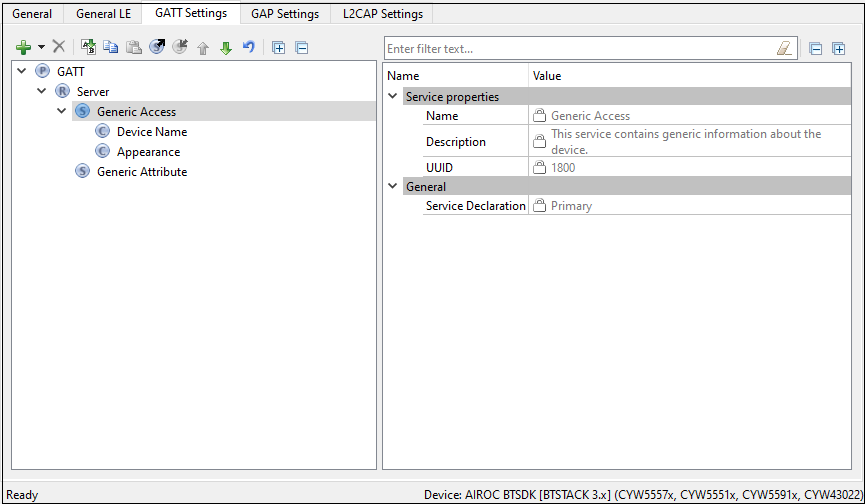
When the
GAP Settings
tab is available, you perform the actual Characteristics configuration in the General options located in it.
Device Name
– This is the name of your device. It has a Read (without authentication/authorization) property associated with it by default. This parameter can be up to 248 bytes. For Option2 , Option3 , and Option4 , the value comes from the Device Name field on the GAP Settings tab, under General .
Appearance – The device's logo or appearance, which is a SIG defined 2-byte value. It has a Read (without authentication/authorization) property associated with it by default. For Option2 , Option3 , and Option4 , the value comes from the Appearance field on the GAP Settings tab, under General .
Peripheral Preferred Connection – A device in the peripheral role can convey its preferred connection parameter to the peer device. This parameter is 8 bytes in total and is composed of the following sub-parameters.
Note:
This parameter is available only when the device supports a Peripheral role. Refer to the
GAP Settings tab Connection parameters
section for more information.
Note:
Minimum Connection Interval
– A 2-byte parameter that denotes the minimum permissible connection time.
Note:
Maximum Connection Interval
– A 2-byte parameter that denotes the maximum permissible connection time.
Note:
Peripheral Latency
– A 2-byte value that defines the latency between consecutive connection events.
Note:
Connection Supervision Timeout
– A 2-byte value that denotes the LE link supervision timeout interval. Defines the timeout duration for which an LE link needs to be sustained if there is no response from the peer device over the LE link.
Note:
For proper operation, the
Connection Supervision Timeout
must be larger than (1 + Peripheral latency) * Connection Interval * 2 (ms). Refer to Bluetooth® Core Specification Volume 6, Part B, Chapter 4.5.2 for more information on Connection Supervision Timeout.
Note:
The above parameters are used for the connection parameters update procedure over L2CAP if a GAP central device does not use the peripheral preferred connection parameters. For example, iOS7 ignores peripheral preferred connection parameter Characteristics and establishes a connection with a default 30 ms connection interval. The peripheral device requests a connection parameter update by sending an L2CAP connection parameter update request at an appropriate time.
Note:
A typical peripheral implementation initiates the L2CAP connection parameter update procedure once any Characteristic is configured for periodic notification or indication.
Central Address Resolution – A device in the central role can convey whether it supports privacy with address resolution. The Peripheral checks if the peer device supports address resolution by reading the Central Address Resolution characteristic before using directed advertisement where the initiator address is set to a Resolvable Private Address (RPA).
Resolvable Private Address Only – Defines whether the device will use only Resolvable Private Addresses (RPAs) as local addresses.
Generic Attribute service
By default, the
Generic Attribute Service
does not have any Characteristics.
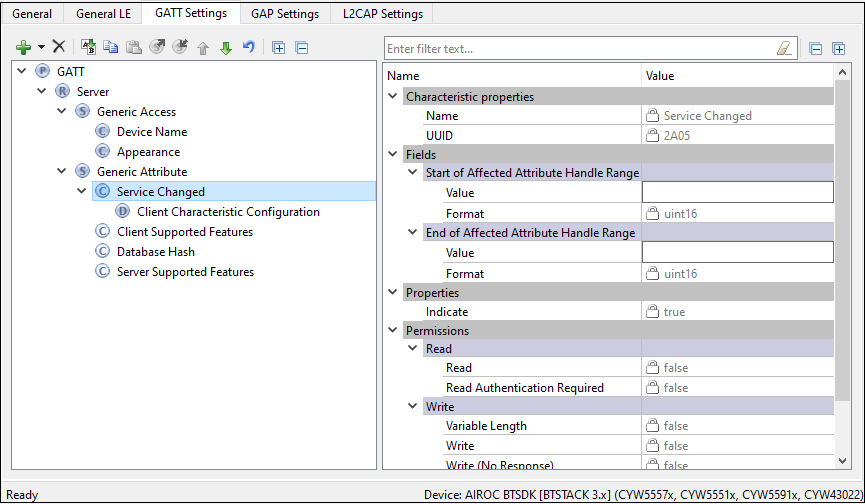
Add the optional Service Changed characteristic under the Generic Attribute Service if needed.
Service Changed – This Characteristic is used to indicate to the connected devices that a Service has changed (added, removed, modified). It is used to indicate to GATT Clients that have a trusted relationship (bond) with the GATT Server when GATT-based Services have changed when they re-connect to the GATT Server. It is mandatory for the device in the GATT Client role. For the device in the GATT Server role, the Characteristic is mandatory if the GATT Server changes the supported Services in the device.
Custom Service configuration
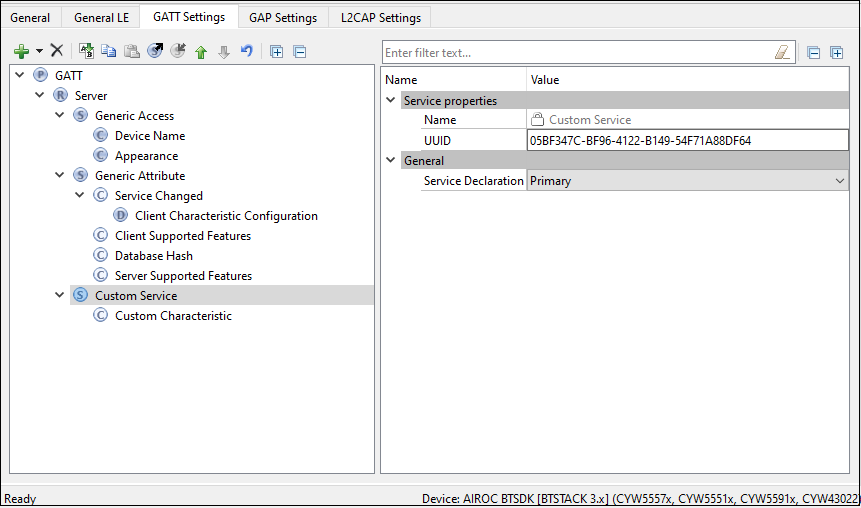
- UUID
A universally unique identifier of the service. This field is editable for Custom Services. By default, it is initialized with a random 128-bit UUID.
Service type
Primary
– Represents the primary functionality of the device.
Secondary
– Represents additional functionality of the device. The secondary service must be included in another service.
Included sevirces
This is the list of the services that can be included in the selected service. Each service may have one or more included services. The included services provide additional functionality for the service.
Custom Characteristic configuration
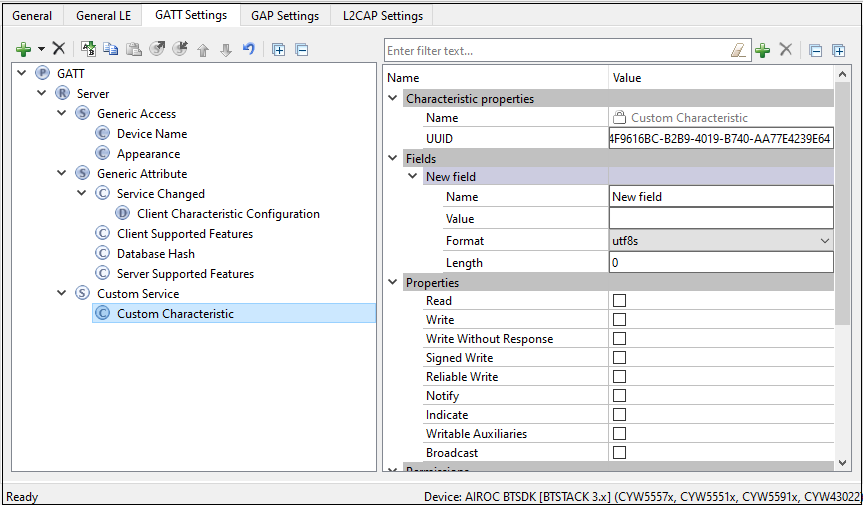
- UUID
A universally unique identifier of the Characteristic. This field is editable for
Custom Characteristic
. By default, it is initialized with a random 128-bit UUID.
Fields
The fields represent a Characteristic value. The default value for each field can be set in the Value property. The fields are customizable for the Custom Characteristic. You can add or delete fields using the tool buttons located above the Properties editor.
Properties
The Characteristic properties define how the Characteristic value can be used. Some properties (Broadcast, Notify, Indicate, Reliable Write, Writable Auxiliaries) require the presence of a corresponding Characteristic Descriptor. For details, see
Bluetooth ® Core Specification
Vol.3, part G (GATT), Section 3.3.1.1 "Characteristic Properties".
Permissions
Characteristic permissions define how the
Characteristic Value
attribute can be accessed and the security level required for this access. Access permissions are set based on the Characteristic properties.
Permissions parameters differ depending on the selected device.
For
Option4
, the
Auto sync
property is available which determines if the
Security permissions
are automatically updated when the
Security Mode
or
Security Level
parameters are changed in
Security Configuration 0
on the
GAP Settings
tab. Additional Security configurations do not affect attribute permissions.
Custom Descriptor configuration
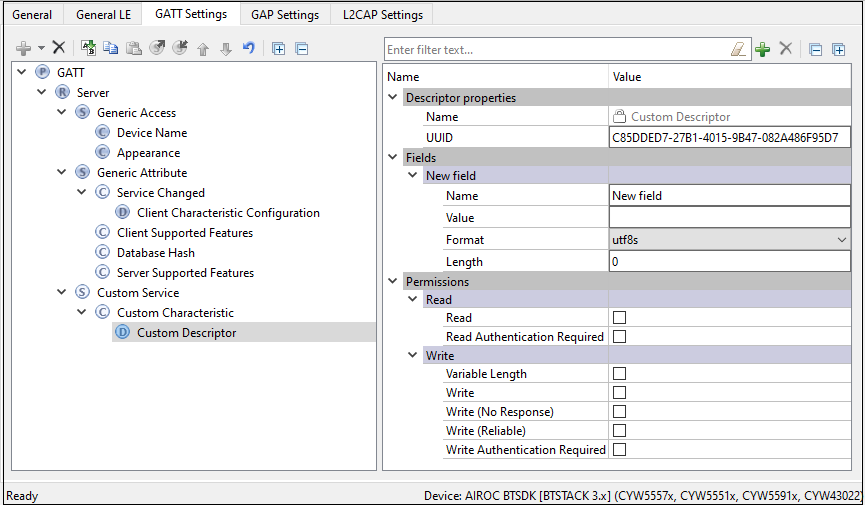
UUID
A universally unique identifier of the
Descriptor
. This field is editable for
Custom Descriptors
. By default, it is initialized with a random 128-bit UUID.
Fields
Fields represent a descriptor value. The default value for each field can be set in the Value property. In case of the
Custom Descriptor
, the fields are customizable. You can add or delete fields using the tool buttons located above the
Properties
editor.
Permissions
Descriptor permissions define how the
Descriptor
attribute can be accessed and the security level required for this access.
Permissions
parameters differ depending on the selected device.
Bootloader service configuration
This service is available only for
Option4
.
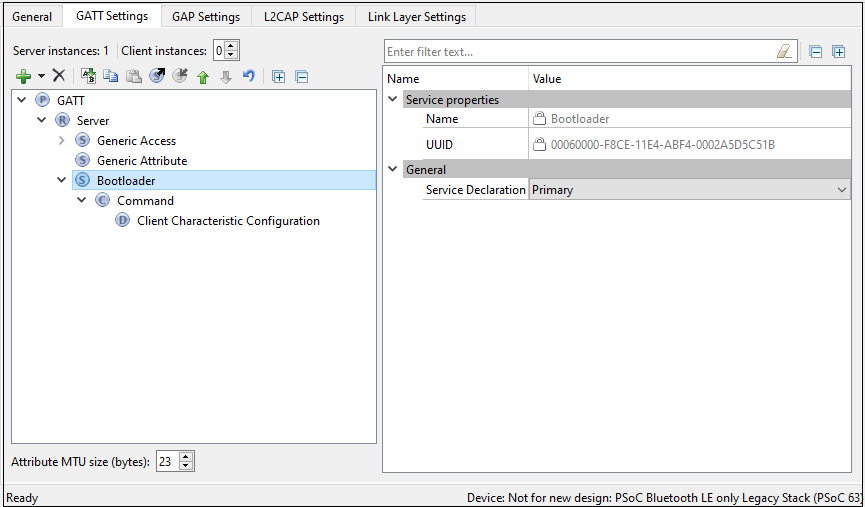
UUID
A universally unique identifier of the service. The
UUID
is set to 00060000-F8CE-11E4-ABF4-0002A5D5C51B.
Command characteristic configuration
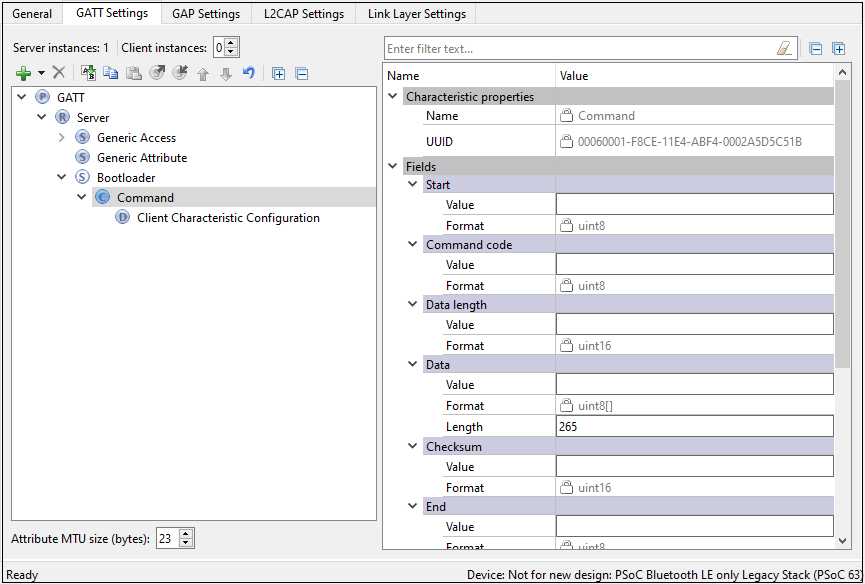
UUID
The universally unique identifier of the Characteristic. The
UUID
is set to 00060001-F8CE-11E4-ABF4-0002A5D5C51B.
Fields
Start of packet – The start of a bootloader packet.
Command – A bootloader command.
Status Code – Command status code.
Data Length – The length of a bootloader command/response to set to the maximum command data length possible in the design.
Per Bluetooth® Low Energy protocol, if the command requires a response larger than 20 bytes, the attribute MTU size should be increased. To support responses with a data length set to 56 (response for Get Metadata command), set the attribute MTU size to 66 according to the equation:
MTU size = Data Length + Bootloader command overhead + notification parameters overhead where:
Data Length = the response data length
Bootloader command overhead = 7
Notification parameters overhead = 3
If the requirements are not followed, the Bluetooth® resource will fail to send a response to the requested command.
Data – Bootloader command data. The length of this field is specified by the Data Length field.
Checksum – A checksum computed for the entire packet except for the Checksum and End of Packet fields.
End of Packet – The end of a bootloader packet.
GATT service import/export
When creating new or updating existing configuration, you can export the selected GATT Service settings to an XML file on disk. Later, when working with another configuration, the saved file (service) can be imported back to the GATT tree. The imported configuration is analyzed for any possible errors (e.g. duplicate service name, etc.)
Partial configuration, containing a single GATT service is saved into a separate XML file on disk. This file has the special extension
*.btsvc
. To export a service, click its name on the GATT tree and press the
Export
button. To import a previously exported service, click “Server” on the GATT tree, press the
Import
button, and select the previously created
*.btsvc
file.