Service Discovery Settings tab (Option1, Option3) (Beta)
The
Service Discovery Settings
are used to configure SDP Services. This tab is available for
Bluetooth® mode
Single mode BR/EDR
or
Dual mode
. The tab has three areas: toolbars, the Services tree, and the Parameter configuration pane.
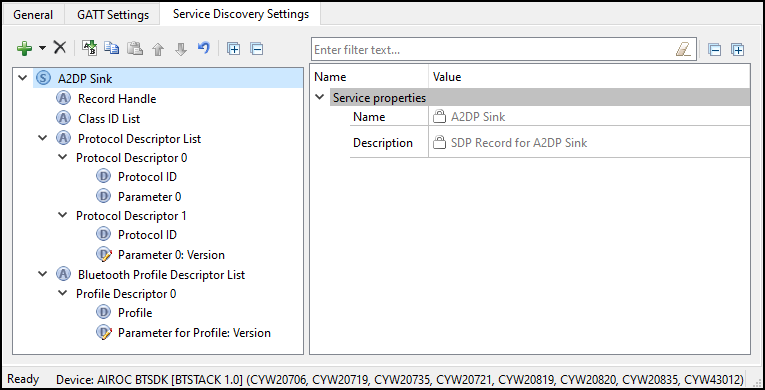
Toolbars
The toolbars contain navigation options and means to add or delete Services and Attributes.
Add
– Allows adding a Service or an Attribute to the Services tree. To add an Attribute, highlight the parent Service in the Services tree. Refer to the
Profiles
section for the available Services.
Delete
– Deletes the selected Service or Attribute.
Rename
– Renames the selected item in the Services tree.
Copy/Paste
– Copies/pastes items in the Services tree.
Move Up
– Moves the selected item up in the Services tree
Move Down
– Moves the selected item down in the Services tree.
Reset branch to default
– Resets the selected item with child items in the Services tree to the default.
Expand All
– Expands all items in the Services tree.
Collapse All
– Collapses all items in the Services tree.
Services tree
The
Services
tree is used to view SDP Services, Attributes, Data element groups, and Data elements. By navigating through the tree, you can quickly add, delete, or modify Services and Attributes using the toolbar buttons or the context menu.
You can configure the parameters by clicking an item on the tree. These parameters will show in the
Parameters configuration
section.
The tree may contain the following nodes:

Service

Service Attribute
Data element group:

Data element.

means that the Data element has editable fields.
In addition, nodes may have the following colors:
Shaded icon – The node is mandatory

White icon – The node is optional
Parameters configuration
The Parameters configuration pane allows you to view and configure a Service, Attribute, or Data element by selecting them in the tree. Attribute values are mainly hard-coded (and thus editing is disabled) to supply the required values according to the Bluetooth® Core Specification. Click through each Attribute and Data element under each Service to identify configurable values, and perform any additional configuration needed.
SDP services
The following SDP Services are available for selection:
Advanced Audio Distribution Profile (A2DP) Sink
Advanced Audio Distribution Profile (A2DP) Source
A/V Remote Control (AVRC) Controller
A/V Remote Control (AVRC) Target
Device ID
Hands-Free Audio Gateway
Hands-Free Unit
Human Interface Device
Serial Port