PSOC™ 64 secure single-core application
Follow instructions in Create/export application for Keil µVision. The project creation process also generates an ide_postbuild.bat file used to execute postbuild commands for the application. When complete, use these instructions to configure, build, and debug your application.
For a PSOC™ 64 secure MCU, you must also follow the instructions in the Secure Boot SDK user guide to generate keys and provision the device.
-
Using the Keil µVision IDE, create an empty project.ini file in the project root folder.
-
Type
LOAD .\build\APP_[kit-name]\Debug\[project-name].hexin the project.ini file and save the file. Replace [kit-name] and [project-name] with the correct values.
-
Then, select Project > Options for Target 'Target 1'… to open the Options dialog.
-
Select the User tab and enable the Run #1 check box under After Build/Rebuild . Then, enter
ide_postbuild.bat \"#L\".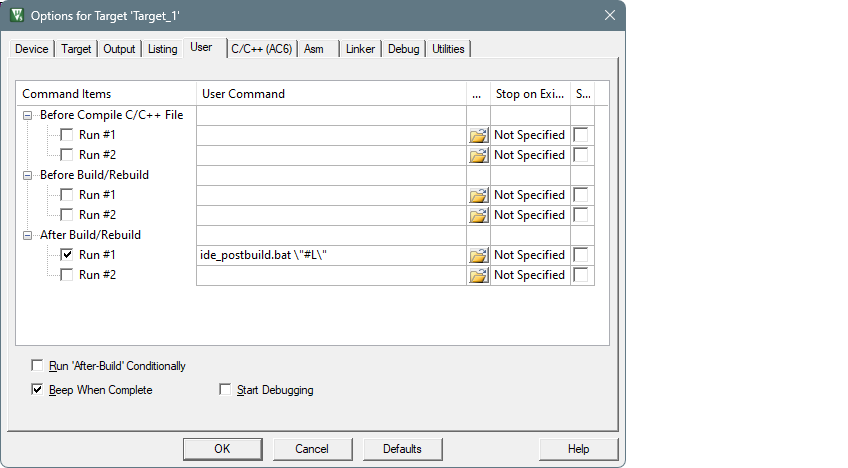
-
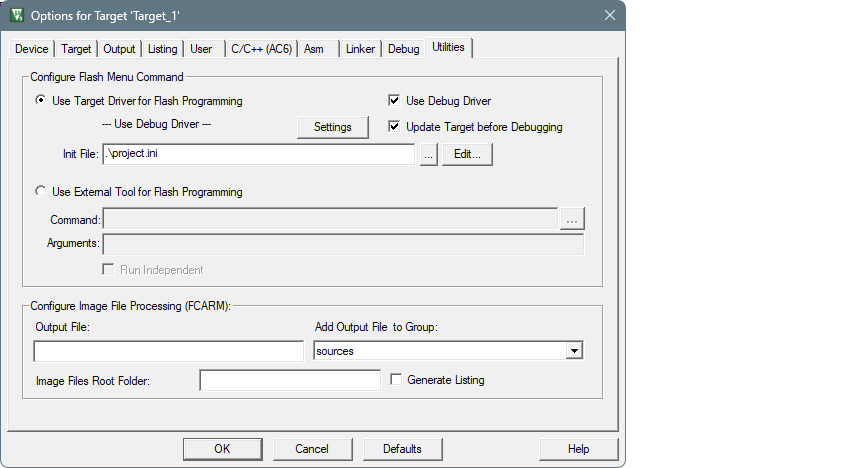
Select the Utilities tab and select the project.ini file using the [ … ] button.
-
Then, click OK to close the options dialog.
-
Select Project > Build Target to build the application and execute post-build commands.
After performing these steps, you should be able to run debug, erase, and program for PSOC™ 64 secure MCUs.