AIROC™ CYW20829 single-core application
Follow instructions in Create/export application for Keil µVision. Then, use these instructions to configure, build, and debug your application.
- Create a program.ini file in the project root folder and add the following text:
LOAD .\build\last_config\mtb-example-empty-app.final.hex
- Create a debug.ini file in the project root folder and add the following text:
    LOAD $L%L NOCODE CLEAR INCREMENTAL
    g, main
-
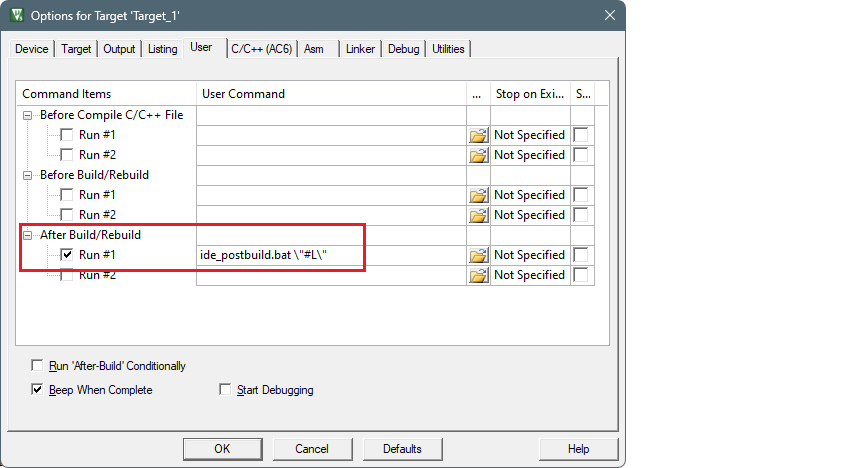
Open the Options dialog and switch to the User tab.
-
Enable the Run #1 check box located under After Build/Rebuild . Then, paste the following command as single line (edit paths as needed).
ide_postbuild.bat \"#L\"
-
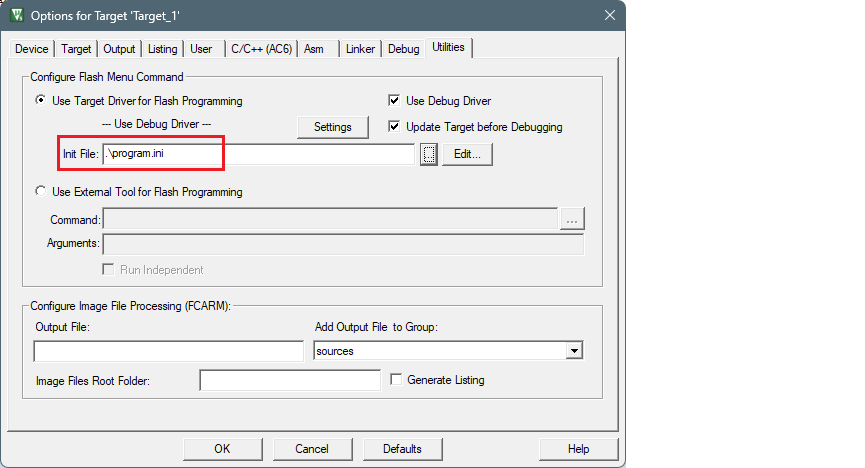
Switch to the Utilities tab and select the program.ini file in the Init File field.
-
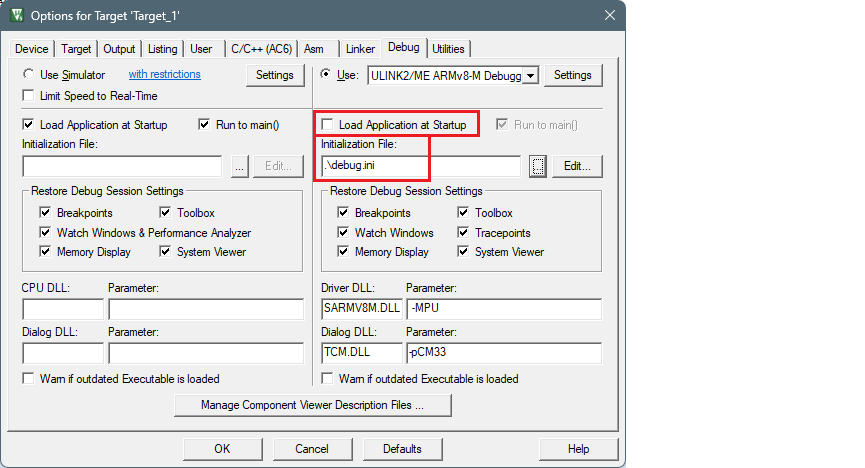
Switch to the Debug tab.
- Make sure that the Load Application at Startup check box is not checked.
- Select the debug.ini file in the Initialization File field.
-
Click OK to close the Options dialog.
-
On the main menu, select Project > Build Target to build the application and execute post-build commands.
After following these steps, you should be able to run Debug, Erase, and Program for the AIROC™ CYW20829 device.