Parameters configuration
The Bluetooth® Configurator contains several tabs in which to configure parameters. The set of active tabs depends on the selected device and other parameter values.
- General tab (Option1, Option3)
- General tab (Option4)
- General LE tab (Option2, Option3)
- GATT Settings tab (Option1..4)
- GAP Settings tab (Option2, Option3, Option4)
- L2CAP Settings tab (Option2, Option3, Option4)
- Link Layer Settings tab (Option4)
- Service Discovery Settings tab (Option1, Option3) (Beta)
General tab (Option1, Option3)
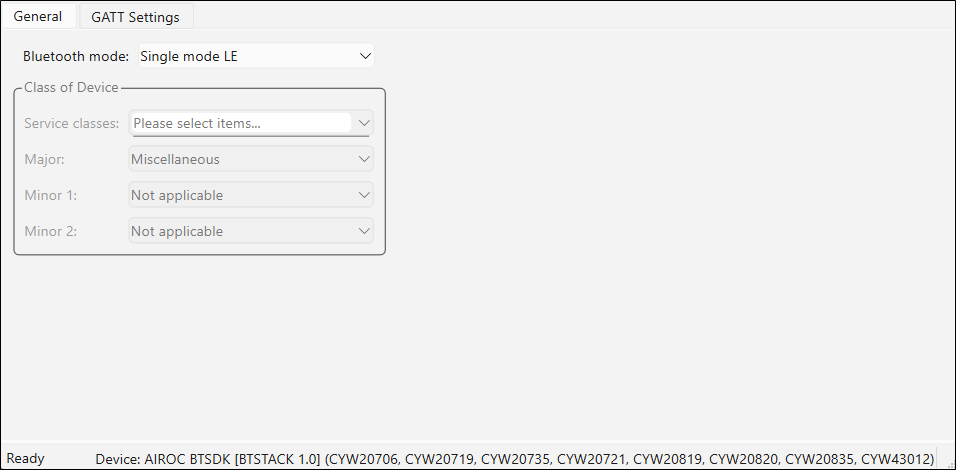
The General tab allows general configuration of the Bluetooth® resource and displays depending on the mode selected:
for Option1
for Option3
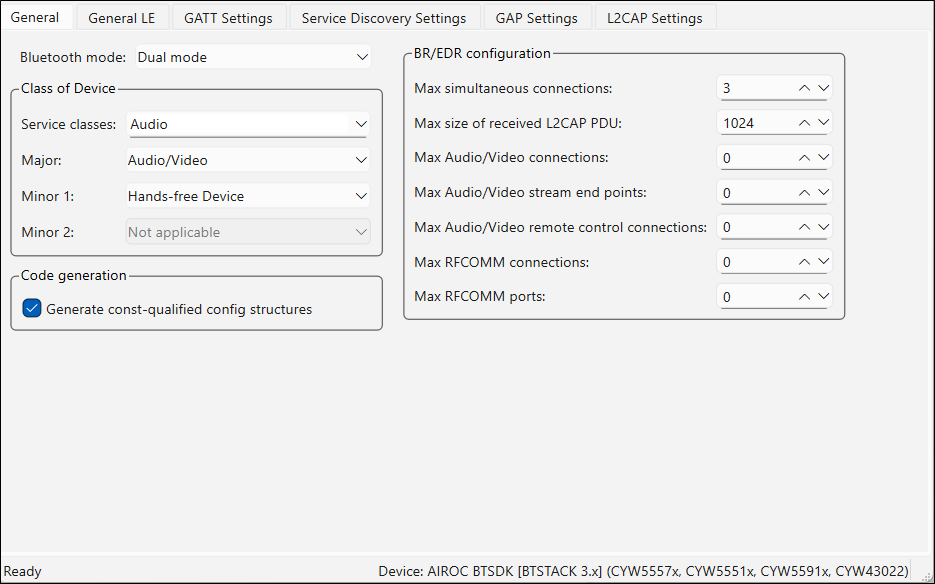
The following chapters describe the General tab settings for Option1 and Option3.
Bluetooth mode
The Bluetooth® mode parameter supports the following functionality in different modes:
-
Single mode LE - Only the Low Energy.
-
Single mode BR/EDR - Only the Basic Rate (BR)/Enhanced Data Rate (EDR) or "classic" Bluetooth®.
-
Dual mode - Both the Low Energy and BR/EDR.
Class of device
The Class of Device group of parameters indicates the device type and is available in Single mode BR/EDR or Dual mode:
-
Service classes - Defines the general categories of devices your application will be associated with.
-
Major - Defines the main device’s function.
-
Minor 1 - Extends the Major device class value.
-
Minor 2 - Extends the Major device class value.
Isochronous Connection configuration
The Isochronous Connection configuration group is located in the General LE tab and is available in Single mode LE, and Dual mode. Isochronous Channels support is one of the main new features added in Bluetooth® specification 5.2. In conjunction with new GATT Audio profiles, it supports Bluetooth® LE Audio transport. LE Audio exists in the two main forms:
-
Multi-Stream Audio – Supports the connection between an audio source device and one or more audio sink devices. It is bidirectional, with acknowledgments.
-
Auracast™ Broadcast audio. – Supports the broadcasting of one or more audio streams from the source to an unlimited number of sink devices. It is unidirectional, without acknowledgments.
Isochronous Connection configuration parameters:
-
Max SDU size - The maximum size of Service Data Unit (octets).
-
Max audio channels per packet - The maximum number of audio channels (left, right …) contained in one packet.
-
Max number of CIS connections - The maximum number of Connected Isochronous Stream connections. CIS is point-to-point, bidirectional connection between the central and peripheral device.
-
Max number of CIG connections - The maximum number of Connected Isochronous Groups. CIG is the group of one or more Connected Isochronous Streams created by the central device.
-
Max number of buffers per CIS - The maximum number of buffers per one Connected Isochronous Stream.
-
Max number of BIG connections - The maximum number of Broadcast Isochronous Groups. BIG is the group of one or more Broadcast Isochronous Streams created by the Isochronous Broadcaster device.
BR/EDR configuration
The BR/EDR configuration group of parameters is available only for Single mode BR/EDR and Dual mode:
- Max simultaneous connections
- Max size of received L2CAP PDU
- Max Audio/Video connections
- Max Audio/Video stream end points
- Max Audio/Video remote control connections
- Max RFCOMM connections
- Max RFCOMM ports
General tab (Option4)
The General tab for Option4 allows general configuration of the Bluetooth® resource. The tab displays as follows, depending on the mode selected.
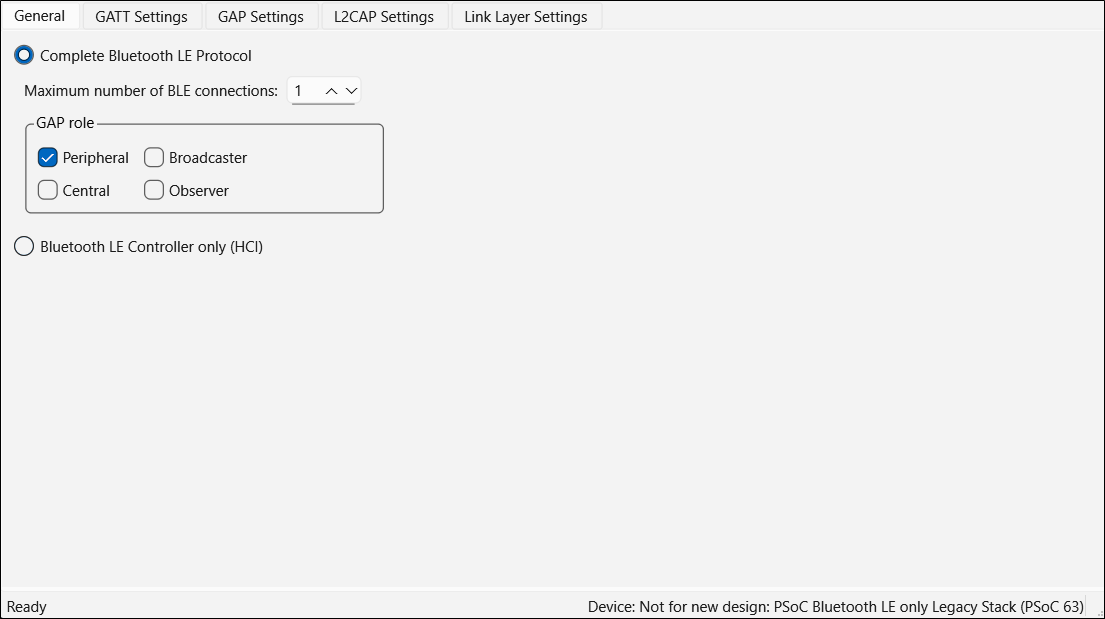
The following chapters describe the General tab settings for Option4.
Complete Bluetooth LE Protocol
The Complete Bluetooth LE Protocol mode enables both Bluetooth® Host and Controller. All GAP roles are exposed for configuration.
Maximum number of Bluetooth LE connections
This parameter displays how many Bluetooth® LE connections (both Central and Peripheral) are allowed. The valid range is 1 - 4.
GAP role
The GAP role parameter can take the following values:
-
Peripheral - Defines the device to advertise using connectable advertising packets in order to establish connection. Peripheral devices need a Central device, because the Central device initiates connection. A Peripheral device can broadcast general information about the device through the advertisement data.
-
Central - Defines the device to initiate connection. Peripheral devices need a Central device, because the Central device initiates connection.
-
Broadcaster - Defines the device to send advertising data – similar to the Peripheral role. However, the Broadcaster does not support connection, it sends data but does not receive it.
-
Observer - Defines the device to scan for a Broadcaster and reports the received information to an application. The Observer role does not allow transmission.
Bluetooth LE Controller only (HCI)
HCI mode enables the use of the device as Bluetooth LE Controller. Selecting this mode makes all other tabs unavailable.

General LE tab (Option2, Option3)
The General LE (Option2, Option3) tab allows general configuration of the Bluetooth® resource:
for Option2
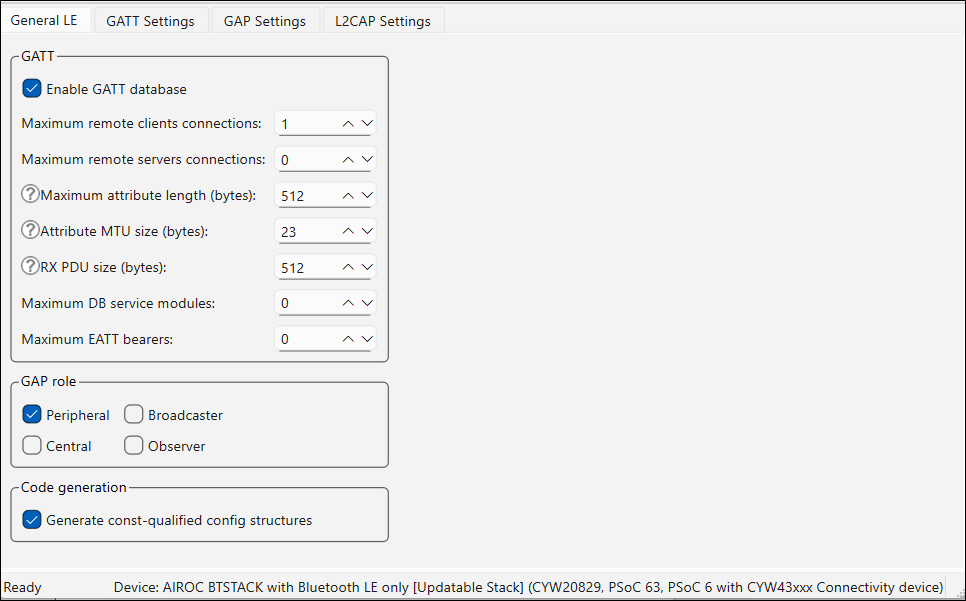
for Option3
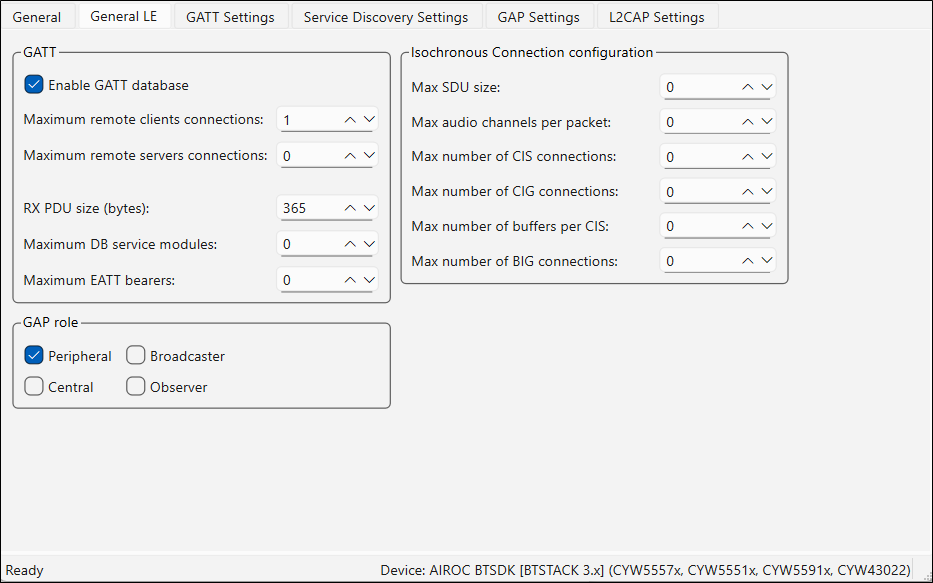
The following chapters describe the General LE tab tab settings for Option2 and Option3.
Enable GATT database
This parameter enables the GATT database. When not enabled, the GATT Settings tab hides and the files cycfg_gatt_db.h and cycfg_gatt_db.c are not generated.
Maximum remote clients/servers connections
These parameters display the maximum number of clients/servers that a local server can connect to.
Maximum attribute length
This value is the maximum length of an attribute in the design. The valid range is 23 - 512 bytes.
This parameter is used in BTSTACK 3.0 or earlier.
Attribute MTU size
This value is the Maximum Transmission Unit size (bytes) of an attribute in the design. The valid range is 23 - 517 bytes. This value is used to respond to an Exchange MTU request from the GATT Client.
This parameter is used in BTSTACK 3.0 or earlier.
RX PDU size
This value is the maximum size allowed for any received L2CAP PDU. The valid range is 65 - 65535 bytes.
This parameter is used in BTSTACK 3.0 or earlier.
GAP role
See GAP role.
Maximum DB service modules
The maximum number of GATT database segments to be added to the GATT DB. Set to 0 for most applications that do not update the GATT DB after invocation. Otherwise, a typical value is 1. The valid range is 0 - 255.
Maximum EATT bearers
The maximum number of allowed EATT bearers. Set to 0 for applications that support only legacy bearers. Otherwise, a typical value is 5. The valid range is 0 - 255.
GATT Settings tab (Option1..4)
The GATT Settings (Option1..4) tab is used to configure profile-specific parameters. The tab has three areas:
- toolbars
- profies tree
- parameters configuration pane
Depending on the selected device, some parameters may be unavailable. The tab displays for the different options as follows:
for Option1
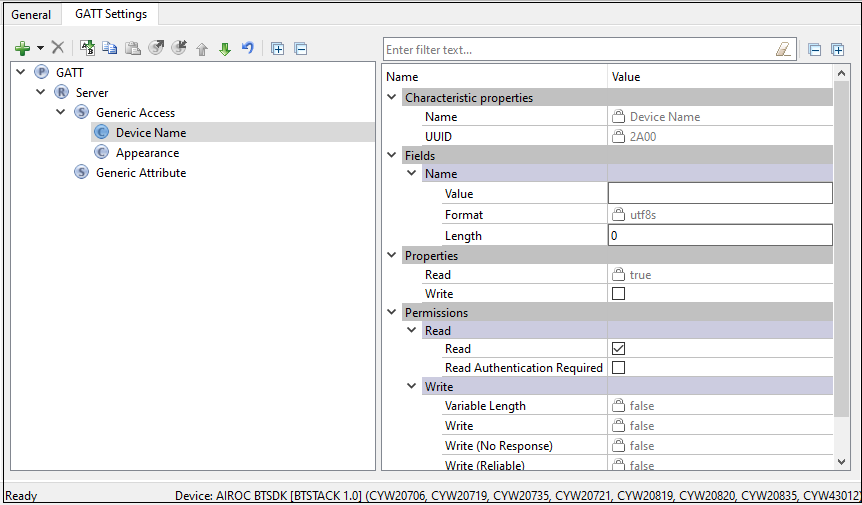
for Option2, Option3
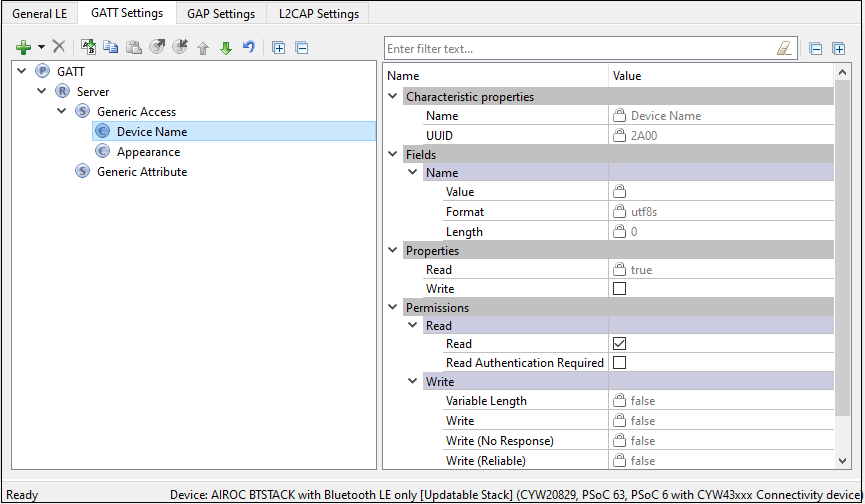
for Option4
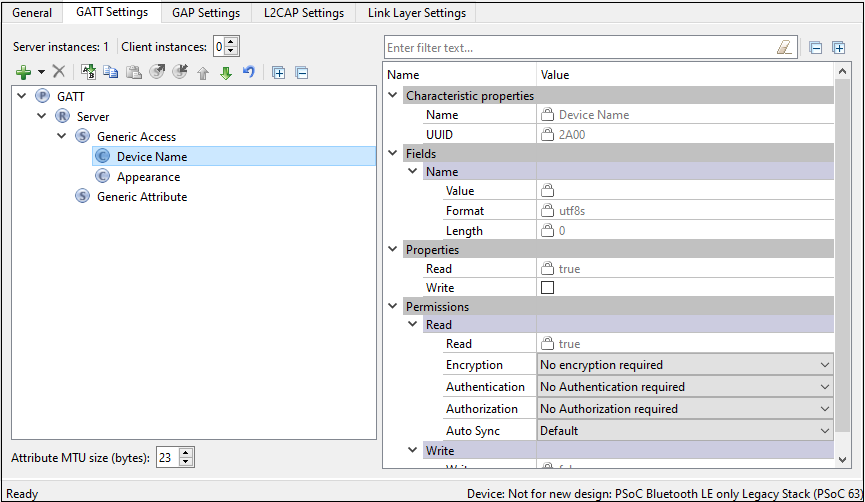
Toolbars (GATT Settings)
The toolbars contain navigation options and various commands to add or delete Services, Characteristics, and Descriptors.
- Server instances ( Option4 ) – The number of GATT Server instances. The Bluetooth® resource supports a single instance of a GATT Server (single GATT database). You can add additional Services or complete Profiles to the existing Server Profiles tree to build the GATT database. This single GATT database will be re-used across all Bluetooth® Low Energy connections.
The CCCD values for each of active connections will be unique.
-
Client instances ( Option4 ) – The number of GATT Client instances. One GATT Client instance exists per connection. You can configure up to four GATT Client instances. All GATT Client instances have one common Client Profiles tree configuration.
-
Add Profile - Available when the GATT node is highlighted in the Profile tree. It allows adding a whole Profile to the Profiles tree. This option does not remove existing Services from the tree. Several Profiles can exist in the tree simultaneously.
-
Add Service - Available when the Profile Role is highlighted in the Profile tree. Allows loading of Services in the selected Profile Role. In the GATT server configuration, adds the selected service data to the server GATT database and enables service-specific APIs.
For Option4, in the GATT client configuration, the data structures for auto discovery of this service are created. If services not populated in the GUI are discovered during auto discovery, this option ignores those services and the application is responsible for discovering the details of such services. Refer to the Profiles section for the available Services.
-
Add Characteristic - Available when a service is highlighted in the Profile tree. The Characteristic options are unique to each Service and are loaded automatically when a service is added to the design. The Add Characteristic button can be used to manually add a new characteristic to the service. All characteristics for the above-mentioned services plus Custom Characteristic are available for selection.
-
Add Descriptor - Available when a characteristic is highlighted in the Profile tree. Similar to the Characteristic options, the Descriptor options are unique to a characteristic and are all automatically loaded when a characteristic is added to the design.
-
Delete - Deletes the selected Service, Characteristic, or Descriptor.
-
Rename - Renames the selected item in the Profiles tree.
-
Copy/Paste - Copies/pastes items in the Profiles tree.
-
Export to file - Exports the settings of the selected GATT Service and saves to an XML file .
-
Import from file - Imports the saved file back to the GATT tree.
-
Move Up/Down - Moves the selected item up or down in the Profiles tree.
-
Reset branch to default - Resets the selected item with child items in the Profiles tree to the default.
-
Expand Al l – Expands all items in the Profiles tree.
-
Collapse all Services - Collapses all Services in the Profiles tree.
Profiles tree
The Profiles tree is used to view GATT Services, Characteristics, and Descriptors of the GATT Server and Client roles (GATT Client role is supported for Option4. By navigating through the tree, you can quickly add, delete, or modify Services, Characteristics, and Descriptors using the toolbar buttons or the context menu. You can configure the parameters by clicking an item on the tree. These parameters will show in the Parameters configuration section.
For GATT Services defined by Bluetooth® SIG (except for Generic Attribute and Generic Access), the version number displays on the tree next to the Service name. This corresponds to the Service specification version currently implemented in the Bluetooth® Configurator.
The tree may contain the following nodes:
 Profile
 Profile Role
 Service
 Characteristic
 Descriptor
In addition, nodes may include colors and icons as follows:
- Shaded icon – The node is mandatory
 White icon – The node is optional
 A '+' sign – The Service includes other Services
 Error icon – The node parameters have errors
Parameters configuration
The Parameters configuration pane allows you to configure a Profile, Service, or Characteristic by selecting the type of a Service or Characteristic in the tree. The filter box above the list of parameters allows limiting the items shown in the pane.
Attribute MTU size
Applicable for Option4. The Maximum Transmission Unit size (bytes) of an attribute to be used in the design. The valid range is 23 – 512 bytes. This value is used to respond to an Exchange MTU request from the GATT Client.
Profiles
You can add a whole profile to the Profiles tree from a list of supported profiles.
All Profiles must have a Generic Access Service and a Generic Attribute Service.
For Option1, Option2, and Option3 devices, only the GATT Server role is configurable.
The Service Characteristics are configurable only if they belong to a GATT Server node.
The security settings located in the GAP Settings tab are applied globally. Also, you may manually configure the security of each Characteristic/Descriptor.
The following profiles are available for selection:
Alert Notification
This profile enables a GATT Client device to receive different types of alerts and event information, as well as information on the count of new alerts and unread items, which exist in the GATT Server device.
- Alert Notification Server Profile role – Specified as a GATT Server. Requires the following Service: Alert Notification Service.
- Alert Notification Client Profile role – Specified as a GATT Client.
Refer to the Alert Notification Profile Specification for detailed information about the Alert Notification Profile.
Automation IO
This profile enables a device to connect and interact with an Automation IO Module (IOM) in order to access digital and analog signals.
- Automation IO Server Profile role – Specified as a GATT Server. Requires the following Service: Automation IO Service.
- Automation IO Client Profile role – Specified as a GATT Client.
Refer to the Automation IO Profile Specification for detailed information about the Automation IO Profile.
Blood Pressure
This profile enables a device to connect and interact with a Blood Pressure Sensor device for use in consumer and professional health care applications.
- Blood Pressure Sensor Profile role – Specified as a GATT Server. Requires the following Services: Blood Pressure Service, Device Information Service.
- Blood Pressure Collector Profile role – Specified as a GATT Client. Requires support of the following Services: Blood Pressure Service. Support of Device Information Service is optional.
Refer to Blood Pressure Profile Specification for detailed information about the Blood Pressure Profile.
Continuous Glucose Monitoring
This profile enables a device to connect and interact with a Continuous Glucose Monitoring Sensor device for use in consumer healthcare applications.
- Continuous Glucose Monitoring Sensor Profile role – Specified as a GATT Server. Requires the following Services: Continuous Glucose Monitoring Service, Device Information Service. Optionally may include Bond Management Service.
- Collector Profile role – Specified as a GATT Client. Requires support of the following Services: Continuous Glucose Monitoring Service. Support of Bond Management Service and Device Information Service is optional.
Refer to Continuous Glucose Monitoring Profile Specification for detailed information about the Continuous Glucose Monitoring Profile.
Cycling Power
This profile enables a Collector device to connect and interact with a Cycling Power Sensor for use in sports and fitness applications.
- Cycling Power Sensor Profile role – Specified as a GATT Server. Requires the following Service: Cycling Power Service. Optionally may include Device Information Service and Battery Service.
- Cycling Power Sensor and Broadcaster Profile role. Requires the following Service: Cycling Power Service.
- Collector Profile role – Specified as a GATT Client. Requires support of the following Service: Cycling Power Service. Support of Device Information Service and Battery Service is optional.
Refer to Cycling Power Profile Specification for detailed information about the Cycling Power Profile.
Cycling Speed and Cadence
This profile enables a Collector device to connect and interact with a Cycling Speed and Cadence Sensor for use in sports and fitness applications.
- Cycling Speed and Cadence Sensor Profile role – Specified as a GATT Server. Requires the following Service: Cycling Speed and Cadence Service. Optionally may include Device Information Service.
- Collector Profile role – Specified as a GATT Client. Requires support of the following Service: Cycling Speed and Cadence Service. Support of Device Information Service is optional.
Refer to Cycling Speed and Cadence Profile Specification for detailed information about the Cycling Speed and Cadence Profile.
Electronic Shelf Label
This profile specifies how a Generic Attribute Profile (GATT) Client can control and update electronic shelf labels (ESLs) using Bluetooth® wireless technology.
-
Electronic Shelf Label (ESL) role – Specified as a GATT Server. A device that can display a graphic (for example, containing a price) for an item offered for sale on a shelf. Such a graphic typically includes integrated sensors and light-emitting diodes (LEDs). Requires the support of the Electronic Shelf Label service. The support of Object Transfer and Device Information services is optional.
-
Access Point (AP) role – Specified as a GATT Client. A central device that can exchange data with many ESLs in a system by using Bluetooth® wireless technology. Requires the support of the Electronic Shelf Label and Object Transfer services.
For more details, refer to the Electronic Shelf Label Profile specification.
Environmental Sensing
This profile enables a Collector device to connect and interact with an Environmental Sensor for use in outdoor activity applications.
- Environmental Sensor Profile role – Specified as a GATT Server. Requires the following Service: Environmental Sensing Service. Optionally may include Device Information Service and Battery Service.
- Collector Profile role – Specified as a GATT Client. Requires support of the following Service: Environmental Sensing Service. Support of Device Information Service and Battery Service is optional.
Refer to Environmental Sensing Profile Specification for detailed information about the Environmental Sensing Profile.
Find Me
This profile defines the behavior when a button is pressed on one device to cause an alerting signal on a peer device.
- Find Me Target Profile role – Specified as a GATT Server. Requires the following Service: Immediate Alert Service.
- Find Me Locator Profile role – Specified as a GATT Client. Requires support of the following Service: Immediate Alert Service.
Refer to Find Me Profile Specification for detailed information about the Find Me Profile.
Glucose
This profile enables a device to connect and interact with a Glucose Sensor for use in consumer healthcare applications.
- Glucose Sensor Profile role – Specified as a GATT Server. Requires the following Services: Glucose Service, Device Information Service.
- Collector Profile role – Specified as a GATT Client. Requires support of the following Service: Glucose Service. Support of Device Information Service is optional.
Refer to Glucose Profile Specification for detailed information about the Glucose Profile.
Health Thermometer
This profile enables a Collector device to connect and interact with a Thermometer sensor in healthcare applications.
- Thermometer Profile role – Specified as a GATT Server. Requires the following Services: Health Thermometer Service, Device Information Service.
- Collector Profile role – Specified as a GATT Client. Requires support of the following Service: Health Thermometer Service. Support of Device Information Service is optional.
Refer to Health Thermometer Profile Specification for detailed information about the Health Thermometer Profile.
HTTP Proxy
This service allows a Client device, typically a sensor, to communicate with a Web Server through a gateway device. HTTP Proxy Service is not available in the Add Profile drop-down list. It can be added as a separate Service.
Refer to HTTP Proxy Service Specification for detailed information about the HTTP Proxy Service.
Heart Rate
This profile enables a Collector device to connect and interact with a Heart Rate Sensor for use in fitness applications.
- Heart Rate Sensor Profile role – Specified as a GATT Server. Requires the following Services: Heart Rate Service, Device Information Service.
- Collector Profile role – Specified as a GATT Client. Requires support of the Heart Rate Service. Support of Device Information Service is optional.
Refer to Heart Rate Profile Specification for detailed information about the Heart Rate Profile.
HID over GATT
This profile defines how a device with Bluetooth® LE wireless communications can support HID Services over the Bluetooth® LE protocol stack using the Generic Attribute Profile.
- HID Device Profile role – Specified as a GATT Server. Requires the following Services: HID Service, Battery Service, and Device Information Service. Optionally may include Scan Parameters Service as part of the Scan Server role of the Scan Parameters Profile. HID Device supports multiple instances of HID Service and Battery Service and may include any other optional Services.
- Boot Host Profile role – Specified as a GATT Client. Requires support of the following Service: HID Service. Support of Battery Service and Device Information Service is optional.
- Report Host Profile role – Specified as a GATT Client. Requires support of the following Services: HID Service, Battery Service, Device Information Service. Support of Scan Client role of the Scan Parameters is optional.
- Report and Boot Host Profile role – Specified as a GATT Client. Requires support of the following Services: HID Service, Battery Service, Device Information Service. Support of Scan Client role of the Scan Parameters is optional.
Refer to HID over GATT Profile Specification for detailed information about the HID over GATT Profile.
Indoor Positioning
This service exposes location information to support mobile devices to position themselves in an environment where GNSS signals are not available. For example, on indoor premises. The location information is mainly exposed via advertising and the GATT-based service is primarily intended for configuration.
The Indoor Positioning Service is not available in the Profile drop-down list. It can be added as a separate Service.
Refer to Indoor Positioning Service Specification for detailed information about the Indoor Positioning Service.
Internet Protocol Support
This profile provides the support of exchanging Ipv6 packets between devices over the Bluetooth® Low Energy transport. The IPSP defines two roles – Node role and Router role. A device may support both Node role and Router role. A device supporting the Node role can be a sensor or actuator. A device supporting the Router role can be an Access Point (such as home router, mobile phone, or similar).
- Node Profile role – Specified as a GATT Server. Requires the following Service: Internet Protocol Support Service.
- Router Profile role – Specified as a GATT Client. Requires support of the following Services: Internet Protocol Support Service.
Refer to Internet Protocol Support Profile Specification for detailed information about IPSP.
Location and Navigation
This profile enables devices to communicate with a Location and Navigation Sensor for use in outdoor activity applications.
- Location and Navigation Sensor Profile role – Specified as a GATT Server. Requires the following Service: Location and Navigation Service. Optionally may include Device Information Service and Battery Service.
- Collector Profile role – Specified as a GATT Client. Requires support of the following Services: Location and Navigation Service. Support of Device Information Service and Battery Service is optional.
Refer to Location and Navigation Profile Specification for detailed information about the Location and Navigation Profile.
Object Transfer
This profile defines the fundamental requirements to enable an Object Client in order to create and delete objects and to execute a variety of actions using the currently-selected object such as reading the object data from or writing the object data to an Object Server that exposes the Object Transfer Service. This profile is designed to be referenced by a higher-layer specification to enable a variety of object transfer use cases.
- Object Server role – Specified as a GATT Server. The Object Server device interacts with an Object Client to read or write the object data and expose the object metadata. Requires the Object Transfer Service.
- Object Client role – Specified as a GATT Client. The Object Client device initiates the reading, writing or another object action from the Object Server. Requires the Object Transfer Service.
Refer to Object Transfer Profile Specification for detailed information about the Object Transfer Profile.
Phone Alert Status
This profile enables a device to alert its user about the alert status of a phone connected to the device.
- Phone Alert Server Profile role – Specified as a GATT Server. Requires the following Services: Phone Alert Status Service.
- Phone Alert Client Profile role – Specified as a GATT Client. Requires support of the following Service: Phone Alert Service.
Refer to Phone Alert Status Profile Specification for detailed information about the Phone Alert Status Profile.
Proximity
This profile enables the proximity monitoring between two devices.
- Proximity Reporter Profile role – Specified as a GATT Server. Requires the following Service: Link Loss Service. Optionally may include Immediate Alert Service and TX Power Service if both are used. Using only one of the optional Services is not allowed.
- Proximity Monitor Profile role – Specified as a GATT Client. Requires support of the following Services: Link Loss Service. Support of Immediate Alert Service and TX Power Service is optional. Same restrictions apply as to Proximity Reporter.
Refer to Proximity Profile Specification for detailed information about the Proximity Profile.
Pulse Oximeter
This profile enables a device to connect and interact with a Pulse Oximeter device for use in consumer and professional health care applications.
- Pulse Oximeter Sensor Profile role – Specified as a GATT Server. Requires the following Services: Pulse Oximeter Service, Device Information Service. Optionally may include Bond Management Service, Current Time Service and Battery Service.
- Collector Profile role – Specified as a GATT Client. Requires support of the following Services: Pulse Oximeter and Device Information Service. Support of Bond Management Service, Current Time Service and Battery Service are optional.
Refer to Pulse Oximeter Profile Specification for detailed information about the Pulse Oximeter Profile.
Ranging
The Ranging Profile (RAP) specification can be used by a distance-measurement application on a device to read remote ranging results of an ongoing Channel Sounding (CS) procedure and configure the desired content and delivery method from a remote device.
Ranging Data is the Channel Sounding Procedure results generated by a Core Controller and sent to the Host via the Host Controller Interface (HCI) Low Energy (LE) CS Subevent Result and Subevent Result Continue events. Ranging Data can be used by the client to perform a distance estimation.
Examples of distance-measurement applications include car and door locks that implement seamless unlocking and locking while a person using a hand-held mobile device approaches or departs the lock. The other uses include asset tracking in a warehouse and smart functionality based on proximity.
Running Speed and Cadence
This profile enables a Collector device to connect and interact with a Running Speed and Cadence Sensor for use in sports and fitness applications.
- Running Speed and Cadence Sensor Profile role – Specified as a GATT Server. Requires the following Service: Running Speed and Cadence Service. Optionally may include Device Information Service.
- Collector Profile role – Specified as a GATT Client. Requires support of the following Services: Running Speed and Cadence Service. Support of Device Information Service is optional.
Refer to Running Speed and Cadence Profile Specification for detailed information about the Running Speed and Cadence Profile.
Scan parameters
This profile defines how a Scan Client device with Bluetooth® LE wireless communications can write its scanning behavior to a Scan Server, and how a Scan Server can request updates of the Scan Client scanning behavior.
- Scan Server Profile role – Specified as a GATT Server. Requires the following Service: Scan Parameters Service.
- Scan Client Profile role – Specified as a GATT Client. Required support of the following Service: Scan Parameters Service.
Refer to Scan Parameters Profile Specification for detailed information about the Scan Parameters Profile.
Time
This profile enables the device to get the date, time, time zone, and DST information and control the functions related to time.
- Time Server Profile role – Specified as a GATT Server. Requires the following Service: Current Time Service. Optionally may include Next DST Change Service and Reference Time Update Service.
- Time Client Profile role – Specified as a GATT Client. Requires support of the following Service: Current Time Service. Support of Next DST Change Service and Reference Time Update Service is optional.
Refer to Time Profile Specification for detailed information about the Time Profile.
Weight Scale
This profile is used to enable a data collection device to obtain data from a Weight Scale that exposes the Weight Scale Service.
- Weight Scale Profile role – Specified as a GATT Server.
- Requires the following Services: Weight Scale Service and Device Information Service.
- Optionally may include: User Data Service, Body Composition Service, Battery Service and Current Time Service.
- Collector Profile role – Specified as a GATT Client.
- Required support of the following Service: Weight Scale Service and Device Information Service.
- Support of User Data Service, Body Composition Service, Battery Service and Current Time Service is optional.
Refer to Weight Scale Profile Specification for detailed information about the Weight Scale Profile.
Wireless Power Transfer (A4WP)
Enables the communication between Power Receiver Unit and Power Transmitter Unit in Wireless Power Transfer systems.
- Power Receiver Unit Profile role – Specified as a GATT Server. Requires the following Service: Wireless Power Transfer.
- Power Transmitter Unit Profile role – Specified as a GATT Client. Requires support of the following Service: Wireless Power Transfer.
Wireless Power Transfer Profile is a custom service defined by the Alliance for Wireless Power (A4WP). Refer to the AirFuel Alliance web site for detailed information about the Wireless Power Transfer Profile.
Bootloader
(Option4) The Bluetooth® Configurator supports the Bootloader Profile and Bootloader Service, which allow a Bootloader to update the existing firmware on the Bluetooth® Low Energy device. The Bootloader Service uses the Bluetooth® Low Energy interface as a communication interface. It can be added to any of the profiles if the design requires updating the firmware Over-the-Air (OTA).
Refer to the Bootloader service configuration section for detailed information about the Bootloader Service.
OTA Upgrade and OTA Secure Upgrade services
(Option1 devices only) The Bluetooth® resource provides the firmware upgrade feature. It supports secure and non-secure versions of the upgrade. The OTA Upgrade Service supports the non-secure upgrade, and the OTA Secure Upgrade Service supports the secure upgrade. They can be added to any of the profiles if the design requires updating the firmware OTA.
Refer to the AIROC™ Firmware Upgrade Library documentation for detailed information about the OTA Upgrade and OTA Secure Upgrade Services.
Generic Access service
The Generic Access Service is used to define the basic Bluetooth® connection and discovery parameters. Click on the Characteristic under the Generic Access Service to view particular Characteristic settings.
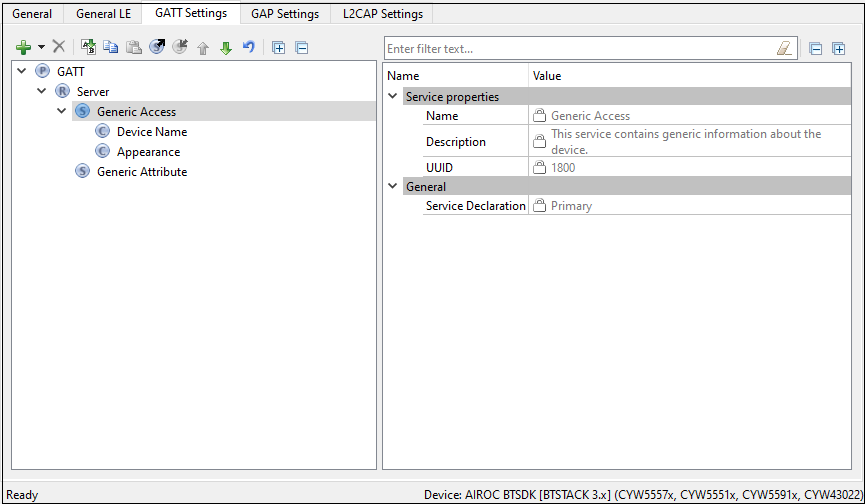
When the GAP Settings tab is available, you perform the actual Characteristics configuration in the General options located in it.
-
Device Name - This is the name of your device. It has a Read (without authentication/authorization) property associated with it by default. This parameter can be up to 248 bytes. For Option2 , Option3 , and Option4 , the value comes from the Device Name field on the GAP Settings tab, under General .
-
Appearance - The device's logo or appearance, which is a SIG defined 2-byte value. It has a Read (without authentication/authorization) property associated with it by default. For Option2 , Option3 , and Option4 , the value comes from the Appearance field on the GAP Settings tab, under General .
-
Peripheral Preferred Connection - A device in the peripheral role can convey its preferred connection parameter to the peer device. This parameter is 8 bytes in total and is composed of the following sub-parameters.
This parameter is available only when the device supports a Peripheral role. Refer to the GAP Settings tab Connection parameters section for more information.
Minimum Connection Interval – A 2-byte parameter that denotes the minimum permissible connection time.
**Maximum Connection Interval **– A 2-byte parameter that denotes the maximum permissible connection time.
Peripheral Latency – A 2-byte value that defines the latency between consecutive connection events.
Connection Supervision Timeout – A 2-byte value that denotes the LE link supervision timeout interval. Defines the timeout duration for which an LE link needs to be sustained if there is no response from the peer device over the LE link.
For proper operation, the **Connection Supervision Timeout **must be larger than (1 + Peripheral latency) * Connection Interval * 2 (ms). Refer to Bluetooth® Core Specification Volume 6, Part B, Chapter 4.5.2 for more information on Connection Supervision Timeout.
The above parameters are used for the connection parameters update procedure over L2CAP if a GAP central device does not use the peripheral preferred connection parameters. For example, iOS7 ignores peripheral preferred connection parameter Characteristics and establishes a connection with a default 30 ms connection interval. The peripheral device requests a connection parameter update by sending an L2CAP connection parameter update request at an appropriate time.
A typical peripheral implementation initiates the L2CAP connection parameter update procedure once any Characteristic is configured for periodic notification or indication.
-
Central Address Resolution - A device in the central role can convey whether it supports privacy with address resolution. The Peripheral checks if the peer device supports address resolution by reading the Central Address Resolution characteristic before using directed advertisement where the initiator address is set to a Resolvable Private Address (RPA).
-
Resolvable Private Address Only - Defines whether the device will use only Resolvable Private Addresses (RPAs) as local addresses.
Generic Attribute service
By default, the Generic Attribute Service does not have any Characteristics.
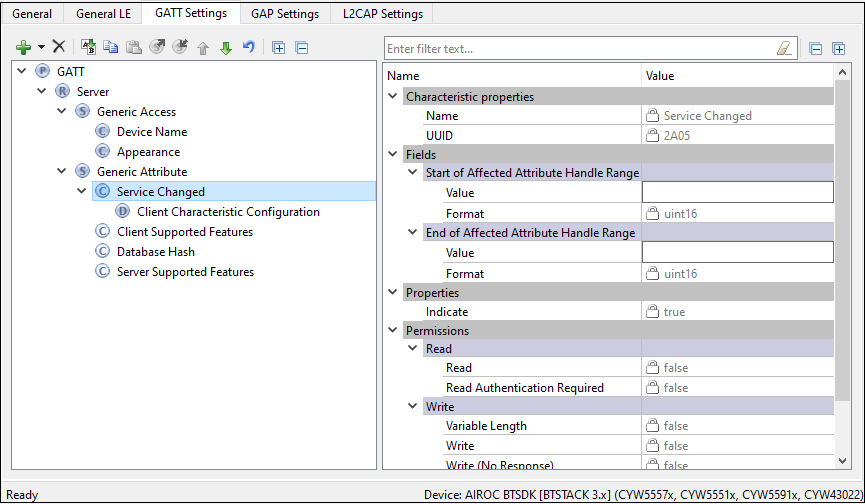
Add the optional Service Changed characteristic under the Generic Attribute Service if needed.
- Service Changed - This Characteristic is used to indicate to the connected devices that a Service has changed (added, removed, modified). It is used to indicate to GATT Clients that have a trusted relationship (bond) with the GATT Server when GATT-based Services have changed when they re-connect to the GATT Server. It is mandatory for the device in the GATT Client role. For the device in the GATT Server role, the Characteristic is mandatory if the GATT Server changes the supported Services in the device.
Custom Service configuration
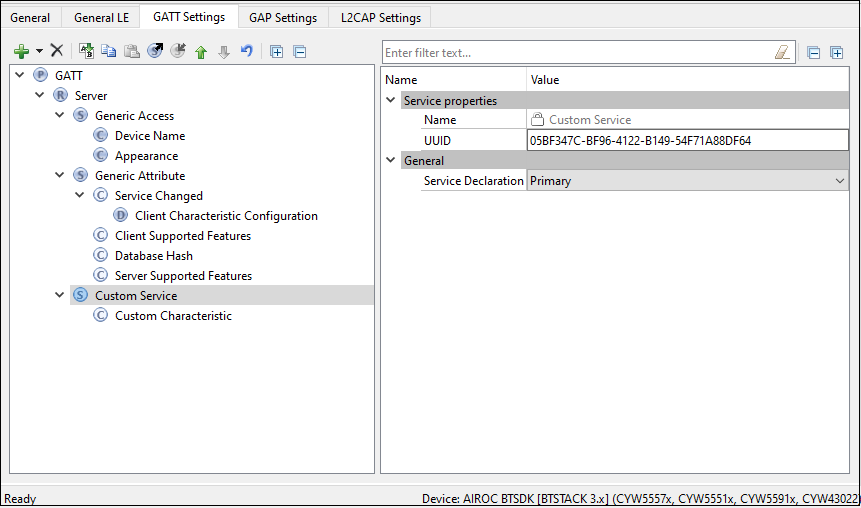
- UUID
A universally unique identifier of the service. This field is editable for Custom Services. By default, it is initialized with a random 128-bit UUID.
-
Service type
- Primary - Represents the primary functionality of the device.
- Secondary - Represents additional functionality of the device. The secondary service must be included in another service.
-
Included sevirces
This is the list of the services that can be included in the selected service. Each service may have one or more included services. The included services provide additional functionality for the service.
Custom Characteristic configuration
-
UUID
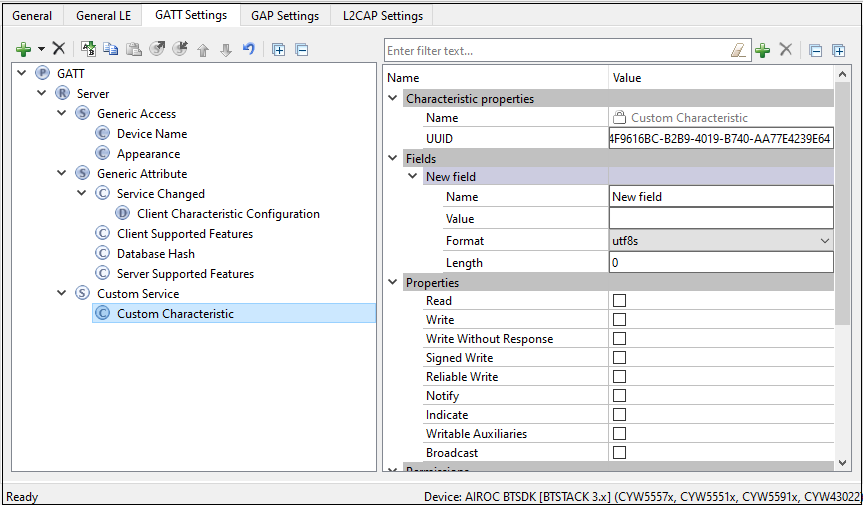
A universally unique identifier of the Characteristic. This field is editable for Custom Characteristic. By default, it is initialized with a random 128-bit UUID.
-
Fields
The fields represent a Characteristic value. The default value for each field can be set in the Value property. The fields are customizable for the Custom Characteristic. You can add or delete fields using the tool buttons located above the Properties editor.
-
Properties
The Characteristic properties define how the Characteristic value can be used. Some properties (Broadcast, Notify, Indicate, Reliable Write, Writable Auxiliaries) require the presence of a corresponding Characteristic Descriptor. For details, see Bluetooth ® Core Specification Vol.3, part G (GATT), Section 3.3.1.1 "Characteristic Properties".
-
Permissions
Characteristic permissions define how the Characteristic Value attribute can be accessed and the security level required for this access. Access permissions are set based on the Characteristic properties.
Permissions parameters differ depending on the selected device.
For Option4, the Auto sync property is available which determines if the Security permissions are automatically updated when the Security Mode or Security Level parameters are changed in Security Configuration 0 on the GAP Settings tab. Additional Security configurations do not affect attribute permissions.
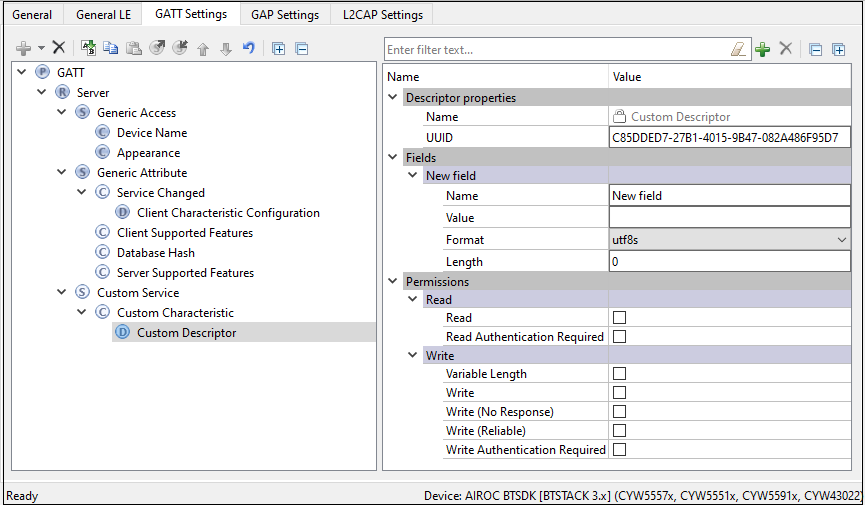
Custom Descriptor configuration
-
UUID
A universally unique identifier of the Descriptor. This field is editable for Custom Descriptors. By default, it is initialized with a random 128-bit UUID.
-
Fields
Fields represent a descriptor value. The default value for each field can be set in the Value property. In case of the Custom Descriptor, the fields are customizable. You can add or delete fields using the tool buttons located above the Properties editor.
-
Permissions
Descriptor permissions define how the Descriptor attribute can be accessed and the security level required for this access. Permissions parameters differ depending on the selected device.
Bootloader service configuration
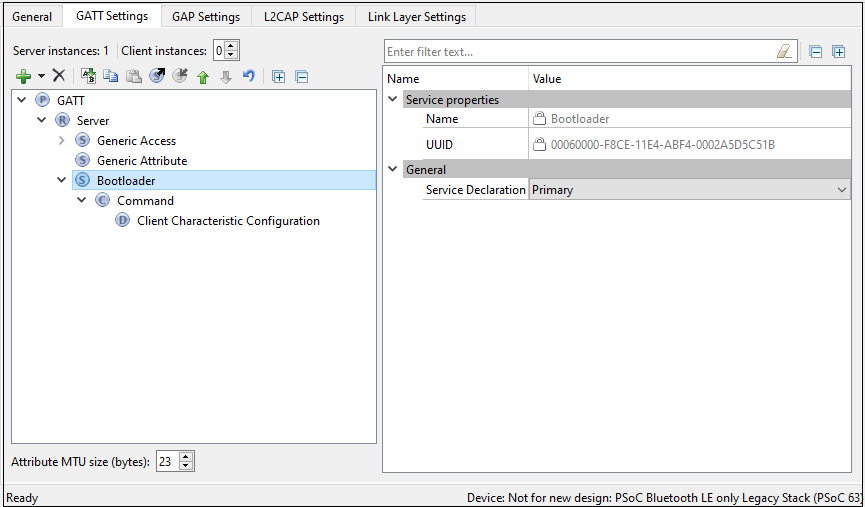
This service is available only for Option4.
-
UUID
A universally unique identifier of the service. The UUID is set to 00060000-F8CE-11E4-ABF4-0002A5D5C51B.
Command characteristic configuration
-
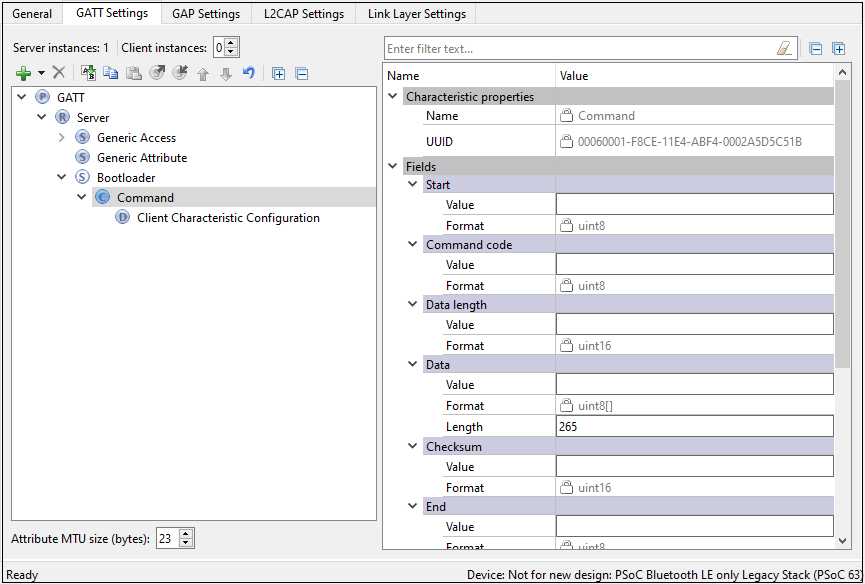
UUID
The universally unique identifier of the Characteristic. The UUID is set to 00060001-F8CE-11E4-ABF4-0002A5D5C51B.
-
Fields
-
Start of packet - The start of a bootloader packet.
-
Command - A bootloader command.
-
Status Code - Command status code.
-
Data Length - The length of a bootloader command/response to set to the maximum command data length possible in the design.
Per Bluetooth® Low Energy protocol, if the command requires a response larger than 20 bytes, the attribute MTU size should be increased. To support responses with a data length set to 56 (response for Get Metadata command), set the attribute MTU size to 66 according to the equation:
MTU size = Data Length + Bootloader command overhead + notification parameters overhead where:
- Data Length = the response data length
- Bootloader command overhead = 7
- Notification parameters overhead = 3
If the requirements are not followed, the Bluetooth® resource will fail to send a response to the requested command.
-
Data - Bootloader command data. The length of this field is specified by the Data Length field.
-
Checksum - A checksum computed for the entire packet except for the Checksum and End of Packet fields.
-
End of Packet - The end of a bootloader packet.
-
GATT service import/export
When creating new or updating existing configuration, you can export the selected GATT Service settings to an XML file on disk. Later, when working with another configuration, the saved file (service) can be imported back to the GATT tree. The imported configuration is analyzed for any possible errors (e.g. duplicate service name, etc.)
Partial configuration, containing a single GATT service is saved into a separate XML file on disk. This file has the special extension *.btsvc. To export a service, click its name on the GATT tree and press the Export button. To import a previously exported service, click “Server” on the GATT tree, press the Import button, and select the previously created *.btsvc file.
GAP Settings tab (Option2, Option3, Option4)
The GAP Settings tab parameters define the general connection settings required when connecting Bluetooth® devices. Select an item in the tree to see the various sections of parameters.
In the General tab, select the GAP role to display the GAP Settings tab settings. Use the Restore Defaults button to restore the default settings of the active tree item.
Values of many parameter settings can be customized. Also, many parameters have check boxes to enable or disable them.
The following sections describe the different categories of parameters based on the item selected in the tree.
Toolbar (GAP Settings)
The toolbar contains options to add or delete GAP role configuration and Security configuration.
-
Add ( Option4 )) – Allows adding: Peripheral, Central, Broadcaster, Observer or Security configurations.
Note: The available options depend on the GAP role selected in the General tab. You can add several configurations for one GAP role and switch between them using the firmware.
-
Delete ( Option4 )) – Deletes the selected Configuration.
GAP Settings tab General
This General section contains general GAP parameters. Option2, Option3, and Option4 have different sets of parameters.
Option4
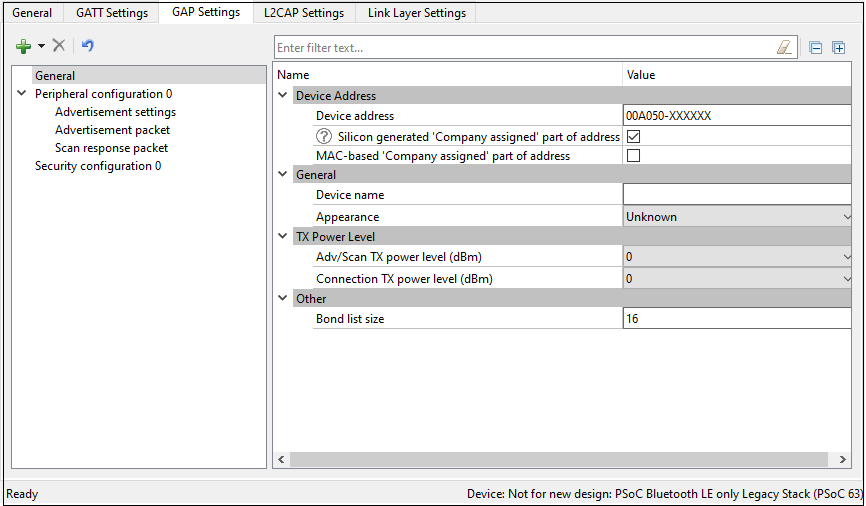
Option2, Option3
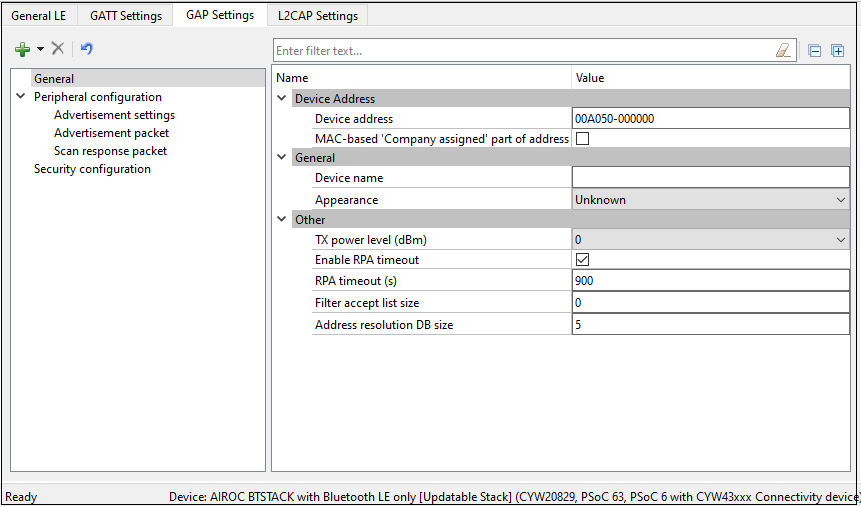
Device Address
This is a unique 48-bit Bluetooth® public address used to identify the device. It is divided into two parts:
-
Company ID - The 24 most significant bits: a 24-bit Organization Unique Identifier (OUI) address assigned by IEEE.
-
Company assigned - The 24 least-significant bits.
The address configured here is static and designed for development purposes only.
For Option4, during production, the device address is programmed into the user area of the supervisory flash (Sflash) location for the device address (Row 0) via the SWD interface. Normally, this address must be programmed only once during mass production, and then never changed in-field. However, application flash can be reprogrammed in-field many times.
During prototyping (FW design), the device address can be programmed into the user area of the Sflash location using the CYPRESS™ Programmer OpenOCD CLI. Refer to https://www.infineon.com/dgdlac/?fileId=8ac78c8c7ddc01d7017ddcfc7a355604 for more details.
The following command is an example of using the CLI to update the device address structure (type of cy_stc_ble_gap_bd_addr_t) with the data: 11 00 00 50 A0 00 00 (first 6 bytes are address with LSB first and last byte is the address type) in the Row 0 (0x1600 0800) of user area of the Sflash.
openocd.exe -s ../scripts -f interface/kitprog3.cfg -f target/psoc6.cfg -c " init; reset init; psoc6 allow_unsafe_sflash on; flash rmw 0x16000800 11000050A00000; reset; exit"

Row 1, Row 2, and Row 3 of the user area of the Sflash are not used by Bluetooth® LE and available for the user information storage.
Silicon-generated 'Company assigned' part of address (Option4)
When checked, the "'Company assigned' part of address" is generated using the factory programmed die X/Y location, wafer ID and lot ID of the silicon.
The Silicon-generated 'Company assigned' part of address option does not guarantee a unique device address. For mass production, Infineon Technologies strongly suggests that the device address be programmed into the user area (Row 0) of the Sflash location via the SWD interface.
MAC-based 'Company assigned' part of address
When checked, the 'Company assigned' part of addressis generated based on the MAC address of the PC.
Device name
The device name displays on the peer side. It can be up to 248 bytes.
This parameter:
-
has the default-associated Read (without authentication/authorization) property
-
configures the GAP Service Device Name Characteristic located in the Profile Tree
-
can be modified only when the device is a GATT Server.
Appearance
The device logo or appearance is a SIG-defined 2-byte value.
This parameter:
-
has the default-associated Read (without authentication/authorization) property
-
configures the GAP Service Appearance Characteristic located in the Profile Tree
-
can ber modified only when the device is a GATT Server.
Adv/Scan TX power level (Option4)
The initial transmitter power level (dBm) of the advertisement or scan channels upon startup. Default: 0 dBm. Possible values: -20 dBm, -16 dBm, -12 dBm, -6 dBm, 0 dBm, 4 dBm.
Connection TX power level (Option4)
The initial transmitter power level (dBm) of the connection channels upon startup. Default: 0 dBm. Possible values: -20 dBm, -16 dBm, -12 dBm, -6 dBm, 0 dBm, 4 dBm.
TX power level (Option2, Option3)
The initial transmitter power level (dBm) upon startup. Default: 0 dBm. Possible values: 20dBm, -16 dBm, -12 dBm, -8 dBm, -6dBm, -4 dBm, 0 dBm, 4 dBm, 8 dBm, 12 dBm.
The TX power level (dBm) parameter on the GAP Settings tab General screen is not applicable to CYW20829 devices and has no effect. Leave the default value (0dBm) in this field when using a CYW20829 device.
Check your project device datasheet to know which TX power levels the device supports.
Bond list size (Option4)
The maximum number of bonded devices supported by this device. The valid range is 1 - 128. Default: 16.
The maximum number of bonded devices is also limited by the size of the available application flash (emulated EEPROM area) size to be consumed for data storage. The consumed application flash size is calculated as the multiple of the number of supported services and the multiple of the number of supported bonded devices.
RPA timeout (Option2, Option3)
The interval of random address refreshing (seconds). The valid range is 1 - 41400. Default: 900.
Filter-accept list size (Option2, Option3 )
The maximum number of devices that can be added to the Filter accept list. The valid range is 0 - 128. Default: 0.
GAP Settings tab Advertisement settings
Option4
These parameters are available when the device is configured to contain a Peripheral or Broadcaster GAP role.
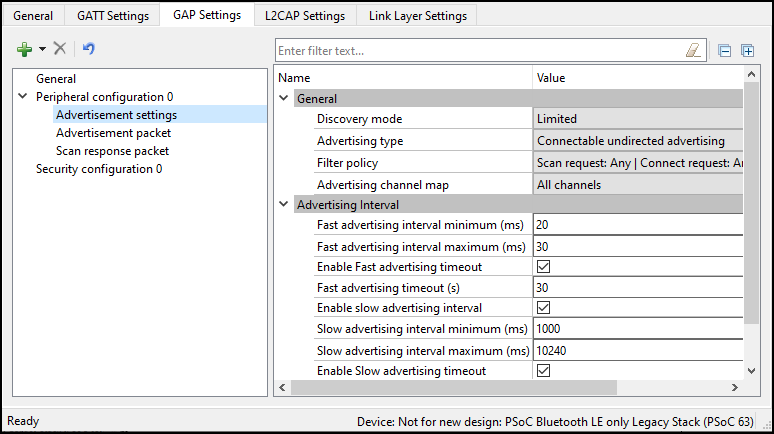
General
Discovery mode
-
Non-discoverable – The device cannot be discovered by a Central device.
-
Limited – Enables a device to be discoverable only for a limited period of time, during temporary conditions, or for a specific event. The device advertising in Limited Discoverable mode can connect to the Central device that is performing the Limited Discovery procedure. The timeout duration is defined by the applicable advertising timeout parameter.
-
General – The device is used by devices to be discoverable continuously or for no specific condition. The device advertising in General Discoverable mode can connect to the Central device that is performing the General Discovery procedure.
Advertising type
This parameter defines the advertising type to be used by the LL for appropriate Discovery mode.
-
Connectable undirected advertising – Advertises advertising and scan response data. It allows any other device to connect to this device.
-
Scannable undirected advertising – Broadcasts advertising data and scan response data to active scanners.
-
Non-connectable undirected advertising – Broadcasts advertising data.
Filter policy
This parameter defines the advertising type to be used by the LL for appropriateDiscovery mode.
-
Scan request – Any | Connect request: Any – Processes scan and connect requests from all devices.
-
Scan request – Filter accept list | Connect request: Any – Processes scan requests only from the devices in the Filter accept list and connect requests from all devices.
-
can request – Any | Connect request: Filter accept list – Processes scan requests from all devices and connect requests only from the devices in the Filter accept list.
-
Scan request – Filter accept list | Connect request: Filter accept list – Processes scan and connect requests only from the devices in the Filter accept list.
Advertising channel map
This parameter is used to enable a specific advertisement channel.
- Channel 37 – Enables advertisement channel #37.
- Channel 38 – Enables advertisement channel #38.
- Channel 39 – Enables advertisement channel #39.
- Channels 37 and 38 – Enables advertisement channels #37 and #38.
- Channel 37 and 39 – Enables advertisement channels #37 and #39.
- Channels 38 and 39 – Enables advertisement channels #38 and #39.
- All channels – Enables all three advertisement channels.
Advertising interval
This parameter defines the interval between two advertising events. Set the permissible minimum and maximum values of two Advertising interval types: Fast advertising interval and Slow advertising interval. Typically, after the device initialization, a peripheral device uses the Fast advertising interval. After the Fast advertising interval timeout value expires, and if a connection with a Central device is not established, then the Profile switches to Slow advertising interval to save the battery life. After the Slow advertising interval timeout value expires, CY_BLE_EVT_GAPP_ADVERTISEMENT_START_STOP event is generated.
The Advertising interval requires aligning with the selected Profile specification.
Fast advertising interval
This advertisement interval results in faster LE Connection. The Bluetooth® resource uses this interval value when the connection time is between the specified minimum and maximum values of the interval.
-
Minimum – The minimum interval for advertising data and establishing the LE Connection. The parameter is configured to increment in multiples of 0.625 ms. The valid range is from 20 ms to 10240 ms.
-
Maximum – The maximum interval for advertising data and establishing the LE Connection. The parameter is configured to increment in multiples of 0.625 ms. The valid range is from 20 ms to 10240 ms.
-
Timeout – The timeout value of advertising with fast advertising interval parameters. When equals 0, the device is advertising continuously and slow advertising settings become unavailable. A timeout cannot occur before the advertising interval expires. So, if a timeout value is smaller than the fast advertising interval minimum value, a warning displays.
Slow advertising interval
Defines the advertising interval for slow advertising. This is an optional parameter to implement advertising with a lower duty cycle to save battery life. The Slow advertising interval parameters are applied to the device after an internal fast advertising interval timeout occurs. The minimum and maximum values defined using this parameter allow the Bluetooth® LE Stack to expect advertising to happen within these intervals. This parameter is not applicable in General discovery mode.
-
Minimum – The minimum interval for advertising data and establishing the LE Connection. The parameter is configured to increment in multiples of 0.625 ms. The valid range is from 20 ms to 10240 ms.
-
Maximum – The maximum interval for advertising data and establishing the LE Connection. The parameter is configured to increment in multiples of 0.625 ms. The valid range is from 20 ms to 10240 ms.
-
Timeout – The timeout value of advertising with fast advertising interval parameters. When equals 0, the device is advertising continuously and slow advertising settings become unavailable. A timeout cannot occur before the advertising interval expires. So, if a timeout value is smaller than the fast advertising interval minimum value, a warning displays.
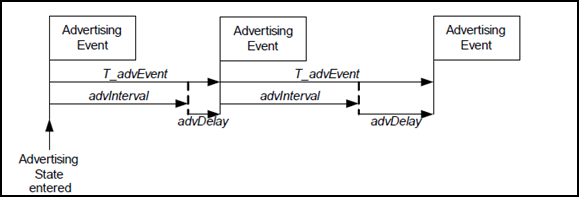
-
AdvDelay - A pseudo-random delay of 0-10 ms.
-
Complete Advertising Event - Consists of one advertising PDU sent into each of the used advertising channels.
Option2, Option3
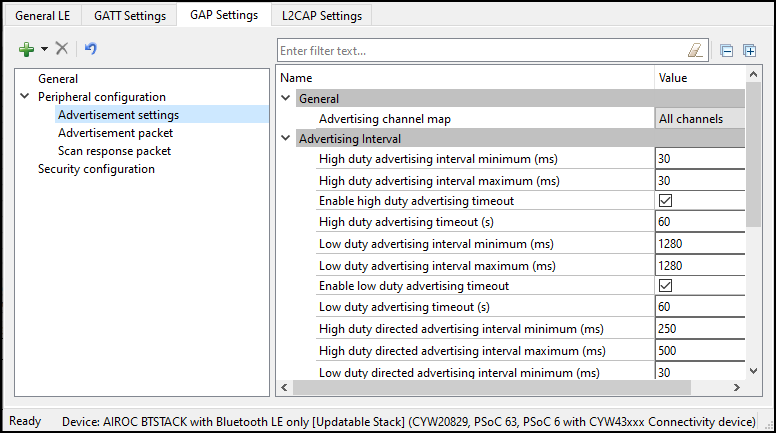
General
Advertising channel map
This parameter is used to enable a specific advertisement channel:
- Channel 37 – Enables advertisement channel #37.
- Channel 38 – Enables advertisement channel #38.
- Channel 39 – Enables advertisement channel #39.
- Channels 37 and 38 – Enables advertisement channel #37 and #38.
- Channels 38 and 39 – Enables advertisement channels #38 and #39.
- All channels – Enables all three advertisement channels.
Advertising interval
This parameter defines the interval between two advertising events.
High duty advertising interval
-
Minimum – The minimum interval for advertising data and establishing the LE Connection. The parameter is configured to increment in multiples of 0.625 ms
-
Maximum – The maximum interval for advertising data and establishing the LE Connection. The parameter is configured to increment in multiples of 0.625 ms.
-
Duration – The duration of advertising with high-duty advertising interval parameters. When not enabled, the device is advertising continuously.
Low duty advertising interval
-
Minimum – The minimum interval for advertising data and establishing the LE Connection. The parameter is configured to increment in multiples of 0.625 ms.
-
Maximum – The maximum interval for advertising data and establishing the LE Connection. The parameter is configured to increment in multiples of 0.625 ms.
-
Duration – The duration of advertising with high-duty advertising interval parameters. When not enabled, the device is advertising continuously.
High duty directed advertising interval
-
Minimum – The minimum interval for advertising data and establishing the LE Connection. The parameter is configured to increment in multiples of 0.625 ms.
-
Maximum – The maximum interval for advertising data and establishing the LE Connection. The parameter is configured to increment in multiples of 0.625 ms.
Low duty directed advertising interval
-
Minimum – The minimum interval for advertising data and establishing the LE Connection. The parameter is configured to increment in multiples of 0.625 ms.
-
Maximum – The maximum interval for advertising data and establishing the LE Connection. The parameter is configured to increment in multiples of 0.625 ms
-
Duration – The duration of advertising with high-duty advertising interval parameters. When not enabled, the device is advertising continuously.
High duty non connectable advertising interval
-
Minimum – The minimum interval for advertising data and establishing the LE Connection. The parameter is configured to increment in multiples of 0.625 ms.
-
Maximum – The maximum interval for advertising data and establishing the LE Connection. The parameter is configured to increment in multiples of 0.625 ms.
-
Duration – The duration of advertising with high-duty advertising interval parameters. When not enabled, the device is advertising continuously.
Low duty non connectable advertising interval
-
Minimum – The minimum interval for advertising data and establishing the LE Connection. The parameter is configured to increment in multiples of 0.625 ms.
-
Maximum – The maximum interval for advertising data and establishing the LE Connection. The parameter is configured to increment in multiples of 0.625 ms.
-
Duration – The duration of advertising with high-duty advertising interval parameters. When not enabled, the device is advertising continuously.
GAP Settings tab Advertisement packet
This Advertisement packet section displays when the device is configured to contain a Peripheral or Broadcaster GAP role. It is used to configure Advertisement data.
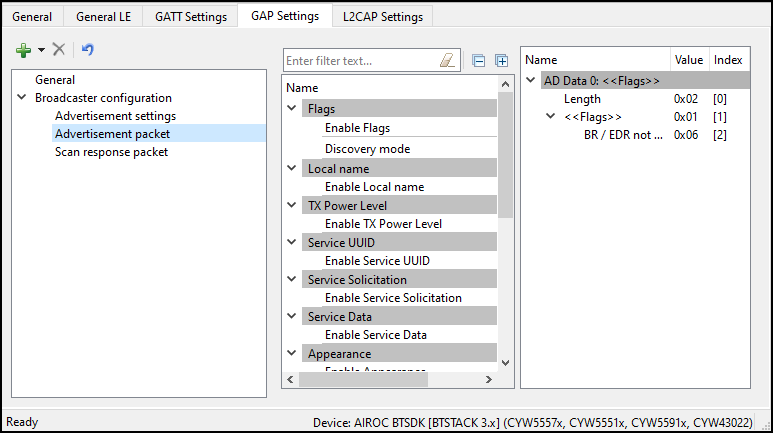
Advertisement/Scan response packet data settings
Advertisement (AD) or Scan response packet data is a 31-byte payload used to declare the device's Bluetooth® Low Energy capability and its connection parameters. This data structure is shown in the below graph per Bluetooth® specification.
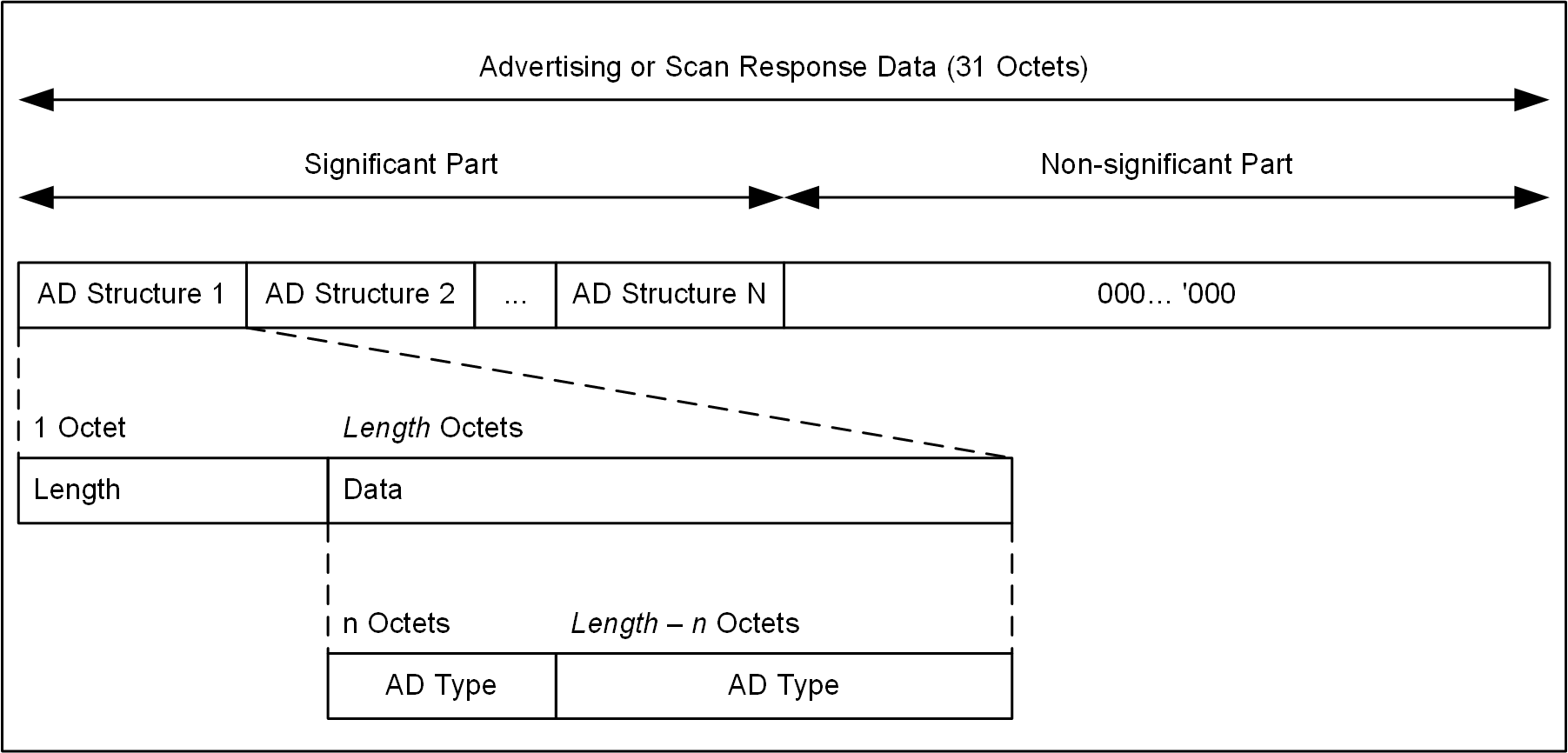
A data packet can contain a number of AD structures. Each of these structures is composed of the following parameters:
-
AD Length - The size of the AD Type and AD Data in bytes.
-
AD Type - The type of an advertisement within the AD structure.
-
AD Data - Data associated with the AD Type.
The total length of a complete Advertising packet cannot exceed 31 bytes.
An example structure for Advertisement data or Scan response data is AD Structure Element Definition:
-
AD Length – Size of AD Type and associated AD Data = 5 bytes
-
AD Type (1 byte) – 0x03 (Service UUID)
-
AD Data (4 bytes) – 0x180D, 0x180A (Heart Rate Service, Device Information Service)
The following table shows the AD Types:
| AD Type | Description |
|---|---|
| Flags | Flags to broadcast the underlying Bluetooth® LE transport capability such as Discoverable mode, LE only, etc. |
| Local Name | Device Name (complete of shortened). The device name value comes from the Device name field on the GAP Settings tab, under General. |
| TX Power Level | Transmit Power Level. Taken from the Adv/Scan TX power level (Option4) or TX power level (Option2, Option3) field on the GAP Settings tab, under General. |
| Peripheral Connection Interval Range | The preferred connection interval range for the device. Not available in the Broadcaster GAP role. |
| Service UUID | The list of device-implemented Service UUIDs to be broadcasted. There are different AD Type values to advertise 16-bit, 32-bit, and 128-bit Service UUIDs. 16-bit and 32-bit Service UUIDs are used if they are assigned by the Bluetooth® SIG. |
| Service Solicitation | The list of Service UUIDs from the central device to be used by the peripheral device. There are different AD Type values to advertise 16-bit, 32-bit, and 128-bit Service UUIDs. |
| Service Data | 2/4/16-byte Service UUID, followed by additional Service data. |
| Security Manager TK value | A temporal key to use at the time of pairing. Not available in the Broadcaster GAP role. |
| Appearance | The device external appearance. The value comes from the Appearance field on the GAP Settings tab, under General. |
| Public Target Address | The public device address of intended recipients. |
| Random Target Address | The random device address of intended recipients. |
| Advertising Interval | For Option4, calculated as an average of Fast advertising interval minimum and maximum values configured on the GAP Settings tab, under Advertisement settings. |
| LE Bluetooth® Device Address | The device address of the local device. The value comes from the Public device address field on the GAP Settings tab, under General. |
| LE Role | Supported LE roles. Not available in the Broadcaster GAP role. |
| URI | URI, as defined in the IETF STD 66. |
| Manufacturer Specific Data | The 2-byte company identifier followed by manufacturer-specific data. |
| Indoor Positioning | Data specified in the Indoor Positioning Service Specification. Available when the Indoor Positioning Service is in the Profile. |
GAP Settings tab Scan response packet
This Scan response packett section displays when the device is configured to contain a Peripheral or Broadcaster GAP role. It is used to configure a Scan response data packet to be used in response to device scanning performed by a GATT Client device.
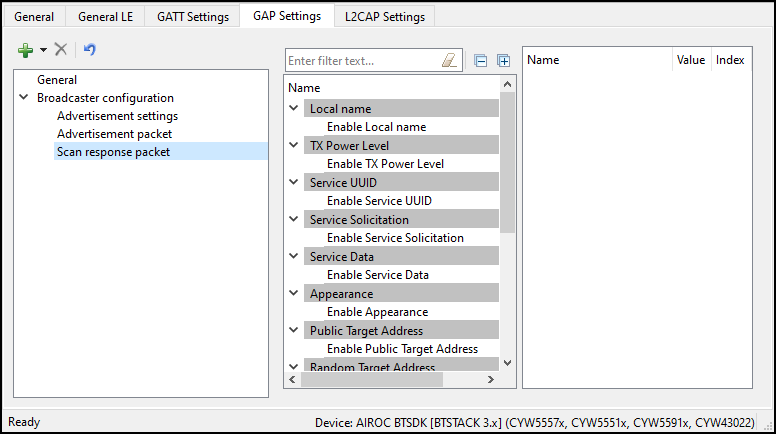
The Scan response packet structure is the same as of the Advertisement packet. See Advertisement / Scan response packet data settings under GAP Settings tab Advertisement packet for information on configuring the Scan response packet.
GAP Settings tab – Multi-advertisement
The Multi-advertisement Settings option is available when the device is configured to contain a Peripheral or Broadcaster GAP role. This feature allows you to advertise different sets of data at different time intervals. You can add up-to-ten multi-advertisement instances to the configuration tree and set different advertisement parameters and data.
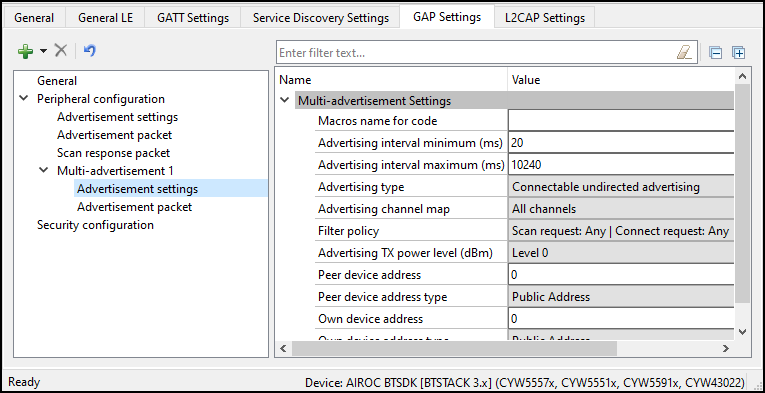
The parameters are as follows:
Macros name for code – Provides a meaningful name to the instance to create a macro-definition in the generated code.
-
Advertising interval minimum (ms)/Advertising interval maximum (ms) - Configured to increment in multiples of 0.625 ms.
-
Advertising type - Has several selectable options of advertising: Connectable undirected, Connectable directed, Scannable undirected, Non-connectable undirected, Connectable low duty cycle directed.
-
Advertising channel map - Selection of primary advertising channels – 37, 38, 39
-
Filter policy - Setting the Scan request and Connect request filtering options
-
Advertising TX power level (dBm) - Selection of a transmission power level: from -12dBm (level 0) to 4dBm (level 4
-
Peer device address - The six-byte address of a peer Bluetooth® LE device
-
Peer device address type - The public, random, Address or ID address of a peer Bluetooth® LE device
-
Own device address - Device own six-byte address
-
Own device address type - The own device public, random, Address or ID address type
For more details on the parameters, refer to GAP Settings tab General and GAP Settings tab Advertisement settings.
GAP Settings tab Scan settings
Option4
These parameters are available when the device is configured to contain the Central or Observer GAP role. Typically, during a device discovery, the GATT Client device initiates the scan procedure. It uses the Fast scan parameters for a period of time, approximately 30 to 60 seconds, and then it reduces the scan frequency using the Slow scan parameters.
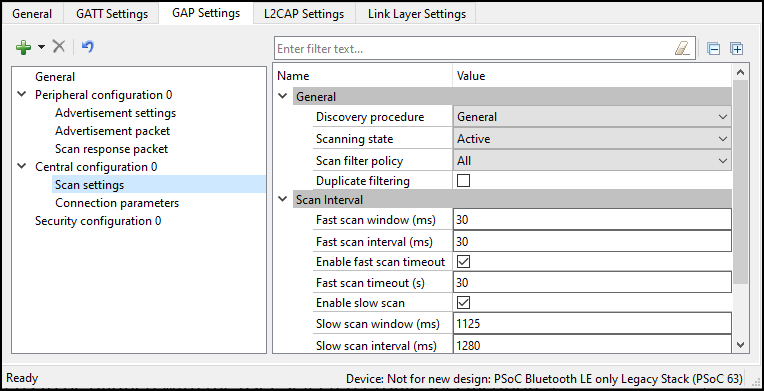
The scan interval requires aligning with the user-selected Profile specification.
General
Discovery procedure
-
Limited – The performing device discovers a device for limited Discovery mode advertising only.
-
General – The performing device discovers a device for both general and limited Discovery advertising.
Scanning state
-
Passive – The device can only listen to advertisement packets.
-
Active – The device may ask the advertiser for additional information.
Scan filter policy
This parameter defines how the advertisement packets are filtered.
-
All - All advertisement packets are processed
-
Filter accept list only – Only advertisement packets from the devices in the Filter accept list are processed.
Duplicate filtering
When enabled, this activates filtering of duplicated advertisement data. If disabled, the Bluetooth® LE stack will not perform filtering of advertisement data.
The controller firmware has eight address locations reserved to cache the previously seen advertiser devices and filter duplicate packets from them. If there are more than eight advertising devices in the scanner proximity during the scan period, the address storing buffer is exhausted. The firmware algorithm for overwriting the address cache buffer is implemented in the FIFO fashion. When the scanner sees more than eight advertisers, the ninth advertiser replaces the first one, the tenth advertiser replaces the second one, and so on, in the address cache. After flushing the first advertiser from the address cache, if the scanner meets the first advertiser's ADV packet again, it treats it as a new device (because the first advertiser is no longer in the address cache) and sends an ADV packet to the host.
Scan parameters
These parameters define the scanning time and interval between scanning events. Two different sets of Scan parameters are used: Fast scan parameters and Slow scan parameters. Typically, after the device initialization, a central device uses the Fast scan parameters. After the Fast scan timeout value expires, and if a connection with a Peripheral device is not set, then the Profile switches to the Slow scan parameters to save the battery life. After the Slow scan timeout value expires, the CY_BLE_EVT_GAPC_SCAN_START_STOP event is generated. See the API documentation.
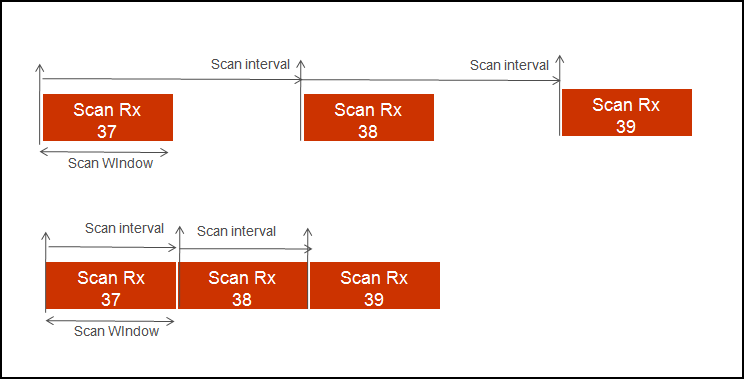
Fast scan parameters – This connection type results in a faster connection between the GATT Client and Server devices than it is possible using normal connection.
-
Scan Window – This parameter defines the scan window when operating in Fast connection. The parameter is configured to increment in multiples of 0.625 ms. The valid range is from 2.5 ms to 10240 ms. Scan Window must be less than the Scan Interval. Default: 30 ms.
-
Scan Interval – This parameter defines the scan interval when operating in Fast connection. The parameter is configured to increment in multiples of 0.625 ms. The valid range is from 2.5 ms to 10240 ms. Default: 30 ms.
-
Scan Timeout – The timeout value of scanning with fast scan parameters. Default: 30 s. When not enabled, the device is scanning continuously. A timeout cannot occur before the scanning interval is expired, that is why if a timeout value is smaller than the slow scanning interval minimum value, a warning displays.
Slow scan parameters – This connection results in a slower than possible connection between the GATT Client and GATT Server devices that use a normal connection. However, this method consumes less power.
-
Scan Window – This parameter defines the scan window when operating in Slow Connection. The parameter is configured to increment in multiples of 0.625ms. The valid range is from 2.5 ms to 10240 ms. Scan Window must be less than the Scan Interval. Default: 1125 ms.
-
Scan Interval – This parameter defines the scan interval when operating in Slow Connection. The parameter is configured to increment in multiples of 0.625 ms. The valid range is from 2.5 ms to 10240 ms. Default: 1280 ms..
-
Scan Timeout – The timeout value of scanning with slow scan parameters. Default: 150 s. When not enabled, the device is scanning continuously. A timeout cannot occur before the scanning interval expires, so if a timeout value is smaller than the slow scanning interval minimum value, a warning displays.
Option2
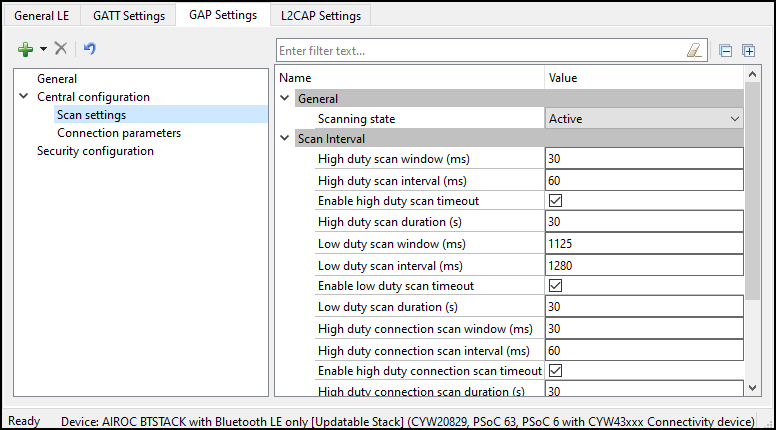
General
Scanning state
- Passive – A device can only listen to advertisement packets
- Active – A device may ask the advertiser for additional information
Scan interval
High duty scan parameters
-
Scan Window – The parameter is configured to increment in multiples of 0.625 ms. Scan Window must be less than Scan Interval.
-
Scan Interval – The parameter is configured to increment in multiples of 0.625 ms.
-
Scan Duration – The timeout value of scanning with high-duty scan parameters. Default: 30 s. When not enabled, the device is scanning continuously
Low duty scan parameters
-
Scan Window – The parameter is configured to increment in multiples of 0.625 ms. The valid range is from 2.5 ms to 10240 ms. Scan Window must be less than Scan Interval.
-
Scan Interval – The parameter is configured to increment in multiples of 0.625 ms.
-
Scan Duration –– The timeout value of scanning with low-duty scan parameters. Default: 30 s. When not enabled, the device is scanning continuously.
High duty connection scan parameters
-
Scan Window – The parameter is configured to increment in multiples of 0.625 ms. Scan Window must be less than Scan Interval.
-
Scan Interval – The parameter is configured to increment in multiples of 0.625 ms.
-
Scan Duration – The timeout value of scanning with high duty connection scan parameters. Default: 30 s. When not enabled, the device is scanning continuously.
Low duty connection scan parameters
-
Scan Window – The parameter is configured to increment in multiples of 0.625 ms. Scan Window must be less than Scan Interval
-
Scan Interval – The parameter is configured to increment in multiples of 0.625 ms.
-
Scan Duration – The timeout value of scanning with low-duty connection scan parameters. Default: 30 s. When not enabled, the device is scanning continuously.
GAP Settings tab Connection parameters
These parameters define the preferred Bluetooth® LE interface connection settings of the Central.
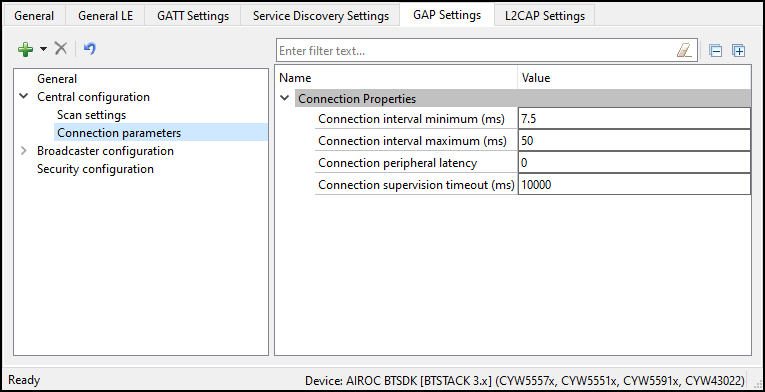
The scaled values of these parameters are used internally by the Bluetooth® LE stack. These are the actual values sent over the air.
-
Connection interval - The Central device connecting to a Peripheral device needs to define the time interval for a connection to happen.
-
Minimum (ms) – This parameter is the minimum permissible connection time value to be used during a connection event. It is configured in steps of 1.25 ms. The valid range is from 7.5 ms to 4000 ms.
-
Maximum (ms) – This parameter is the maximum permissible connection time value to be used during a connection event. It is configured in steps of 1.25 ms. The valid range is from 7.5 ms to 4000 ms.
Note: For the multi-connection use case, recommended the minimum connection interval per connection greater than N * Max Time taken by individual connections to complete a Bluetooth® Connection Event (CE).
Min_CI = N * Average Time Per CE
The average time for each CE is the amount of time taken to complete one Bluetooth® LE TX and RX transaction. This time varies depending on the Link Layer Data Length Extension (DLE) and Bluetooth® LE data rate (1 Mbps or 2 Mbps) configuration. The application can use the following timing lookup table for the CE value:
- If DLE is enabled and data rate is 1Mbps, Average time = 6ms
- If DLE is enabled and data rate is 2Mbps, Average time = 3.5ms
- If DLE is disabled and data rate is 1Mbps, Average time = 2ms
- If DLE is disabled and data rate is 2Mbps, Average time = 1.6ms
For example, if an application supports 4 Bluetooth® LE connections with DLE and 1-Mbps data rate, the recommended minimum connection interval for each of the connections is:
4 * 6 = 24 ms
Note: Connection intervals shorter than this value will still work, but under certain conditions, real-time control procedures (connection update, channel map update etc.) with a shorter update instance might result in a link disconnection.
-
-
Peripheral Latency - Defines the latency of the peripheral by responding to a connection event in consecutive connection events. This is expressed in terms of multiples of connection intervals, where only one connection event is allowed per interval. The valid range is 0 - 499 events.
-
Connection Supervision Timeout - This parameter defines the LE link supervision timeout interval. It defines the timeout duration for which an LE link needs to be sustained if there is no response from the peer device over the LE link. The time interval is configured in multiples of 10 ms. The valid range is from 100 ms to 32000 ms.
For proper operation, the Connection Supervision Timeout must be larger than (1 + Peripheral latency) * Connection Interval * 2 (ms). Refer to Bluetooth® Core Specification Volume 6, Part B, Chapter 4.5.2 for more information on Connection Supervision Timeout.
GAP Settings tab Security configuration
This Security configuration section contains several parameters to configure the global security options. Option2, Option3, and Option4 devices have different sets of parameters.
These parameters are configurable only if a connectable GAP role, Peripheral or Central, is selected. You can optionally set each parameter using its own unique Security Properties in the Profile Tree.
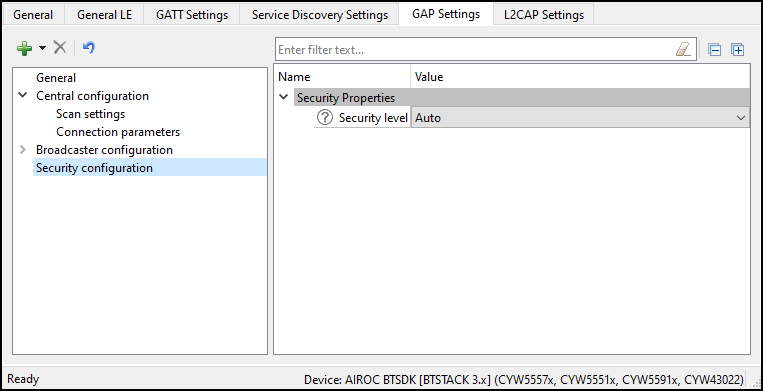
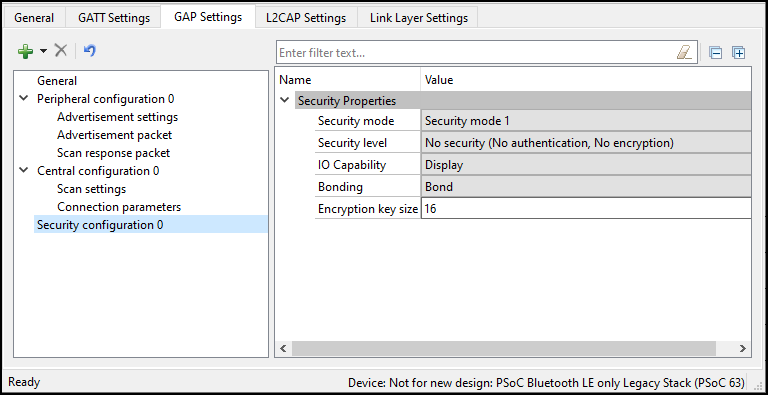
Security Properties
Security mode
Defines the GAP security modes. Both available modes may support authentication:
- Mode 1 – For designs where data encryption is required.
- Mode 2 – For designs where data signing is required.
Security level
-
**Option4 ** library: Enables different levels of security depending on the selected Security mode.
- Mode 1
-
No security – The device does not use encryption or authentication.
-
Unauthenticated pairing with encryption – The device sends encrypted data after establishing a connection with the remote device.
-
Authenticated pairing with encryption – The device sends encrypted data after establishing a connection with the remote device. To establish a connection, the devices perform the authenticated paring procedure.
-
Authenticated LE Secure Connections pairing with encryption – The device uses an algorithm called Elliptic curve Diffie–Hellman (ECDH) for key generation, and a new pairing procedure for the key exchange. It also provides a new protection method from Man-In-The-Middle (MITM) attacks
- Numeric Comparison.
-
- Mode 2
-
Unauthenticated pairing with data signing – The device performs data signing prior to sending it to the remote device after a connection is set up.
-
Authenticated pairing with data signing – The device performs data signing prior to sending it to the remote device after a connection is set up. To establish a connection, the device performs the authenticated paring procedure.
-
- Mode 1
-
Option2, Option3:
Provides the following levels of security:
-
Auto – The recommended choice for most applications to connect to the widest range of devices. Allows the stack to choose the highest level of security possible between the two devices.
-
Secure Connections – Can be set by applications that need to enforce secure connections.
-
Authentication – Can be set by applications that need to enforce Authentication.
-
Secure Connections with MITM protection – Can be set by applications that need to enforce secure connections with man-in-the-middle (MITM) protection.
Note: This parameter is used in BTSTACK 3.0 or above.
-
-
Keypress notifications
Provides an option for a keyboard device during the LE secure pairing process to send key press notifications when the user enters or deletes a key. This option is available when the Security level is set to Authenticated LE Secure Connections pairing with encryption and I/O capabilities option is set to either Keyboard or Keyboard and Display.
-
I/O capabilities
Refers to the device input and output capability, which can enable or restrict a particular pairing method or security level.
-
Display – In devices with the display capability and may display authentication data. GAP authentication is required.
-
Display Yes/No – In devices with a display and at least two input keys for the Yes/No action. GAP authentication is required.
-
Keyboard – In devices with a numeric keypad. GAP authentication is required.
-
No Input/No Output – In devices without any capability to enter or display the authentication key data to the user. Used in mouse-like devices. No GAP authentication is required.
-
Keyboard and Display – In devices like PCs and tablets. GAP authentication is required.
-
-
Bonding Requirement
Used to configure the bonding requirements. The purpose of bonding is to create a relation between two Bluetooth® devices based on a common link key (a bond). The link key is created and exchanged (pairing) during the bonding procedure and is expected to be stored by both Bluetooth® devices, to be used for future authentication. The maximum number of remote devices that can be bonded is 128. - Bonding – The device stores the link key of a connection after paring with the remote device in the application flash memory. If a connection is lost and re-established, the device uses the previously stored key for the connection.
Note: Bonding information is stored in RAM and is written to the application flash to be retained during a shutdown.
- No Bonding – The pairing process is performed on each connection establishment.
-
Encryption Key Size
Defines the encryption key size based on the Profile requirement. The valid values of an encryption key size are 7 - 16 bytes.
L2CAP Settings tab (Option2, Option3, Option4)
The L2CAP Settings define the parameters for L2CAP connection-oriented channel configuration.
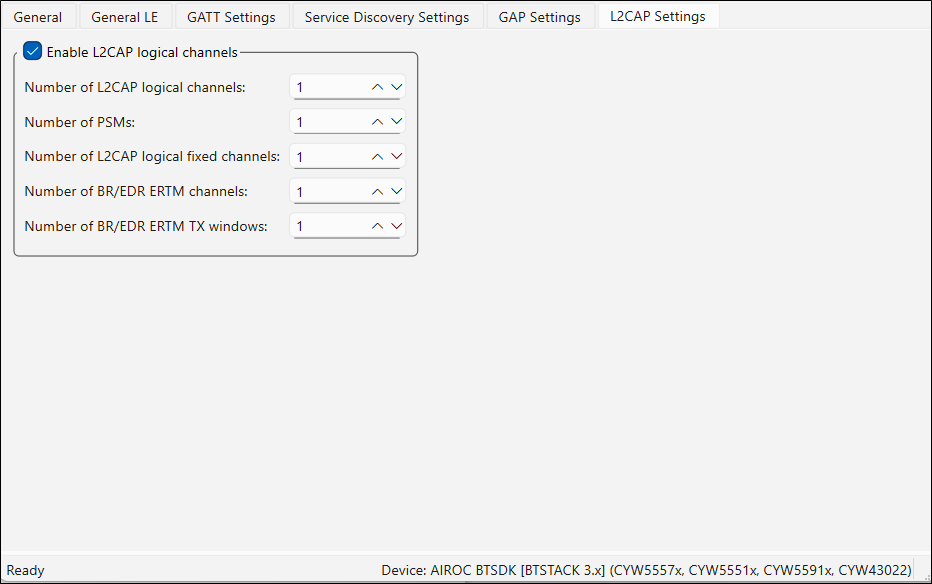
Enable L2CAP logical channels
This parameter enables configuration of the L2CAP logical channels.
The default value for Option4 is true, for Option2 and Option3 – false.
Number of L2CAP logical channels
This parameter defines the number of Low Energy L2CAP connection oriented logical channels required by the application. The valid range is 1 - 255. Default: 1.
Number of PSMs
This parameter defines the number of PSMs required by the application. The valid range is 1 - 255. Default: 1.
L2CAP MTU size
This parameter defines the maximum SDU size of an L2CAP packet. The valid range is 23 - 65488 bytes. Default: 1280 bytes when Internet Protocol Support Service is supported and 23 bytes otherwise.
Link Layer Settings tab (Option4)
The Link Layer Settings parameters for the Link Layer.
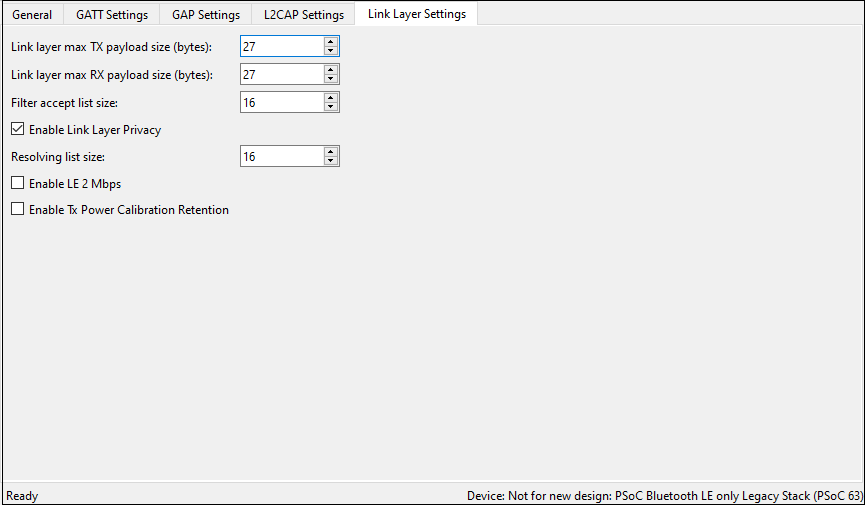
Link Layer Max TX payload size
The maximum link layer transmits a payload size to be used in the design. The actual size of the link-layer transmit packet is decided based on the peer device’s link-layer receive packet size during Data Length Update Procedure and will be informed through the CY_BLE_EVT_GAP_DATA_LENGTH_CHANGE event. The valid range is 27 - 251 bytes.
Link Layer Max RX Payload Size
The maximum link layer receives a payload size to be used in the design. The actual size of the link-layer receive packet is decided based on the peer device’s link-layer transmit packet size during Data Length Update Procedure and will be informed through CY_BLE_EVT_GAP_DATA_LENGTH_CHANGE event. The valid range is 27 - 251 bytes.
Setting Link Layer Max TX Payload Size or Link Layer Max RX Payload Size to the value greater than 27 enables the Low Energy Data Length Extension feature.
Filter accept list size
The maximum number of devices that can be added to the Filter accept list. The valid range is 1 - 16. Default: 16.
Enable Link Layer Privacy
Enables LL Privacy 1.2 feature of Bluetooth® 4.2 and enables generation of CY_BLE_EVT_GAP_ENHANCE_CONN_COMPLETE and CY_BLE_EVT_GAPC_DIRECT_ADV_REPORT events.
The CY_BLE_EVT_GAP_DEVICE_CONNECTED event is not generated when this feature is enabled.
Resolving list size
The maximum number of peer devices whose addresses should be resolved by this device. This parameter is applicable when the Enable Link Layer Privacy feature is enabled. The valid range is 1 - 16. Default:16.
Enable LE 2 Mbps
Enables the LE 2 Mbps feature of Bluetooth® 5.0.
The LE 2 Mbps feature enables a new Physical (PHY) modulation scheme that allows increasing data throughput between the two devices which support this feature. Refer to Bluetooth® Core Specification v5.0 for more details about this feature.
Use the Cy_BLE_SetDefaultPhy() API after the CY_BLE_EVT_STACK_ON event to set the preferred default PHY for all connections, or the Cy_BLE_SetPhy() API to set PHY for the current connection.
The CY_BLE_EVT_PHY_UPDATE_COMPLETE event will indicate when the controller changes the transmitter PHY or receiver PHY in use.
Enable TX Power Calibration Retention
When enabled, the Bluetooth® Low Energy radio TX power calibration is performed only once after programming and the calibration values are retained in the Sflash location. This retained value is reloaded to radio power calibration registers during consecutive device reboots. This reduces the Bluetooth® LE stack boot-up time significantly.
In Bluetooth® LE Dual-core mode, ensure to call the Cy_SysDisableCM4() function before enabling the Bluetooth® LE controller [that is, before calling Cy_BLE_Enable() on the controller core].
The calibration values are retained in user’s row 0 (after BLE_DEVICE_ADDRESS) of the Sflash location.
Service Discovery Settings tab (Option1, Option3) (Beta)
The Service Discovery Settings are used to configure SDP Services. This tab is available for Bluetooth® modeSingle mode BR/EDR or Dual mode. The tab has three areas: toolbars, the Services tree, and the Parameter configuration pane.
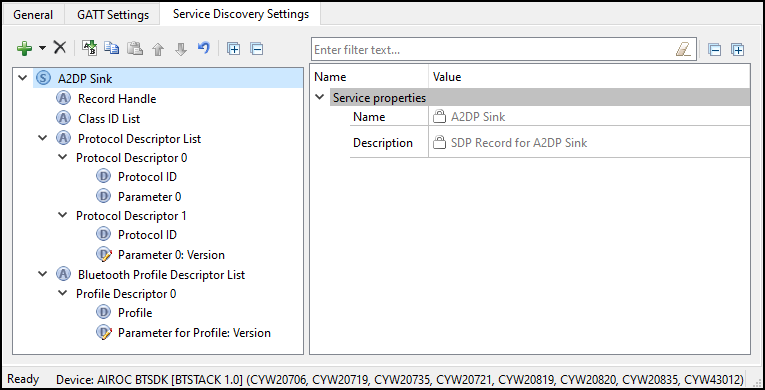
Toolbars
The toolbars contain navigation options and means to add or delete Services and Attributes.
-
Add - Allows adding a Service or an Attribute to the Services tree. To add an Attribute, highlight the parent Service in the Services tree. Refer to the Profiles section for the available Services.
-
Delete - Deletes the selected Service or Attribute.
-
Rename - Renames the selected item in the Services tree.
-
Copy/Paste - Copies/pastes items in the Services tree.
-
Move Up - Moves the selected item up in the Services tree
-
Move Down - Moves the selected item down in the Services tree.
-
Reset branch to default - Resets the selected item with child items in the Services tree to the default.
-
Expand All - Expands all items in the Services tree.
-
Collapse All - Collapses all items in the Services tree.
Services tree
The Services tree is used to view SDP Services, Attributes, Data element groups, and Data elements. By navigating through the tree, you can quickly add, delete, or modify Services and Attributes using the toolbar buttons or the context menu.
You can configure the parameters by clicking an item on the tree. These parameters will show in the Parameters configuration section.
The tree may contain the following nodes:
- Service
 Service Attribute
- Data element group: Data element.
 means that the Data element has editable fields.
In addition, nodes may have the following colors:
- Shaded icon – The node is mandatory
- White icon – The node is optional
Parameters configuration
The Parameters configuration pane allows you to view and configure a Service, Attribute, or Data element by selecting them in the tree. Attribute values are mainly hard-coded (and thus editing is disabled) to supply the required values according to the Bluetooth® Core Specification. Click through each Attribute and Data element under each Service to identify configurable values, and perform any additional configuration needed.
SDP services
The following SDP Services are available for selection:
- Advanced Audio Distribution Profile (A2DP) Sink
- Advanced Audio Distribution Profile (A2DP) Source
- A/V Remote Control (AVRC) Controller
- A/V Remote Control (AVRC) Target
- Device ID
- Hands-Free Audio Gateway
- Hands-Free Unit
- Human Interface Device
- Serial Port