Configure settings for devices, peripherals, and libraries
Depending on your application, you may want to update and generate some of the configuration code. While it is possible to write configuration code from scratch, the effort to do so is considerable. ModusToolbox™ software provides applications called configurators that make it easier to configure a hardware block or a middleware library. For example, instead of having to search through all the documentation to configure a serial communication block as a UART with a desired configuration, open the appropriate configurator to set the baud rate, parity, stop bits, etc.
Before configuring your device, you must decide how your application will interact with the hardware. That decision affects how you configure settings for devices, peripherals, and libraries.
The configurators can be run as GUIs to easily update various parameters and settings. Most can also be run as command line tools to regenerate code as part of a script. For more information about configurators, see the
Configurators
section. Also, each configurator provides a separate document, available from the configurator's
Help
menu, that provides information about how to use the specific configurator.
Configurator GUI tools
You can open various configurator GUIs using the appropriate make command from the application directory. For example, to open the Device Configurator, run:
make device-configurator
This opens the Device Configurator with the current application's design.modus configuration file.
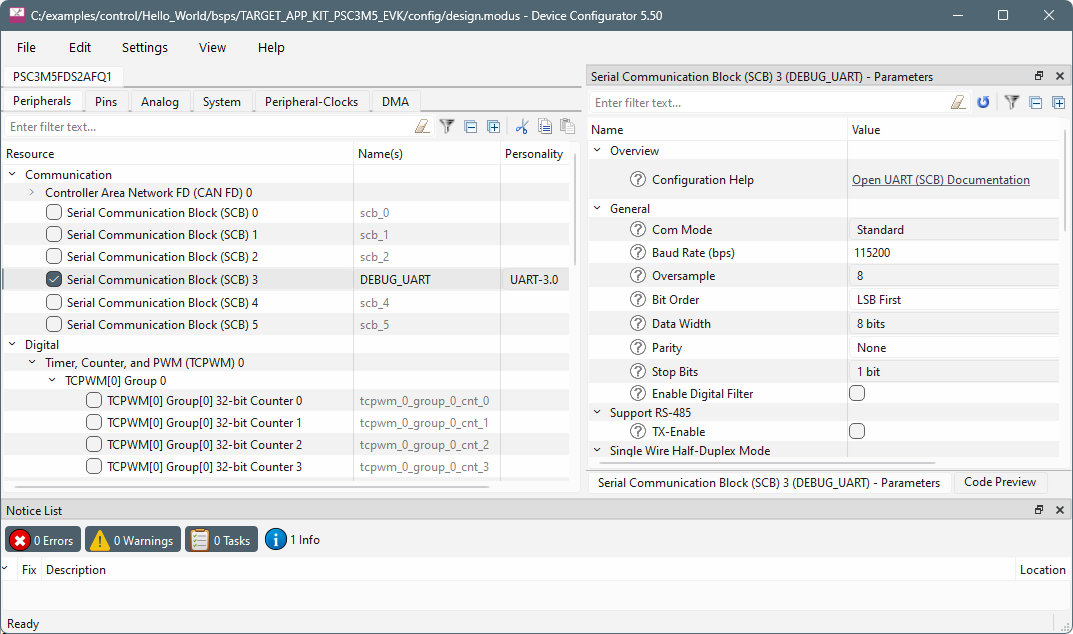
As described under
Utility make targets
, you can use the make command with appropriate arguments to open any configurator. For example, to open the CAPSENSE™ Configurator, run:
make capsense-configurator
You can also use the Eclipse IDE, if installed, to open configurators. For example, if you select the "Device Configurator" link in the IDE Quick Panel, the tool opens with the application's design.modus file. Refer to the
Eclipse IDE for ModusToolbox™ user guide
for more details about the Eclipse IDE.
One other way to open BSP configurators (such as CAPSENSE™ and SegLCD Configurators) is by using a link from inside the Device Configurator. However, this does not apply to Library configurators (such as Bluetooth® and USB Configurators).
Configurator CLI tools
Most of the configurators can also be run from the command line. The primary use case is to re-generate source code based on the latest configuration settings. This would often be part of an overall build script for the entire application. The command-line configurator cannot change configuration settings. For information about command line options, run the configurator using the
-h
option.