Overview
The DFU Host tool is a cross platform utility for managing DFU firmware upgrades. The tool has both GUI and CLI interfaces.
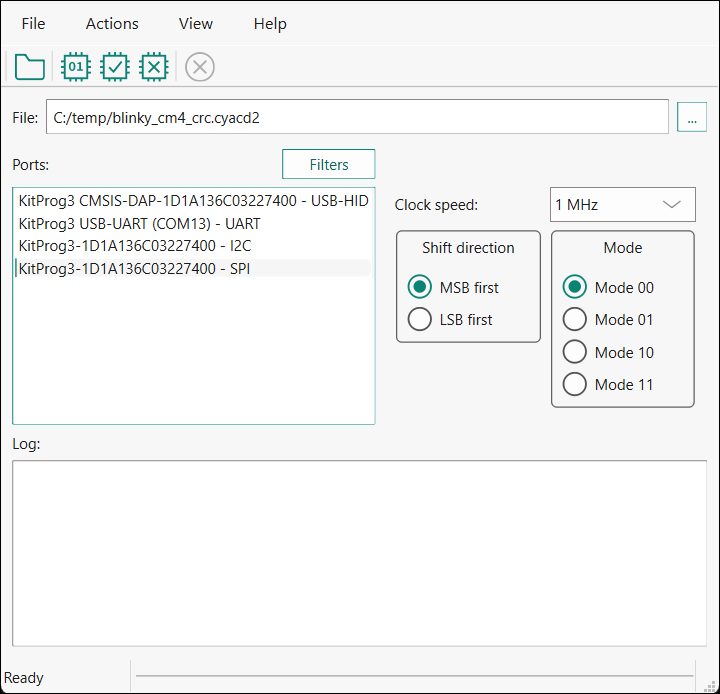
This tool allows you to:
-
Program new application data onto the supported MCU device using supported input files. See Supported devices and file formats .
-
Verify the program data that is already contained on the device.
-
Erase the application from the device.
-
Select the *.mtbdfu file output from a ModusToolbox™ application in order to program, write, read, erase and communicate with the device.
-
Abort the current operation.
Note: This operation leaves the device in whatever state it is in when the abort message is acted upon.
The DFU Host tool supports communicating via I2C, SPI, UART, USB-CDC, USB-HID, and CAN/CAN-FD. They are displayed to configure their settings and view the programming status. For I2C and SPI, supported MCU must include the KitProg3 firmware module or other bridge interface, which implements USB-UART, USB-I2C, and USB-SPI bridges. For UART, communication can be done directly from the PC simply by connecting an appropriate cable. For CAN/CAN-FD, use PEAK System hardware.
The process of initializing the device, two CPUs therein, and executing code in the SROM and supervisory flash, is referred to as “bootloading”. The process of installing and updating applications in the field is referred to as “device firmware update”. This process uses standard communication channels (UART, I2C, USB, etc.) to download new applications from a host.