GUI description
Menus
File
-
Open… - Opens an existing input file of the supported formats. If a file is already open, it will be closed.
-
Save Log As… - Opens the dialog to save the log file in a specified location.
-
Clear Log - Clears the current log.
-
Exit - Closes the DFU Host tool.
Actions
-
Program - Programs the application to the device.
-
Execute - Executes the . mtbdfu file on the host, establishes a DFU session with the target and processes the DFU commands
-
Verify - Verifies the programming of the device.
-
Erase All - Erases the program from the device.
-
Abort - Aborts the action.
View
- Toolbar - Shows/hides the toolbar.
Help
-
View Help - Opens this document.
-
About Device Firmware Update Host Tool - Opens the About box for version information, with links to open https://www.infineon.com and the current session log file.
Main window
File selection
This section describes how to select the input file, which contains the DFU commands or firmware image.
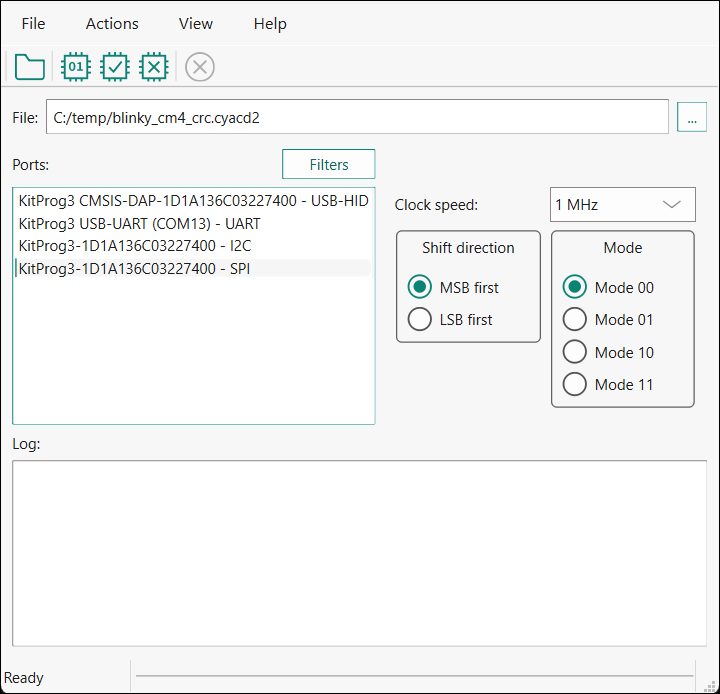
*** .mtbdfu**file configuration
The Configure and Generate buttons display when one or more *.bin or *.hex files are passed as an input. Click the Configure button to display the "Configuration" window.
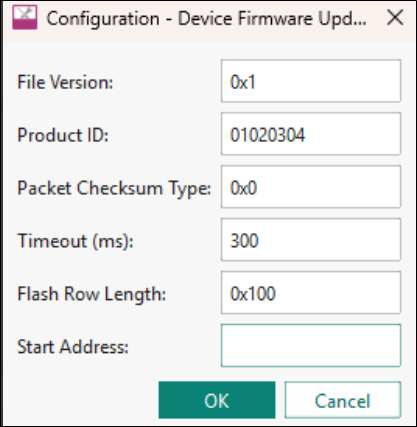
Enter the .mtbdfu file parameters to generate an *.mtbdfu file that is used to program/verify/erase the selected *.hex or *.bin file.
Ports
This section lists all ports attached to the computer to communicate with the bootloader. Based on which item is selected, different options are available for the Port Configuration.
Filters...
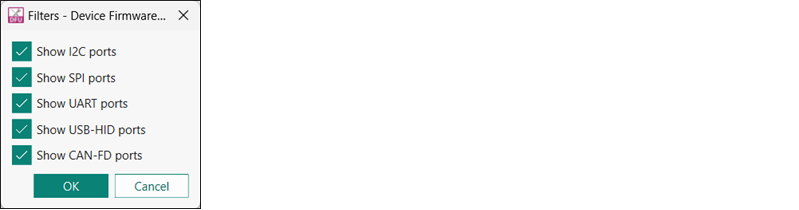
Use the Filters button to select which ports display in the Ports list.
Port configuration
This section allows for configuring the interface-specific options for communicating with the DFU system. This is necessary to ensure both the DFU and host computer are configured the same.
Refer to the appropriate probe documentation for a list of supported modes.
Not all SPI and UART communication properties combinations are supported.
I2C
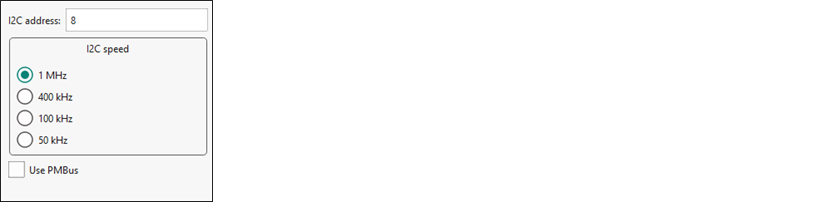
The parameters for the I2C communication:
-
I2C address - The address of the I 2 C-based target DFU system with which the host is communicating. The range for valid addresses is 8 - 120.
-
I2C speed - The I 2 C SCK signal frequency.
Note: It may happen that the device sends neither ACK nor NACK signal. In this case, it may take the DFU Host tool up to 20 seconds to send a timeout error.
PMBus

The parameters for the PMBus communication:
-
Command code - The PMBus command byte to send to the device.
-
Command size - The number of data bytes associated with the PMBus command.
-
Use PEC byte - Check this to append/verify the PMBus PEC for data integrity.
SPI
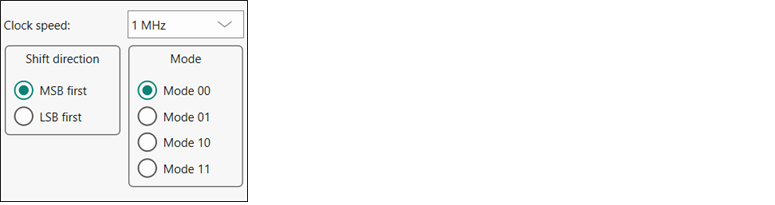
The parameters for the SPI communication:
-
Clock speed - The SPI SCLK signal frequency.
-
Shift direction - The bit ordering of transferred data.
-
Mode - The SPI operating mode.
UART and USB-CDC

The parameters for the UART/USB-CDC communication:
-
Baud - The baud (bit) rate at which data is transferred.
-
Data bits - The number of data bits per byte.
-
Stop bits - The number of stop bits indicating the termination of a byte.
-
Parity - The parity bit added to a byte.
Note: KitProg3 and MiniProg devices do not support custom values for data bits, stop bits, and parity. They are set to 8 data bits, 1 stop bit, and no parity respectively and cannot be changed.
USB-HID
USB-HID does not need port configuration. Both VID and PID are obtained automatically the device name is selected.
CAN
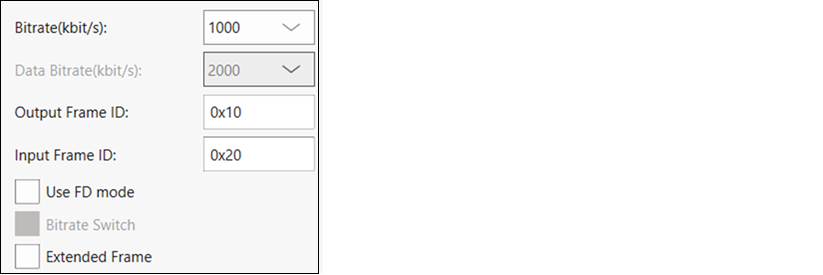
The parameters for the CAN communication:
-
Data bitrate - The data bitrate in kbit/s at which data is transferred if bitrate switch is enabled.
-
Output Frame ID - The output Frame ID for each sent frame.
-
Input Frame ID - Optional. Filters an incoming frame by its ID. Leave this field empty if you do not use it.
-
Extended Frame - Extended Frame to enable extended frame support.
CAN-FD
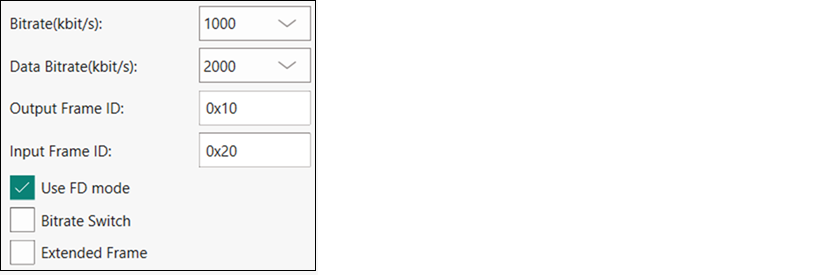
Enable the Use FD mode option to toggle switching between CAN-FD and CAN.
CAN-FD allows the following new options:
-
Data bitrate - The data bitrate in kbit/s at which data is transferred if bitrate switch is enabled.
-
Bitrate Switch - The bitrate switch to enable switching between bitrate and data bitrate.
The CAN-FD middleware supports one of the following configurations:
| Nominal Bitrate (kbps) | Data Bitrate (kbps) | |||||||
|---|---|---|---|---|---|---|---|---|
| 125 | 250 | 500 | 1000 | 2000 | 4000 | 8000 | 10000 | |
| Clock Frequency (Mhz) | 80 | 80 | 80 | 80 | 80 | 80 | 80 | 80 |
| Prescaler | 40 | 20 | 10 | 10 | 4 | 2 | 2 | 1 |
| Time Segment 1 | 12 | 12 | 12 | 5 | 7 | 7 | 7 | 5 |
| Time Segment 2 | 3 | 3 | 3 | 2 | 2 | 2 | 2 | 2 |
| Synchronization Jump Width | 1 | 1 | 1 | 1 | 1 | 1 | 1 | 1 |
Log
The log displays the history of what happened while the host was open:
- when operations started/completed
- information about user-initiated operations
- error messages during an operation if any.
Errors
Any errors for various fields display as a red X in the field containing the error, and it contains a tooltip when you hover the mouse cursor on it.