Input files
The DFU Host tool requires the .mtbdfu file file (JSON format) as the default input file. It also supports the *.cyacd2 file format for the basic program, verify, and erase operations as an input to retain the backward compatibility for PSOC™ 4 and PSOC™ 6 legacy devices.
The details for the supported input file:
-
*.mtbdfu file: The JSON input file for the DFU Host tool. It can be used for communication with the device using different commands available in the file. It should include a set of commands with respective data to be sent to the device through the DFU Host tool, using the DFU Command-Response protocol.
-
*.cyacd2 file: This can only be used for the firmware update use case. The file will consist of the required header information for the firmware image along with the firmware binary and address where data will be loaded. This format is only supported for PSOC™ 6 and PSOC™ 4 devices.
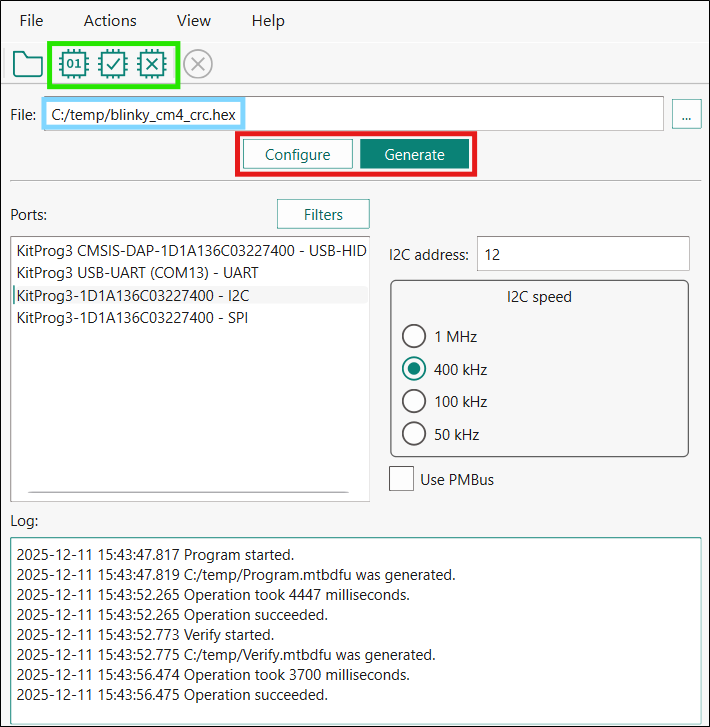
However, for the basic program, verify, and erase operations, the DFU Host tool can generate an *.mtbdfu file using the *.hex file provided as an input with the necessary header parameters required for the *.mtbdfu file. The below figure shows the dynamic window of the DFU Host tool, which displays when the *.hex file is selected as the input.
-
The green box on the toolbar indicates the actions available for using a *.hex or *.bin file as an input: program, verify, and erase the device. Modify the required parameter shown in the image and select the required option.
-
The blue box displays the *.hex file path selected as an input to the host tool. Only limited operations/actions are possible with selecting the *.hex or *.bin file as the input. For complex operation, use the *.mtbdfu file with the required set of commands.
-
The red box indicates the Configure and Generate buttons. Click the Configure button to open the "Configuration" window (see Main window ) where you can define the values of the "APPInfo" section, "timeoutMS" and "flashRowLength" of the *.mtbdfu file to be generated. The window displays the default values. They can be modified per device and use case. For more details, refer to the .mtbdfu file section. The Generate button generates the reference *.mtbdfu file for the program use case, the file will be saved in the same folder as the selected *.hex or *.bin file.
Sample JSON generated for the basic program use case
{
    "APPInfo": {
        "File Version": "0x1",
        "Packet Checkum Type": "0x0",
        "Product Id": "01020304"
    },
    "commands": [
        {
            "commandSet":[
                {
                    "cmdId":"0x37",
                    "dataLength":"0x10",
                    "repeat":"0x20"
                },
                {
                    "cmdId": "0x49",
                    "dataLength": "0x08"
                }
            ],
            "dataFile":"blinky_cm4_crc.hex",
            "flashRowLength":"0x200",
            "repeat": "EoF",
            "timeoutMS": "0x12c"
        }
    ]
}
The above JSON sample displays the template *.mtbdfu file generated from the given *.hex file as the input. The DFU Host Tool will use the *.mtbdfu file for programming the firmware *.hex file to the device.
The default flow of the DFU-MW-based firmware update includes a set of repetitive Send Data commands (0x37), a program row command (0x49) with the row checksum, and the row address to write.
The set of 0x37 commands must send exactly the same number of bytes as specified in the flashRowLength field to provide enough data to the device DFU buffer for the program or verify operations. The sample JSON above sends 32 (0x20) Send Data commands and each of them passes 16 (0x10) bytes of data, so that the amount of passed data (32*16=512) equals the length of the flash row.
You can increase the number of data bytes in order to decrease the number of operations and execution time by sending 32 bytes 16 times, 64 bytes 8 times or even sending 121 bytes 4 times and 28 bytes 1 time (121*4+28=512). These combinations depend on the interface, its maximum transfer size, bootloader, and flash row length. Some bootloaders (for example, Extended Boot) support only up to 60 bytes per packet via the SPI, and common use cases of I2C and SPI via KitProg/MiniProg usually allow the maximum of 64 bytes per packet. The maximum packet size, which can be sent out of the DFU Host Tool is 128 bytes, so the maximum data size in one packet is 121 (7 bytes describe the packet).
The JSON file uses the APPInfo object required for the DFU communication setup. It contains potential information, the image version, product ID of the device the same as loaded with the loader application along with the checksum type for DFU command packet.
The sample contains the command object, which contains the list of command sent to the device. This object can be used to send a single as well as multiple DFU commands in the sequence required. The object contains another sub-object commandSet, which can group multiple commands to provide shared data across the group and repeat the set of commands.
In the JSON sample above, the command set is repeated till the end of the image file. The DFU application requires the flash row length to divide the packets into multiple sets. For more details, refer to AN 236282.
.mtbdfu file
The file contains the following sections:
APPInfo
Provides information about the device and the application:
-
File Version – Indicates the application version, can be used to track updates.
-
Product ID – Unique ID of the device communicating with the host.
-
Packet Checksum Type – Used for the . hex file, for DFU packet checksum.
-
Timeout (ms) – Alters the timeout for the response packet (milliseconds).
-
Flash Row Length – Specifies the flash row length on the device.
-
Start Address – Used with a *.bin file. Defines the flash memory address where the raw binary’s first byte is written
Command
Consists of the details of the command to be sent to the device along with the data.
JSON fields available in the Command section
| Field | Description |
|---|---|
cmdId | Command field. Specifies the DFU command number; the valid range is "0x00 - 0xFF". "0x00 - 0x49": A standard DFU command range"0x50-0xFF": Reserved for Future Use |
commandSet | Denotes a set of commands, required for repeating a set of commands. |
dataBytes | (Optional) The actual payload to use in a command. |
dataFile | (Optional) Specifies the name of the input file from where the payload data will be read. |
startAddress | Used with a *.bin file. Defines the flash memory address where the raw binary’s first byte is written. |
dataLength | (Optional) The length of the payload data in bytes. |
flashRowLength | Specifies the flash row length on the device. Valid only if dataFile is defined. |
repeat | - Repeats a command for a specified number of times. Valid only when dataFile is defined. For example: repeat: "10" means that the command will be repeated 10 times.repeat: "EoF" means that the command will be repeated until the end of dataFile.- Only for cmdId: "0x37", "repeat": "auto" can be used to automatically calculate how many times to repeat the command to fill the program data row size. |
startOffset | Specifies the file offset from where data bytes will be read. Valid only if dataFile is defined. |
sessions | (Optional) Used to define multiple DFU sessions in the *.mtbdfu file. |
outFile | (Optional) Specifies the file name to store intermediate packets generated by the tool. |
outCli | (Optional) Output response data from the device to the command line. Note: The option does not display the response packet metadata (status code, data length, checksum etc.), only data payload. Use --debug, to display all DFU packets |
msg | (Optional) Used to add comments to the *.mtbdfu file. These will not be sent to the device. |
rsp | (Optional) A response is expected for the defined command. If no response is defined, the default expected response is 0x00 (DFU_SUCCESS). |
retriesCount | Restart the connection lost for a specified number of times or until the channel gets active again. The DFU Host tool will reconnect to the device with all previous selected configuration of the channel, speed, address mode, etc.. Reconnection means establishing the channel communication again and sending the DFU start command. After successful reconnection, JSON will define the next set of tasks/commands. Equals 0 by default. |
timeoutS | Alters the timeout for the response packet (seconds). It will apply for all retries of the operation if the "retriesCount" is non-zero. |
timeoutMS | Alters the timeout for the response packet (milliseconds). It will apply for all retries of the operation if the "retriesCount" is non-zero. |
timeoutUS | Alters the timeout for the response packet (microseconds). It will apply for all retries of the operation if the "retriesCount" is non-zero. |
delayS | Sets the amount of time to wait between two commands in seconds. It is defined in a separate JSON object in the "commands" array without any additional fields in it. |
delayMS | Sets the amount of time to wait between two commands in milliseconds. It is defined in a separate JSON object in the "commands" array without any additional fields in it. |
delayUS | Sets the amount of time to wait between two commands in microseconds. It is defined in a separate JSON object in the "commands" array without any additional fields in it. |
The "APPInfo" section is mandatory for the JSON file; it is required to start the DFU communication.
Optional commands must be defined per use case.
All number values must be in the hexadecimal format.
Use case 1: Sample JSON generated for basic program
{ "APPInfo": { "File Version": "0x1", "Product Id": "01020304", "Packet Checksum Type": "0x0" }, "sessions": [ { "commands": [ { "dataFile":"blinky_cm4_crc.hex", "commandSet":[ { "cmdId":"0x37", "dataLength":"0x39", "repeat":"0x8" }, { "cmdId":"0x37", "dataLength":"0x38" }, { "cmdId": "0x49", "dataLength": "0x08" } ], "repeat":"EoF", "flashRowLength":"0x200", "outFile":"log.txt" } ] }, { "commands": [ { "dataFile":"blinky_cm4_crc.hex", "commandSet":[ { "cmdId":"0x37", "dataLength":"0x39", "repeat":"0x8" }, { "cmdId":"0x37", "dataLength":"0x38" }, { "cmdId": "0x4A", "dataLength": "0x08" } ], "repeat":"EoF", "flashRowLength":"0x200" } ] } ] }
The above sample JSON file describes two sessions for programming and verifying the same image. Both sessions write 512 bytes of data (defined by the flashRowLength field) to the device by sending 57 bytes 8 times and 56 bytes one time before each Program Data(0x49) or Verify Data(0x4A) command. This is the optimal combination of Send Data command configurations to pass the maximum data in the minimum amount of operations. The first session also defines the outFile field to log all the packets. The sample JSON file is used only to demonstrate how to use the various arbitrary fields in the *.mtbdfu file. This *.mtbdfu file is only a reference template and does not correspond to any specific use case.
Use case 2: Sample JSON generated for multi-segment sparse binary program
{ "APPInfo": { "File Version": "0x1", "Packet Checksum Type": "0x0", "Product Id": "01020304" }, "commands": [ { "commandSet": [ { "cmdId": "0x37", "dataLength": "0x10", "repeat": "0x10" }, { "cmdId": "0x49", "dataLength": "0x08" } ], "dataFile": "C:/dfu-configurator/psoc4_blinky_crc.bin", "flashRowLength": "0x100", "repeat": "EoF", "startAddress": "0x10000", "timeoutMS": "0x12c" }, { "commandSet": [ { "cmdId": "0x37", "dataLength": "0x10", "repeat": "0x10" }, { "cmdId": "0x49", "dataLength": "0x08" } ], "dataFile": "C:/dfu-configurator/psoc4_blinky_crc2.bin", "flashRowLength": "0x100", "repeat": "EoF", "startAddress": "0x10100", "timeoutMS": "0x12c" } ] }
A raw .bin file contains only consecutive byte data and no intrinsic load address metadata. Therefore, the flash start location must be explicitly provided for each segmen via startAddress in the *.mtbdfu file so the data be placed in the device memory.
The binary is manually split into two segment files to skip large zero-filled/uninitialized gap so reducing the total bytes transferred and programming time. This example performs two full programming passes over two non-contiguous 256-byte segments. Each session programs segment psoc4_blinky_crc.bin at 0x10000 and psoc4_blinky_crc2.bin at 0x10100, skipping the zero-filled gap. For every flash row (0x100 bytes), sixteen Send Data (0x37) packets of 16 bytes (0x10 * 0x10 = 0x100) precede a Program Data (0x49) command.