Board support packages
This chapter describes a board support package (BSP). The major headings include:
Overview
A BSP provides a standard interface to a board's features and capabilities. The API is consistent across our kits. Other software (such as middleware or an application) can use the BSP to configure and control the hardware. BSPs do the following:
-
initialize device resources, such as clocks and power supplies to set up the device to run firmware
-
contain default linker scripts and startup code that you can customize for your board
-
contain the hardware configuration (structures and macros) for both device peripherals and board peripherals
-
provide abstraction to the board by providing common aliases or names to refer to the board peripherals, such as buttons and LEDs
-
include the libraries for the default capabilities on the board (For example, the BSP for a kit with CAPSENSE™ capabilities includes the CAPSENSE™ library.)
What's in a BSP
This section presents an overview of the key resources that are part of a BSP. Applications can share libraries. BSPs are owned by an application. For more details about library management, refer to the Library Manager user guide.
The following shows a typical PSOC™ Control BSP located in the bsps subdirectory.
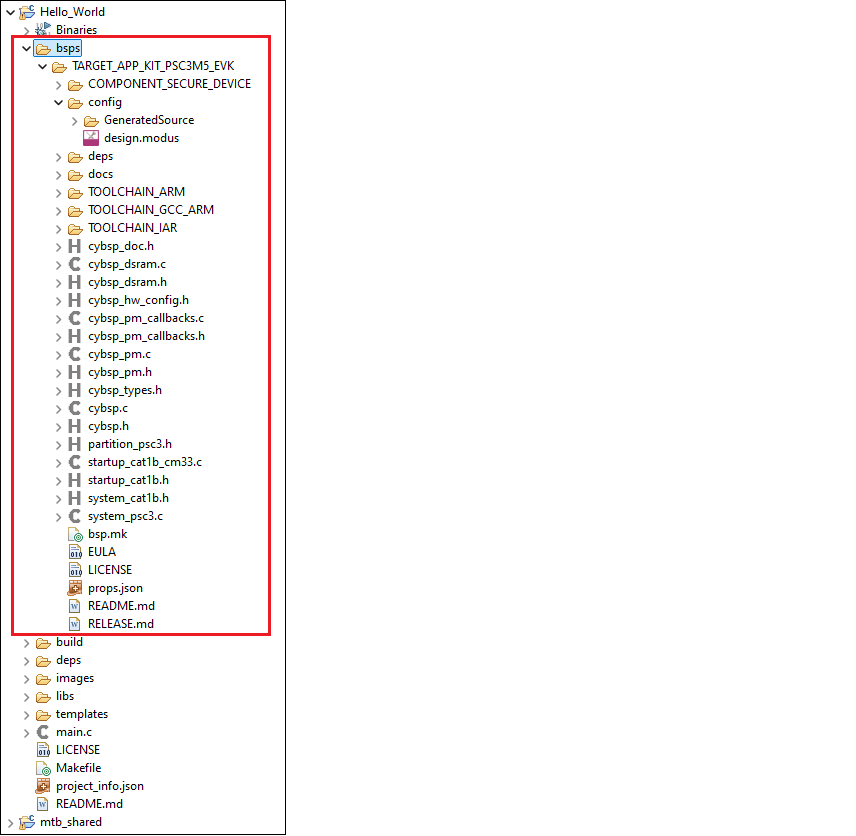
The following sections describe the various files and directories in a typical BSP:
TARGET
This is the top-level directory for a BSP. All BSPs begin with "TARGET" and this is referenced in the application Makefile for the active BSP.
config
This directory contains the configuration files (such as design.modus) for use with various BSP configurator tools, including Device Configurator, QSPI Configurator, and CAPSENSE™ Configurator. At the start of a build, the build system invokes these tools to generate the source files in the GeneratedSource directory.
COMPONENT
Some applications may have "COMPONENT" subdirectories. These directories are conditional, based on what the BSP is being built for. For example, the PSOC™ 6 BSPs include COMPONENT directories to restrict which files are used when building for the Arm® Cortex M4 or M0+ core.
deps subdirectory
The deps subdirectory inside the BSP contains .mtbx files for various library dependencies for the BSP.
docs subdirectory
The docs subdirectory contains the documentation in HTML format for the selected BSP.
Support files
Different BSPs will contain various files, such as the API interface to the board's resources. For example, a typical PSOC™ 6 BSP contains the following:
-
c ybsp.c /.h – You need to include only cybsp.h in your application to use all the features of a BSP. Call
cybsp_init ()from cybsp.c to initialize the board. -
cybsp_types.h – This currently contains Doxygen comments. It is intended to contain the aliases (macro definitions) for all the board resources, as needed.
-
system_psoc6.h – This file provides information about the chip initialization that is done pre-
main().
bsp.mk
This file defines the DEVICE and other BSP-specific make variables such as COMPONENTS. These are described in the ModusToolbox™ build system chapter. This file also defines board-specific information such as the device ID, compiler and linker flags, pre-builds/post-builds, and components used with this board implementation.
README/RELEASE.md
These are documentation files. The README.md file describes the BSP overall, while the RELEASE.md file covers changes made to version of the BSP.
BTSDK-specific BSP files
BTSDK BSPs may optionally provide the following types of files:
-
wiced_platform.h – Platform specific structures to define hardware information such as max number of GPIOs, LEDs or.user buttons available
-
Makefile – Provided to support LIB flow applications (BTSDK 2.7 and earlier). Not used in MTB flow BTSDK 2.8 or later applications.
-
*. hex – binary application image files that are used as part of the embedded application creation, program, and/or OTA (Over-The-Air) upgrade processes.
-
platform.c/h* – Platform specific source and header files used by platform and application initialization functions.
-
[BSP_NAME].cgs* – Patch configuration records in text format, can be multiple copies supporting various board configurations.
-
[BSP_NAME].btp* – Configuration options related to building and programming the application image, can be multiple copies supporting various board configurations.
Creating your own BSP
For ModusToolbox™ version 3.x, there is a tool called the BSP Assistant to create and modify BSPs. Refer to the BSP Assistant user guide for details about using that tool.
For a better understanding of the contents and structure of a BSP and more detailed information about how to create a custom BSP, as well as update the Wi-Fi and Bluetooth® connectivity device and firmware in a BSP, refer to Application Note AN235297.