Understand application structures
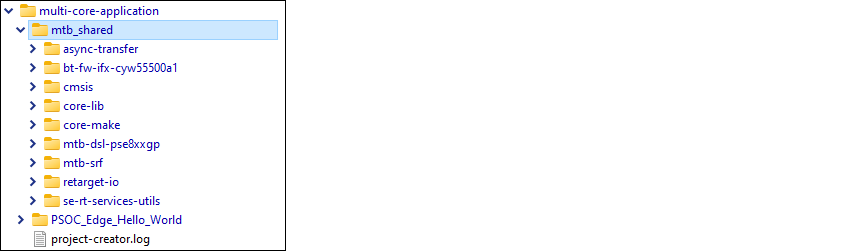
After creating one or more applications, they will be located in a top-level container, or workspace directory, that contains a project creation log file, one or more application directories, plus a
mtb_shared
directory. Depending on the example you chose to create the application, it can be either single-core or multi-core.

Note:
Some older code examples default to 2.x application format. If you're using one of those, refer to Knowledge Base Article
KBA236134.
Version 2.x BSPs/applications versus 3.x BSPs/applications
Some code examples still create ModusToolbox™ 2.x format BSPs and applications. These 2.x applications, as well as any you created using ModusToolbox™ versions 2.2 through 2.4, fully function in the 3.x ecosystem. The following table highlights a few key differences between 2.x BSPs/applications and 3.x BSPs/applications:
Item | Version 2.x | Version 3.x |
|---|---|---|
BSP Assistant usage | Not applicable | Creates and updates 3.x BSPs |
Default BSP type | Git repo, to make changes requires custom BSP | Application-owned, can be directly modified |
Local BSP location | Under the libs directory | Under the bsps directory |
design.modus file location | libs/COMPONENT_BSP_DESIGN_MODUS subdirectory | bsps/config subdirectory |
Makefile MTB_TYPE variable | Not applicable | Identifies single-core vs. multi-core applications |
This user guide focuses on the 3.x application structure. For more details about 2.x applications and BSPs, refer to the older revision of this user guide, located in the
docs_2.4
directory of the ModusToolbox™ 2.4 installation.
To take full advantage of the newest features, you can easily migrate version 2.x applications to the 3.x structure following Knowledge Base Article
KBA236134
. This KBA provides instructions for replacing your BSP and associated libraries with compatible versions for 3.x.
Note:
You cannot mix and match version 2.x format applications with 3.x format BSPs, or vice-versa.
Single-core 3.x application
A typical single-core 3.x application, such as "Hello World," is one project directory with application source code, a Makefile, and assorted files, in addition to the bsps, deps, images, and libs subdirectories. A single-core application uses the
ModusToolbox™ build system
to produce a single ELF file for use on a single-core MCU.
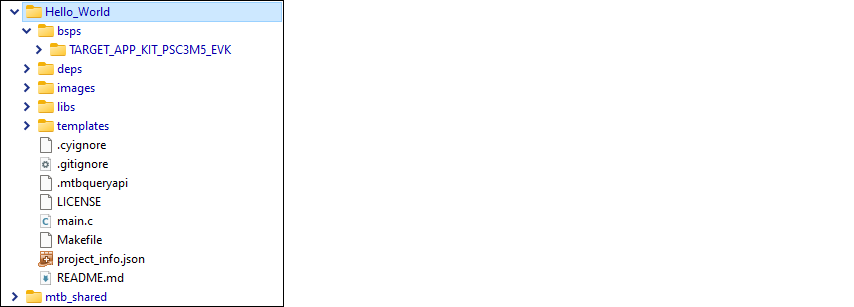
The following describe the contents for a single-core project directory:
bsps subdirectory – This directory contains one or more BSPs for this specific project.
deps subdirectory – By default, this subdirectory contains <library>.mtb files for libraries that were included directly or for which you changed using the Library Manager.
This subdirectory also contains the assetlocks.json file, which keeps track of the version for each dependent library.
images subdirectory – If a project has images used by the README.md file, for example, this directory contains those images.
libs subdirectory – This subdirectory may contain different types of files generated by the project creation process, based on how the project is created. You can regenerate these files using the Library Manager, so you do not need to add these files to source control.
If you update your project to specify any libraries to be local, then this directory will contain source code for those libraries.
By default, this subdirectory contains the <library>.mtb files for libraries included as indirect dependencies of the BSP or other libraries.
This directory also contains the mtb.mk file that lists the shared libraries and their versions.
. gitignore file – This file contains information about files for Git to ignore such as common, tool- or user-specific files that are typically not checked into a version control system.
mtbqueryapi – A background file that provides project information.
LICENSE file – This is the license agreement.
Source code – This is one or more files for your project's code. Often it is named main.c , but it could be more than one file and the files could have almost any name. Source code files can also be grouped into a subdirectory anywhere in the application's directory (for example, sources/main.c ).
Makefile – This is the project's Makefile , which contains configuration information such as
TARGET
for the BSP,
TOOLCHAIN
, and
MTB_TYPE
for the type of application; in this case,
COMBINED.
project_info.json – A json file containing the product ID.
README.md file – This file describes the code example that was used to create the project.
Note:
If an application needs to modify a standard BSP's configuration, then it will include a templates directory with various BSP templates, which contain configuration files (for example, design.modus) and a reserved resources list. If an application uses the BSP's configuration as-is, then it won't include a templates directory.
Multi-core 3.x application
A multi-core 3.x application, such as "PSOC_Edge_Hello_World," includes multiple makefiles and various assorted files described under
Single-core 3.x application
. It also contains separate subdirectories for each of the core projects, plus the bsps subdirectory that applies to all the core projects in the application. A multi-core application directory hierarchy builds multiple ELF files for various purposes (for example, to support boot loading, multi-core support, or secure enclave scenarios).
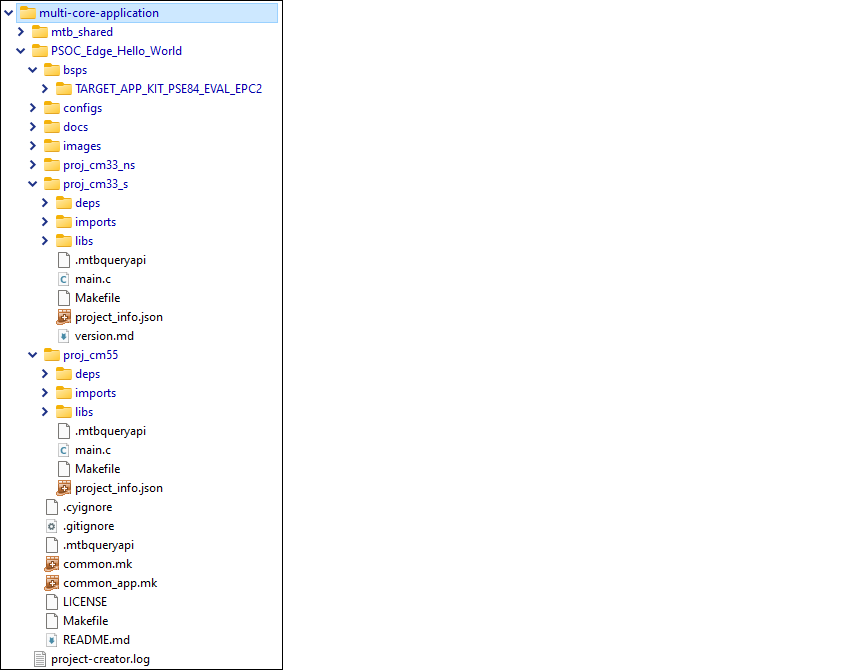
Multi-core application directory
A multi-core application directory contains the following files and subdirectories:
Makefile – The application Makefile contains the
MTB_TYPEvariable set toAPPLICATION, plus theMTB_PROJECTSvariable to specify the included projects. This file also includes the common_app.mk file and the path information to the application.mk file in the installation tools_<version> directory. This is responsible for forwarding build related requests to the individual core projects and dealing with post-build activities (for example, generating single monolithic HEX files that can be used to program all projects simultaneously) when they are complete.common.mk – This makefile is shared across all projects. It contains variables including:
MTB_TYPE
,
TARGET
,
TOOLCHAIN
, and
CONFIG
. In this case,
MTB_TYPE=PROJECT
. This file also includes a reference to the common_app.mk file.
common_app.mk – This makefile is shared across the entire application and all its projects. It contains path information to indicate the location of the installation tools_<version> directory.
bsps subdirectory – This contains one or more BSPs for all projects in the multi-core application.
Multi-core project subdirectories – These contain the source code and Makefile for each specific core project. The name format is proj_<core> ; for example, " proj_cm7_0 " or " proj_cm0p ".
Multi-core project directories
Each multi-core project directory contains its own project Makefile that is responsible for compiling and linking a single ELF image. Multi-core project directories are similar to single-core project directories in that they contain source code, as well as libs and deps subdirectories. One main difference is that multi-core project directories do not have a bsps subdirectory, because they use the same BSP from the multi-core application directory.
Source code – This is one or more files for the core project's code.
Makefile – This is the core project's Makefile . It includes numerous variables used for the projects, such as
COMPONENTS
,
CORE,CORE_NAME, and other variables used to specify flags and pre-build and post-build commands. This file also includes path information for source code discovery, shared repo location, and path to the compiler. Plus, it includes the common.mk file from the application and the path information to the start.mk file in the installation tools_<version> directory.README.md file – This file contains information for the specific core project.
deps subdirectory – By default, this subdirectory contains <library>.mtb files for libraries that were included directly or for which you changed using the Library Manager.
This subdirectory also contains the assetlocks.json file, which keeps track of the version for each dependent library.
libs subdirectory – This subdirectory may contain different types of files generated by the project creation process, based on how the project is created. You can regenerate these files using the Library Manager, so you do not need to add these files to source control.
If you update your project to specify any libraries to be local, then this directory will contain source code for those libraries.
By default, this subdirectory contains the <library>.mtb files for libraries included as indirect dependencies of the BSP or other libraries.
This directory also contains the mtb.mk file that lists the shared libraries and their versions.
mtb_shared directory
Each workspace you create with one or more applications will also include a
mtb_shared
directory adjacent to the application directories, and this is where the shared libraries are cloned by default. This location can be modified by specifying the
CY_GETLIBS_PATH
variable. Duplicate libraries are checked to see if they point to the same commit, and if so, only one copy is kept in the
mtb_shared
directory. You can regenerate these files using the Library Manager, so you do not need to add these files to source control.