Basic sharing steps
When sharing an application, follow these basic steps:
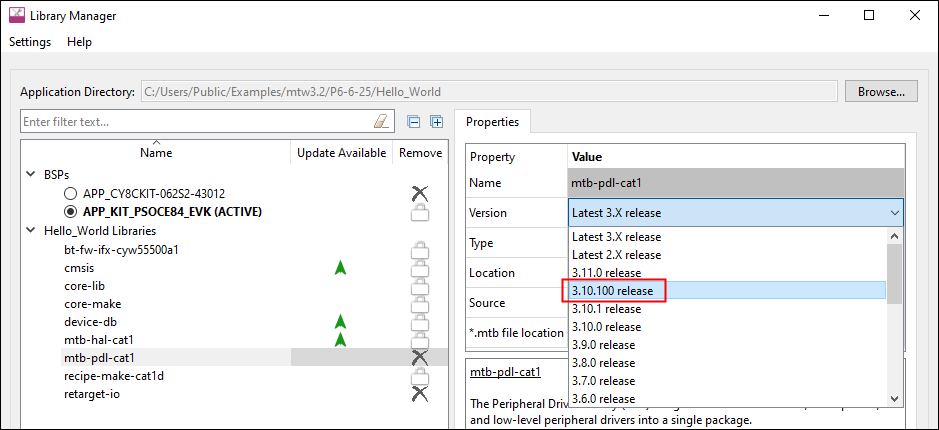
Lock the library versions
. Some of the library references in your project might be pointing to the latest version. If a newer version of these becomes available, they could be automatically updated using the Library Manager or the make getlibs command. To prevent this, lock libraries to specific versions using the Version setting in the Library Manager. See the Library Manager user guide for more details.
Lock the tools versions
. Communicate the version of the ModusToolbox™ tools package used to create the application. Different versions of tools may behave differently when sharing an application. The recipient should set the
CY_TOOLS_PATHS
variable to the same package version that you use. See Specifying alternate tools version for more details.
Remove unneeded files
. See
Files to include/exclude
.
Share the application
. Use version control software, manually copy files, and/or use an IDE as described in the following sections. Make sure to include all files and folders that you modified and/or added that will not be regenerated.
Using version control software
If you are working on a production design, you likely use version control software to manage the design and any potential revisions. This allows all users to stay synchronized with the latest version of an application. ModusToolbox™ assets are provided using Git, but you can use any version control method or software that you prefer.
ModusToolbox™ code examples have a default .
gitignore
file that excludes directories that can be easily recreated, as well as files containing IDE-specific information that need not be checked in. If you are using Git as your version control software, you can often use that file as-is. However, you are free to change it to fit your needs. For example, you may want to check in all of the libraries from
libs
and
mtb_shared
, even though they are available on Infineon's GitHub site.
If you are using version control software other than Git, you can use the .
gitignore
file as a guide for configuring the software that you are using.
Once you have an application checked in to your desired version control software, sharing the application with a new user is straight-forward. The steps include:
Get a copy of the checked-in data. This will vary depending on the version control software (for example using Git,
git clone <url>
).
Run the Library Manager and click the
Update
button, or open a terminal and run the command
make getlibs
. Either one will get all of the libraries required by the application.
Use the command line and run
make <IDE>
for the IDE you wish to use. For example,
make eclipse
or
make vscode
.
Work with the application as usual. The
build
and
GeneratedSource
files will be created automatically as needed.
When finished with your changes, check in your updates following your version control process.
Manual file copy
If you are not using version control software, you can just copy a complete application directory from one user to another. If desired, you can exclude the directories listed under
Files to include/exclude
since the libraries can be recreated, and the other files are regenerated when the application is built.
Saving/exporting from IDE
Another method to share files is by using your preferred IDE's export or
Save As
method. Refer to your IDE's documentation for details, keeping in mind certain files and folders need not be exported.
One such example is the Eclipse IDE
Export as Archive
. Refer to the
Eclipse IDE for ModusToolbox ™ user guide
for more details.