Create your own manifest
By default, the ModusToolbox™ tools look for our manifest files maintained on our server. So, the initial lists of BSPs, code examples, and middleware available to use are limited to our manifest files. You can create your own manifest files on your servers or locally on your machine, and you can override where ModusToolbox™ tools look for manifest files.
To use your own examples, BSPs, and middleware, you need to create manifest files for your content and a super-manifest that points to your manifest files. To see examples of the syntax of super-manifest and manifest files, you can look at files provided on GitHub:
Super-manifest:
Code example manifest:
BSP manifest (including dependencies):
Middleware manifest (including dependencies):
Make sure you look at the "fv2" manifest files if you are using the flow for ModusToolbox™ version 2.2 and later.
Note: You can point to local super-manifest and manifest files by using file:/// with the path instead of https://. For example: file:///C:/MyManifests/my-super-manifest.xml
The manifest system is flexible, and there are multiple paths you can follow to customize the manifests.
You can create supplementary super-manifest files that identify additional content. The tools will merge your additional content with the default super-manifest.
You can replace the default super-manifest file used by the tools.
Supplementing super-manifest using manifest.loc
In addition to the standard super-manifest file, you can specify "custom" super-manifest files. This allows you to add additional items (BSPs, code examples, libraries) along with the standard items. You can do this by creating a
manifest.loc
file in a hidden subdirectory in your home directory named ".
modustoolbox
":
<user_home>/.modustoolbox/manifest.loc
For example, a manifest.loc file may have:
# This points to the IOT Expert template set
https://github.com/iotexpert/mtb2-iotexpert-manifests/raw/master/iotexpert-super-manifest.xml
If this file exists, then each line in the file is treated as the URL to another super-manifest file, which is exactly like the standard super-manifest file. The data from these manifests is combined with data from the standard super-manifest. See the
Conflicting data
section for dealing with conflicts.
Replacing standard super-manifest using variable
The location of the standard super-manifest file is hard coded into all of the tools. However, you may override this location by setting the
CyRemoteManifestOverride
environment variable. When this variable is set, the tools use the value of this variable as the location of the super-manifest file and the hard-coded location is ignored. This removes all Infineon content from the tools, by default. For example:
CyRemoteManifestOverride=https://myURL.com/mylocation/super-manifest.xml
Processing
The process for using the manifest files is the same for all tools that use the data:
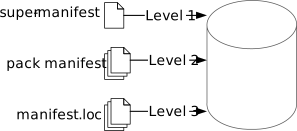
The first level is to access the super-manifest file(s) to obtain a list of manifest files.
The second level is to retrieve the manifest data from any packs that were installed.
The third level is to retrieve the manifest data from manifest.loc file, if it exists.
All the manifest data is merged into a single global data model in the tool. See the
Conflicting data
section for dealing with conflicts. There is no per-file scoping. All data is merged before it is presented. The combination of a super manifest file and the merging of all of the data allows various contributors, including third-party contributors, to make new data available without requiring coordinated releases between the various contributors.
Conflicting data
Ultimately, data from all of the super-manifest and manifest files are combined into a single data collection of BSPs, code examples, and middleware. During the collation of this data, there may be conflicting data entries. There are two types of conflicts.
The first kind is a conflict between data that comes from the level 1 primary super-manifest (and linked manifests), data that comes from the level 2 pack manifest, if present, and data that comes from the level 3
manifest.loc
file, if present. In this case, the data in the level 2 pack manifest overrides the data from the level 1 standard super-manifest, and the data in the level 3
manifest.loc
file overrides the data in the level 2 pack manifest. This mechanism allows you to intentionally override data that is in the standard location. In this case, no error or warning is issued. It is a valid use case.
The second kind of conflict is between data coming from the same source (that is, both from primary or both from secondary). In this case, an error message is printed and all pieces of conflicting data are removed from the data model. This is done because in this case, it is not clear which data item is the correct one.